Portfolio · Enterprise UX · 2026

DEF Beauty Supply: designing a unified ERP from fragmented operations

I designed a connected ERP for DEF Beauty Supply, bringing customer ordering, inventory, fulfilment, and invoicing around shared business records.

Client
DEF Beauty Supply
Year
2026
Role
Product design & implementation
Duration
4 months
Industry
B2B beauty wholesale
Tools
Figma, Codex
  • Enterprise UX
  • Systems design
  • B2B commerce

At a glance

Challenge

Separate systems left staff checking inventory, re-entering orders, and carrying information between sales and finance.

Solution

A connected customer storefront and ERP, with local delivery rules and records that continue from ordering through fulfilment and invoicing.

Outcome

In a one-week sample about a month after launch, 86% of orders were placed by customers themselves. Orders now enter the ERP directly, order errors have almost disappeared, and sales can focus on customers.

Deliverables

  • Connected ordering
  • Delivery rules
  • Sales workflow
  • Order-based invoicing

01 / Overview

A wholesale business ready for customers to order directly.

DEF Beauty Supply sells professional beauty products to salons in Italy. Customers browsed a WeChat mini-program catalogue, then messaged sales to order. I designed and built the ERP behind a new storefront: ordering, sales, inventory, fulfilment and invoicing on shared records. It is live.

People across 8 real jobs, mapped to 5 permission roles
15
Disconnected systems replaced by one platform
2 → 1
Role interviews: sales, warehouse, finance, procurement, owner
5

02 / The problem

Staff were doing the work between disconnected systems.

Disconnected systems and manual handoffsThe product catalogue and desktop inventory do not share live stock, so sales staff take orders in WeChat, re-enter them in the inventory platform, and message dispatch updates to customers while finance re-enters invoice items.MINI-PROGRAM BACKENDWECHAT CONVERSATIONSINTERNAL OPERATIONSNO STOCK SYNCMESSAGE SALESRE-ENTER ORDERRE-ENTERINVOICE ITEMSMESSAGE STATUSProduct catalogueCustomer ordersSales + inventoryDispatch updatesInvoice preparationSeparately maintained productsSales take orders in chatLegacy desktop platformStock checked at order entrySales message customersFinance inputs each productProduct details aremaintained twice.Manual information transferData not synchronised
Before the ERP: stock did not sync between the catalogue and inventory platform. Dashed arrows are manual handoffs for orders, dispatch updates, and invoice items. Scroll horizontally on smaller screens.

The same product information was repeatedly checked, communicated, and entered as work moved from one person to the next.

I audited both systems before drawing anything

Of 12 business domains, 7 existed in only one system. The other 5 existed in both, with different data.

3Only in WeChat ordering
Online salesWeChatNo counterpart in MPSOFT
PromotionsWeChatNo counterpart in MPSOFT
StorefrontWeChatNo counterpart in MPSOFT
5In both, data split
ProductsWeChatMPSOFT
CustomersWeChatMPSOFT
FinanceWeChatMPSOFT
AnalyticsWeChatMPSOFT
PermissionsWeChatMPSOFT
4Only in MPSOFT
InventoryMPSOFTNo counterpart in WeChat
PurchasingMPSOFTNo counterpart in WeChat
SuppliersMPSOFTNo counterpart in WeChat
In-store POSMPSOFTNo counterpart in WeChat
CompletePartialMissing
Function audit of the WeChat ordering backend and the MPSOFT inventory tool, from screenshots of every module. Source: my research analysis report, May 2026.

03 / Research

Five interviews, and what they overturned.

I interviewed one person per role, recorded and transcribed each, used AI to cluster repeated problems, then checked every finding against the transcript. Findings went into one file, UX.md, with every line tagged: interview, code, decision or assumption. Tags let a rule be overturned cleanly when a later interview contradicts it.
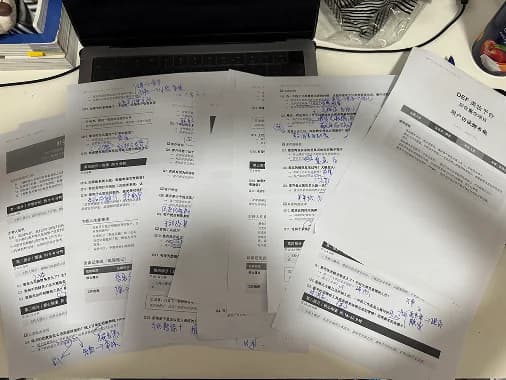

Printed interview scripts spread across a desk, with handwritten notes and annotations in blue ink.
Interview scripts with handwritten notes.
Audio recordings and text transcripts labelled by warehouse, management, finance, and sales roles.
Recordings and transcripts for cross-role analysis.

Often a customer is still adding items right up to the second before loading. The system only gets in the way.

Sales interview, May 2026, translated from the transcript.

Four assumptions the evidence changed

  1. I designed

    Hide real stock from customers.

    Then I learned

    The owner disagreed: customers can see it, opened up by login and order history later.

    So I changed it to

    Visibility is a per-identity policy (anonymous, signed in, has ordered), never hard-coded.

    UX.md · sales → owner
  2. I designed

    Invoice the moment an order closes.

    Then I learned

    Finance: B2B customers pay in batches, then ask for an invoice.

    So I changed it to

    Invoice from paid orders, merge several orders, skip lines already invoiced.

    UX.md · finance
  3. I designed

    Lock the order after approval, then issue the delivery note.

    Then I learned

    Customers add goods until the second before loading. Staff cope by reopening a new order.

    So I changed it to

    Delivery notes are decoupled from the order; shipments are tracked per delivery, partial included.

    UX.md · sales
  4. I designed

    The owner’s top pain is the whole picture.

    Then I learned

    Sales named a different pain: order and delivery-note coupling. Neither was wrong.

    So I changed it to

    Solve both. The channel gap (stock, orders) and the loading-day edits each got a fix.

    UX.md · owner vs sales

04 / Principles

Five principles, each traced to evidence.

  1. 1. Enter once, reuse across the workflow

    Product and order data carry through sales, dispatch and invoicing. No retyping between roles.

  2. 2. Automate the routine, keep exceptions human

    Stock, delivery options and shipping costs are rules. Payment review, fulfilment exceptions and invoice adjustments stay with staff, and are recorded.

  3. 3. Built to balance, not just to be fast

    Purchase totals copy the supplier invoice’s rounding order, because a €0.03 gap breaks every reconciliation. Simplifying the maths would defeat the page.

  4. 4. The counter has a queue

    Anything on the sales path is timed by the customers waiting behind. Hold and resume stay one step; no dialogs there.

  5. 5. AI fills the field; people decide

    OCR writes into editable inputs and flags gaps. It never submits.

05 / Iteration

381 commits in 5 months. Some went the other way.

Commits on packaging units, the most reworked model
48
Commits on invoicing
39
Commits on returns and refunds
37
  1. Returns

    Jun 2026

    Pick a sales order first; one return per order.

    Pick the customer, search SKUs into a cart, return across several orders.

  2. Packaging units

    Jul – Oct

    Units attached loosely to products; fields drifted.

    Pricing fields consolidated; default unit synced with SKU price and barcode.

  3. Sales product picker

    Oct 6 – 12

    Tested standalone product rows against the SPU / SKU picker.

    Ended the trial and removed the variant; kept the original picker and row-merging rules.

  4. Confirmations

    Sep 2026

    Browser confirms with “Are you sure?”.

    A shared dialog that lists consequences before stock or money moves.

  5. Dashboards

    Jun – Sep

    One page for every login.

    Role dashboards on one skeleton, then real data, chart and filter polish.

Counts and dates from the project’s git history, 25 May to 7 Nov 2026, matched by commit-message keyword.

06 / Design system

A shared system, from design to code.

Written rules plus reusable components give design and the coding agent one shared reference. Step through it below; the controls and patterns are live and use demonstration data.

  1. People first, then ERP rules.

    Fourteen rules, one source of truth.

07 / The solution

Connect each step to the information already available.

The storefront and internal teams now work from shared ERP records. Product and inventory data support customer ordering, and the same order continues into fulfilment and invoicing.

Three order channels, one ERP

The platform supports three ways to create an order, all feeding the same ERP records:

  • In-store checkout: staff create orders at the store’s sales counter.
  • Mini-program orders: customer submissions appear directly in the ERP, without sales re-entering them.
  • Sales-assisted orders: sales staff create orders on a customer’s behalf.

Trade-off: how to join two systems. Linking the two tools would have been quicker; one platform meant a longer build but a single set of records.

AB

Stitch the two menus together

Cheapest. Staff stop switching windows, but product, customer and stock records stay duplicated.

AB

Sync A and B point to point

Keeps both tools, but every entity needs a conflict rule, and two-way stock writes disagree.

StorefrontStaffShared records

One platform, shared records Chosen

Product, customer and stock live once. Storefront and every role read the same order.

Three options considered. Evidence: five entities duplicated across both systems, and roughly 50+ daily stock re-entries in my diagnosis. Cost I accepted: a four-month build, and a full stocktake as the go-live baseline, because the owner’s biggest worry was losing data.
One source of truth across ordering and operationsThe customer storefront uses ERP products and inventory, submits orders directly into shared ERP records, and displays dispatch status and tracking numbers; finance reuses order lines while staff retain payment review and invoice decisions.CUSTOMER STOREFRONTSHARED ERPSHARED DATASELECT ITEMSCREATE ORDERREUSE LINESPUBLISH STATUSProduct catalogueCustomer orderingShared ERP recordsDispatch visibilityInvoice preparationERP-backed products + stockAddress / delivery / shippingProducts / stock / ordersSales / warehouse / financeDispatched + tracking numberFinance reviews invoice detailsMaintain once, reusethrough the business.Shared data flowStaff retain payment review and invoice decisions
The result: shared ERP records connect ordering, fulfilment, and invoicing, with staff retaining review and approval.

Role-based dashboards

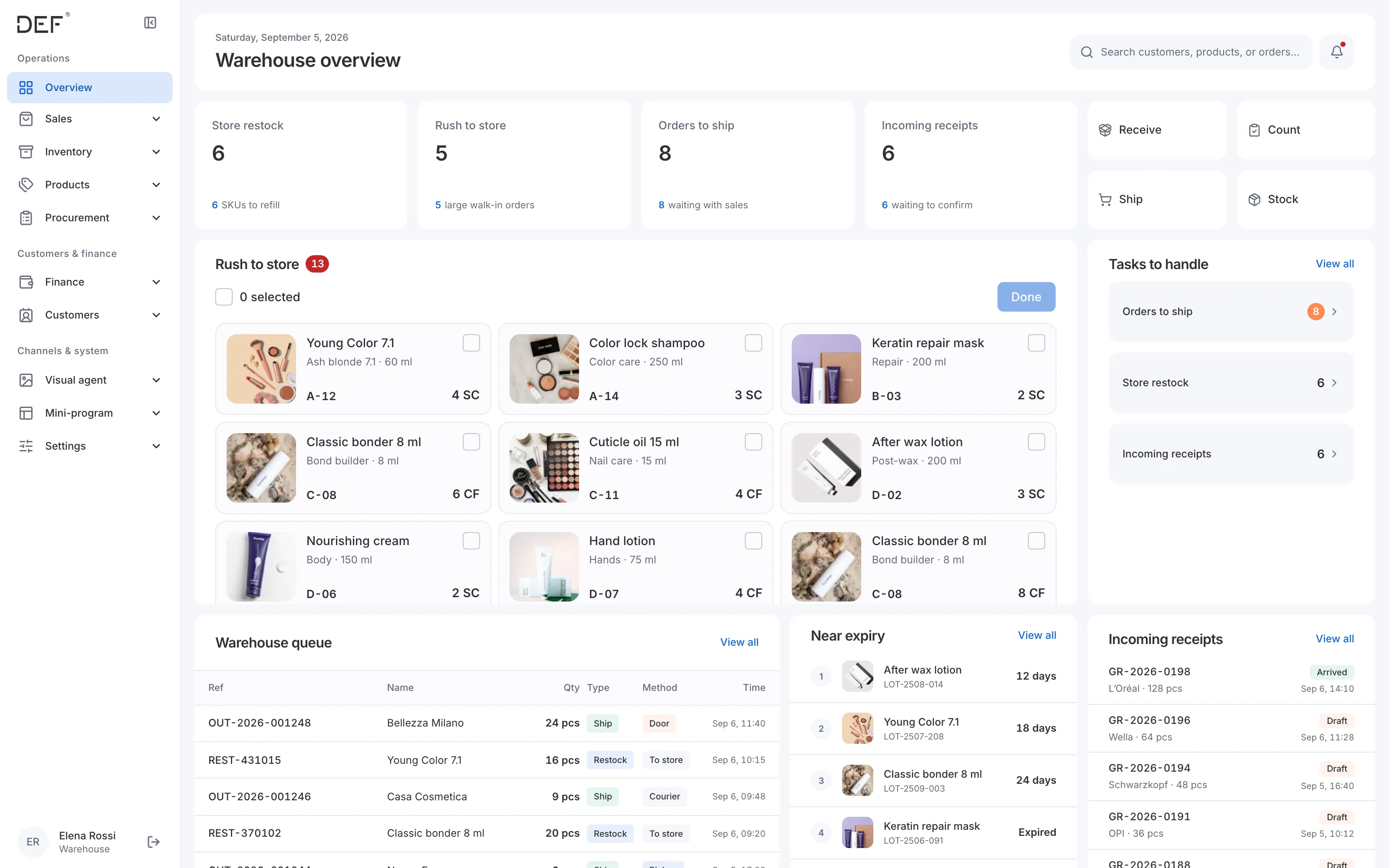
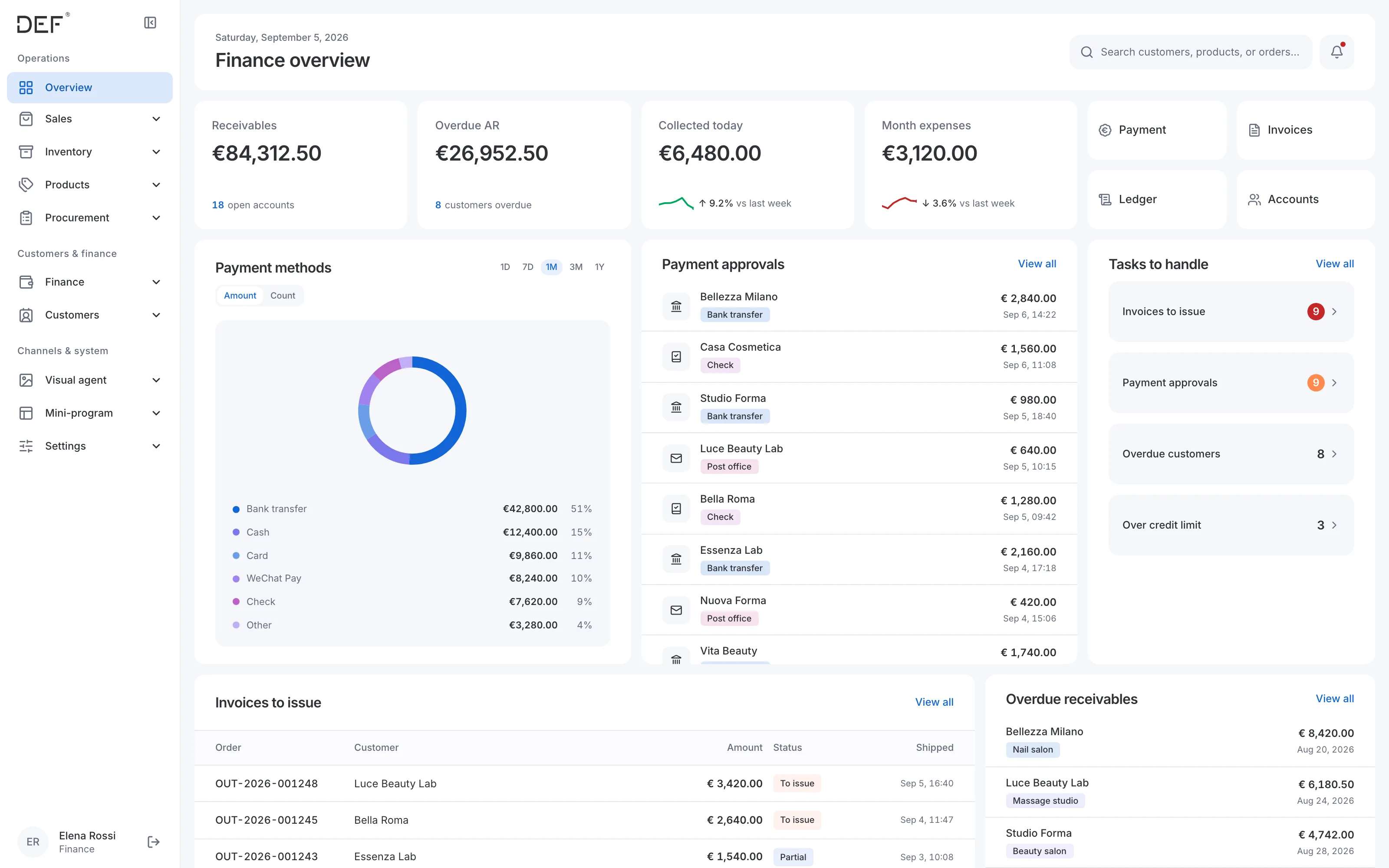
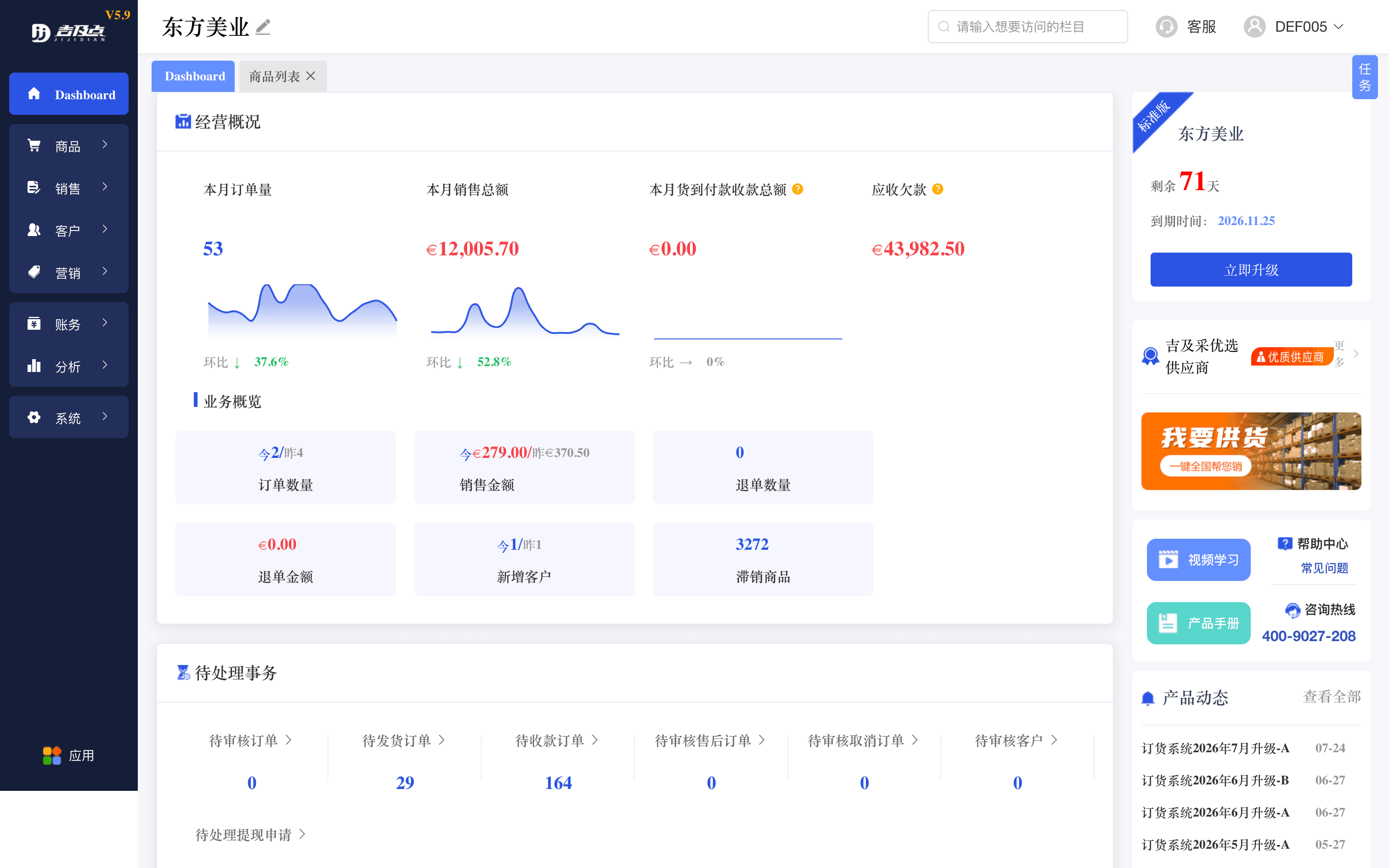
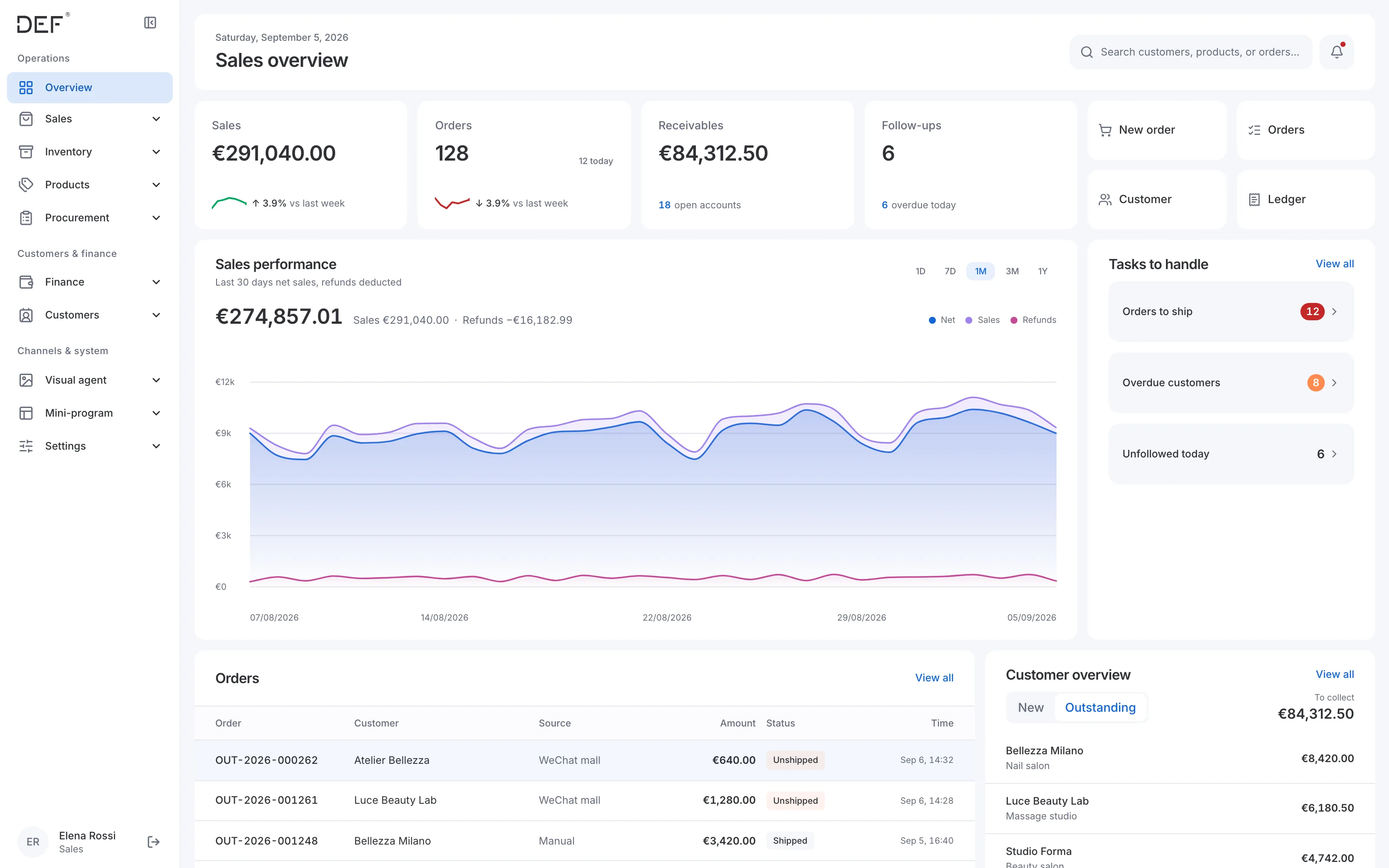
Each role sees a different view of the same business data. Admin monitors the business overall, sales focuses on orders and customer follow-ups, warehouse tracks stock and dispatch tasks, and finance reviews payments and invoices. A shared layout keeps the system familiar while making each role’s priorities visible.
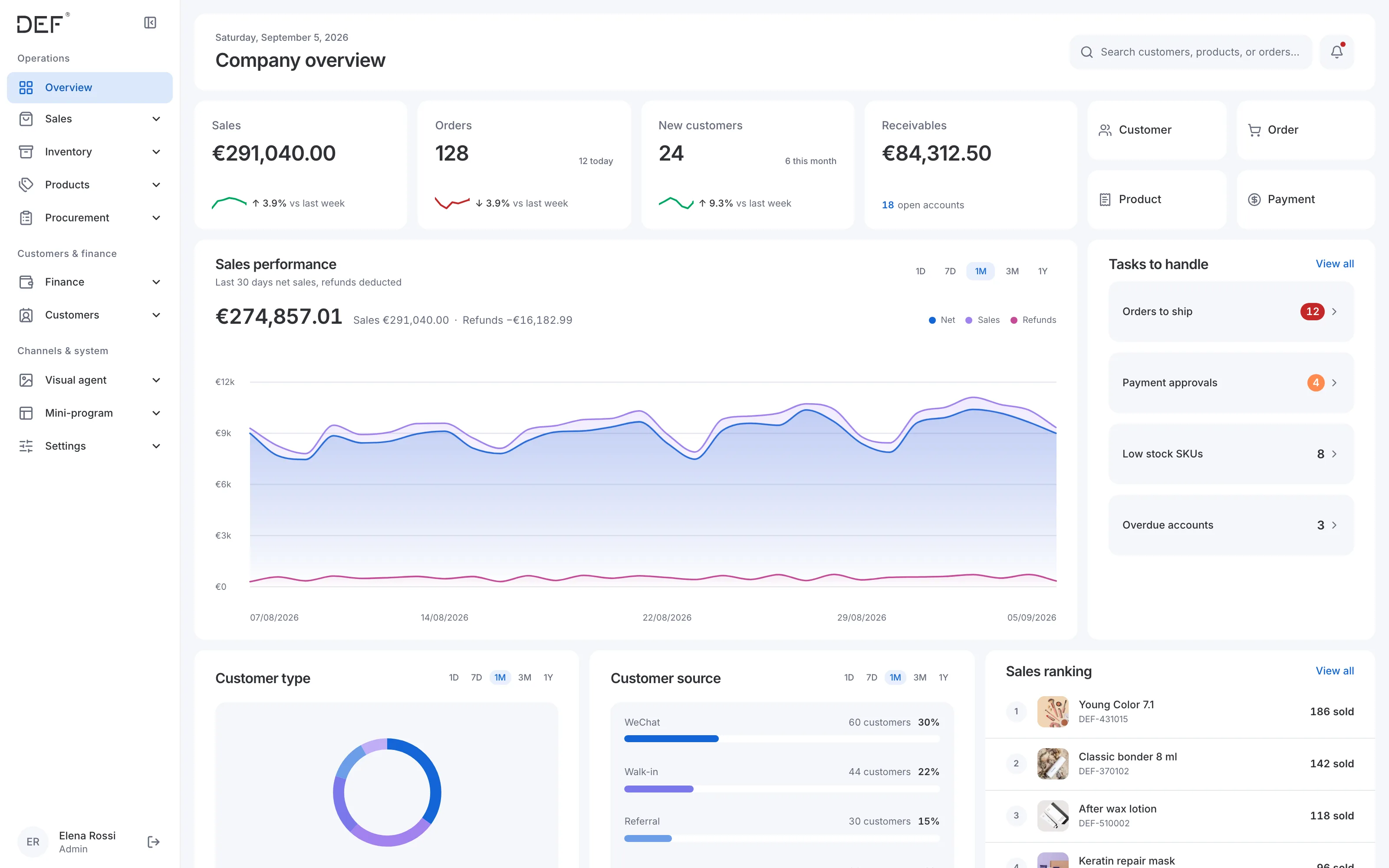
New Admin dashboard: sales, orders, new customers and receivables with trend lines, sales performance, customer mix, and tasks to handle.
Legacy ordering system Dashboard: one undifferentiated view mixing sales KPIs, pending approvals, and promotional panels for every user.
BeforeAfter
Drag the handle, or use the arrow keys, to compare.

Before: one Dashboard page for every login, mixing task types that belonged to different jobs. After: the same shell, reweighted per role — this is the Admin view.
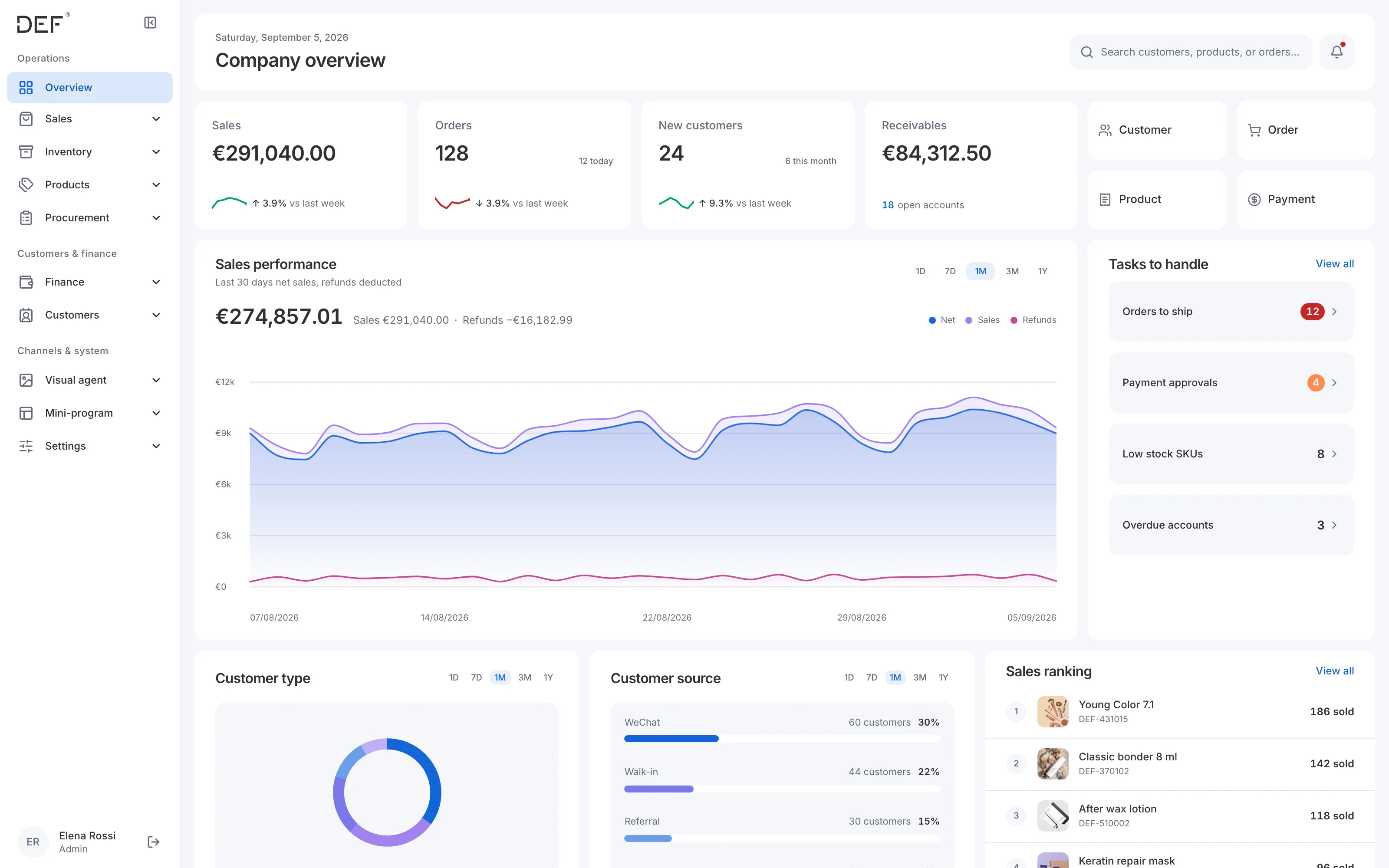
Admin dashboard with business metrics, sales trends, customer mix, and outstanding tasks.
Admin — business performance and outstanding work.
Sales dashboard showing orders to ship, overdue customers, customer follow-ups, and sales performance.
Sales — orders, receivables, and customer follow-ups.
Warehouse dashboard with stock tasks, orders to ship, incoming receipts, and near-expiry products.
Warehouse — stock, dispatch, and incoming goods.
Finance dashboard showing payment approvals, invoices to issue, and overdue receivables.
Finance — payment approvals, invoices, and receivables.

One order, from search to delivery

Two trade-offs shaped the sales screens: how packaging units are modelled, and when the system asks before acting.

  1. 01

    Where do packaging units (piece, box, carton) live?

    Packaging units code spec
    • On the product, shared by every SKU (rejected)Shades of one product can be priced differently.
    • On each SKU, with stock counted in one base unitChosen (chosen)One stock number; split sales convert automatically; each tier has its own price.
    Evidence
    The same SKU is sold by piece, box and carton at separate prices.
    Cost I accepted
    Legacy SKUs that stored a box as their unit needed migrating, and the model was reworked in 48 commits.

Trade-off: when to ask “are you sure?” Committed stock and money actions have no undo, so the default is to confirm and state the consequence. The sales counter breaks the rule on purpose: a customer is waiting.

1

Reversible, no side effects

Editing draft rows. Applies instantly, no dialog.

2

Reversible, but costs something

Switching single / multi-SKU mode drops selections. Confirm, and say what is lost.

3

Irreversible: stock or money moves

Confirm shipment, post a stocktake, void an invoice. Danger dialog listing consequences, with a reason where it applies.

4

Counter queue: the logged exception

Hold, resume, add an item while a customer waits. Instant action and a toast, no confirmation.

Level 3 · stocktake confirmation
About to:
 · Adjust stock for 12 SKUs
 · Record €340.50 in losses
   (posts to finance)
 · This cannot be undone
Level 4 · counterHeld: Zhang San, 5 items
Confirmation policy by consequence. Level 4 is logged as an exception. 21 native browser confirms still break the policy, tracked by file; none may be added.

These are the real pages running on demonstration data, played one module at a time. Watch, or move your pointer in and use them yourself. Nothing is saved.

  1. One search, two ways to add.

    Broad search groups shades; exact search finds the SKU.

Purchasing and receiving

Purchase orders carry product and quantity information through supplier confirmation and receiving. The main trade-off was how much approval a small team needs. The demo below uses the real pages on demonstration data; nothing is saved. For the complete procurement workflow and its AI-assisted optimisation, see AI Procurement Agent for DEF Beauty Supply.
  1. 01

    Keep the purchase request → approval → order chain?

    Procurement redesign doc · decision log
    • Keep request, approval and order as separate stages (rejected)Three demand lines were half-wired; with a small team it becomes approving your own request.
    • Delete the request tables (rejected)Loses data and the room to grow if the team scales.
    • Fold approval into placing the orderChosen (chosen)Placing an order requires confirmed prices and an uploaded supplier confirmation. Tables stay, hidden.
    Evidence
    Request routes were unreachable from navigation, and no one reviews amounts full-time.
    Cost I accepted
    Control applies to the whole order, not each line request. A return-to-draft safety valve is admin-only.
  1. Edit lines in place.

    Stock and sales beside each line.

Order-based invoicing

Finance creates invoices from existing sales orders, reusing product details, quantities, prices and tax rates.

Trade-off: when an order becomes an invoice. The one documented conflict between roles. I did not side with either.

Sales wantedInterview · sales
Order closesInvoice at onceStrip what cannot be invoiced
Finance’s realityInterview · finance
Orders A, B, CCustomer pays in one transferOne invoice
What I built ChosenBoth cadences
Order carries a payment trackInvoice from paid ordersMerge orders, skip invoiced lines
Sales wanted to invoice at close; finance invoices after customers settle in batches. Both cadences work in the product.

The real invoicing page on demonstration data; nothing is issued.

  1. Paid orders, waiting for an invoice.

    Start from orders, not a blank invoice.

Storefront builder

Staff edit the mini-program home page module by module, with the real mini-program as the preview, and link each customer’s WeChat account to their ERP record.

  1. 01

    A free-form canvas, or a fixed set of modules?

    Storefront builder code · home layout schema
    • Free-form page editor (rejected)Any layout is possible, but staff are not designers, and a broken page goes straight to every salon.
    • Stacked modules, draft before publishChosen (chosen)Staff add, reorder and configure ready-made modules. Edits stay in a draft until someone publishes them.
    Evidence
    Draft and live layouts are stored separately. Products come from ERP records, and Frequent products fills itself from order history.
    Cost I accepted
    Less layout freedom, and every new module type needs development: video and coupons are still marked planned.
  1. Edit right, see it on the phone.

    The phone preview is the real mini-program.

WeChat mini-program: the trade-offs

Salons already ordered through a WeChat mini-program. The goal was to get every flow working and live quickly, so each choice below favours speed and familiarity, and names what it gave up.

  1. 01

    Redesign the storefront, or keep the look salons know?

    Mini-program · home, sign-in, account
    • A fresh visual redesign (rejected)More to show, but salons reorder from habit and would have to relearn it.
    • Keep the layout, replace what is behind itChosen (chosen)Same blocks in the same places; each now reads live ERP stock, euro prices and tax rates.
    Evidence
    Customers already ordered from the old home page; the problem was the data behind it, not the layout.
    Cost I accepted
    The before and after look alike. The change is in what the blocks are connected to.
  2. 02

    What to build it on?

    Mini-program code · Taro 4, React, TypeScript
    • Native WeChat code, from scratch (rejected)Full control, but every screen and the login flow would be written by hand.
    • Taro with WeChat’s own loginChosen (chosen)React and TypeScript like the ERP, and customers sign in with their WeChat account. No separate accounts, passwords or SMS.
    Evidence
    The same React and TypeScript skills build both the ERP and the storefront, and WeChat login was already there to use.
    Cost I accepted
    The storefront lives inside WeChat. Customers who do not use WeChat still order through staff.
  3. 03

    How does a customer reach their own prices and history?

    Mini-program code · registration and binding
    • Phone number and SMS sign-up (rejected)Familiar, but creates a new account that still has to be matched to the ERP by hand.
    • A one-time code from the ERPChosen (chosen)Staff generate a code on the customer’s record; scanning it binds WeChat to that record, prices and orders included.
    Evidence
    Every salon already had an ERP customer record with its own prices. The SMS step was removed once binding by code worked.
    Cost I accepted
    Staff create one code per customer before the customer can see their own prices.
  4. 04

    Rebrand now, or launch fast and validate the data first?

    Mini-program commits · 24 Aug – 28 Sep 2026
    • Redesign the brand before launch (rejected)A stronger first impression, but months before any real order reaches the ERP.
    • Phase 1: launch fast, connect and validate the dataChosen (chosen)Browsing, cart, checkout, orders and account binding went live on the existing look, so real orders could prove the data flow.
    Evidence
    The value was orders arriving in the ERP without re-entry. The full brand redesign is scheduled as the focus of phase 2.
    Cost I accepted
    The brand stays as it was until phase 2.
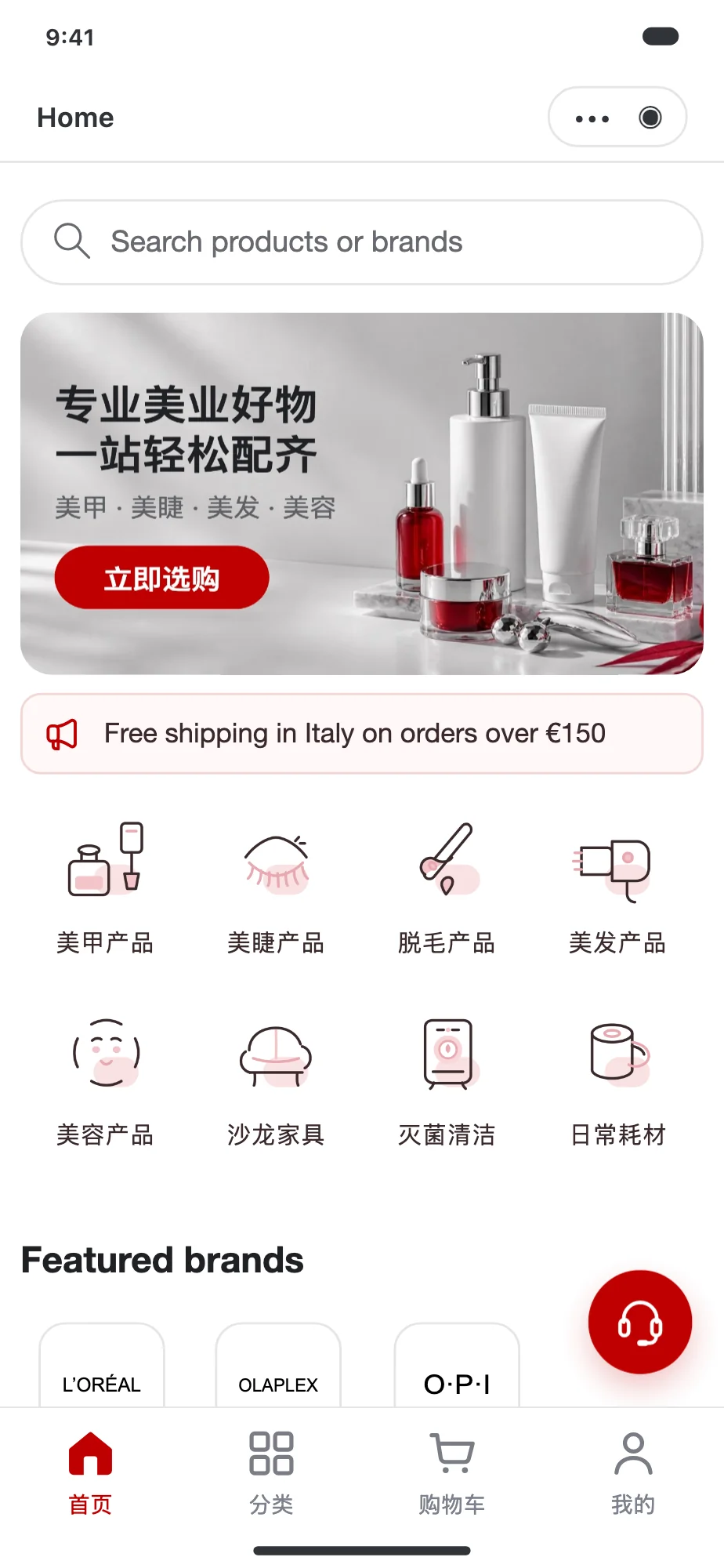
The rebuilt mini-program home page: search, banner carousel, announcement strip, the same eight categories, a featured brands row, and a salon essentials group, with the bottom tab bar.
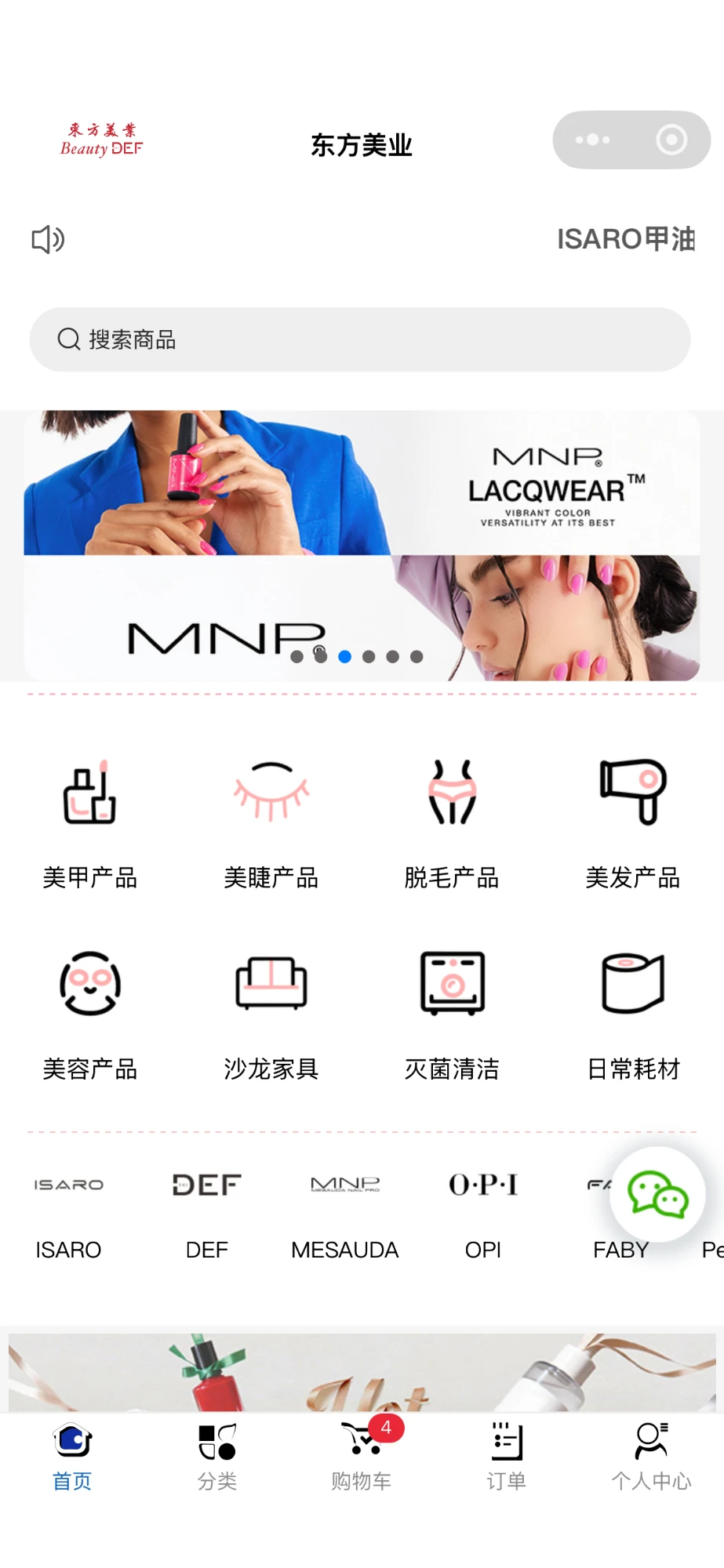
The old WeChat mini-program home page: search, banner carousel, eight category icons, and a scrolling row of brand logos, with the bottom tab bar.
BeforeAfter

Home

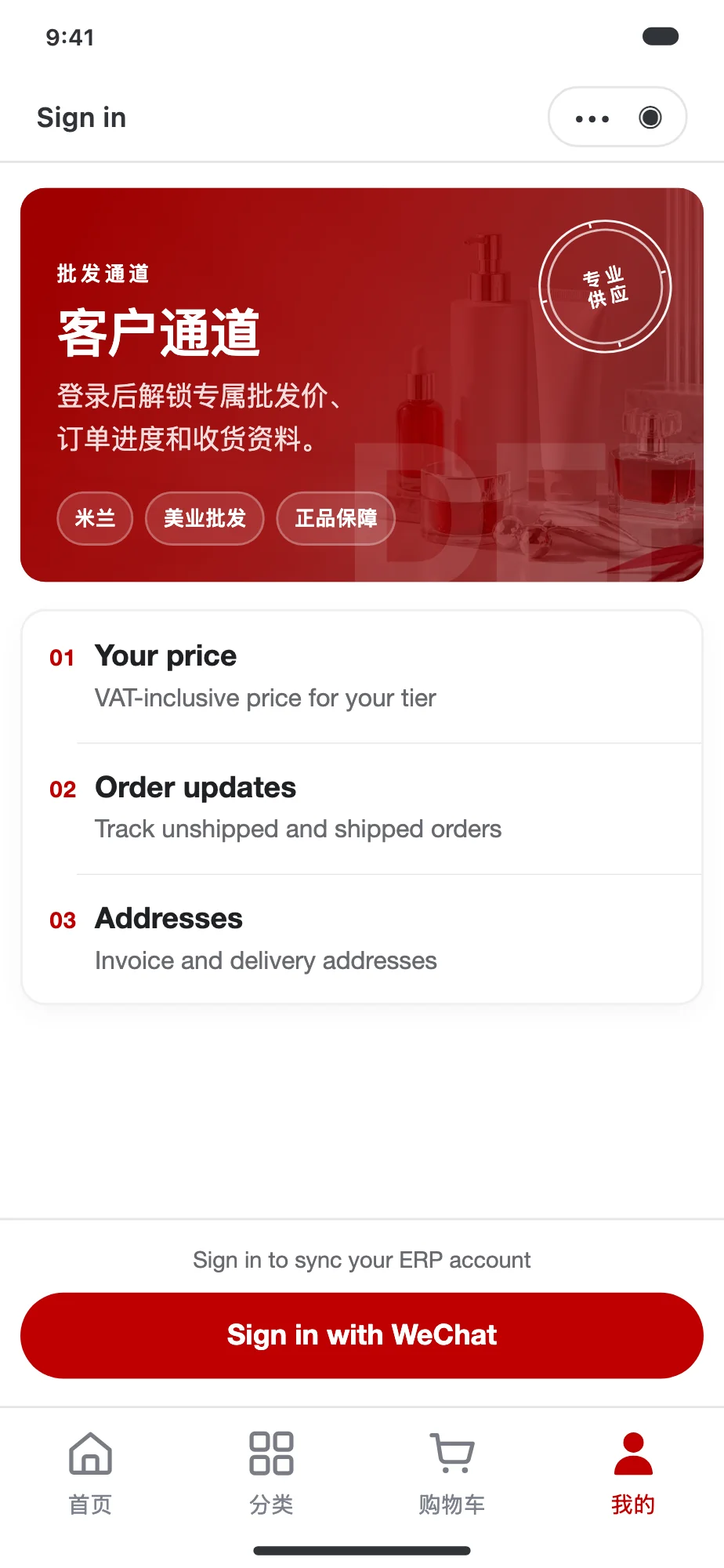
The rebuilt sign-in screen: a customer channel banner, three reasons to sign in, and a Sign in with WeChat button above the bottom tab bar.
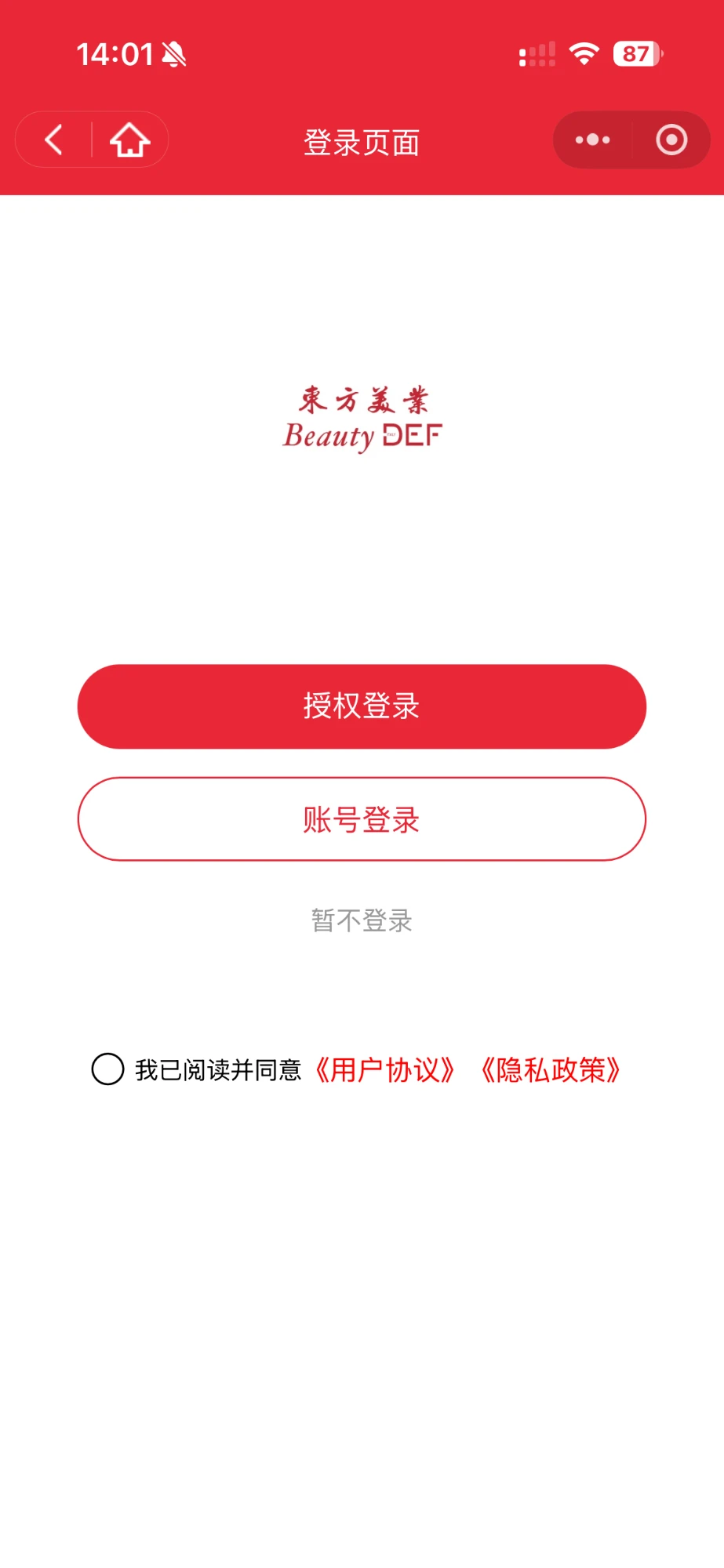
The old mini-program login page: the shop logo, WeChat authorisation and account sign-in buttons, and a terms checkbox.
BeforeAfter

Sign in

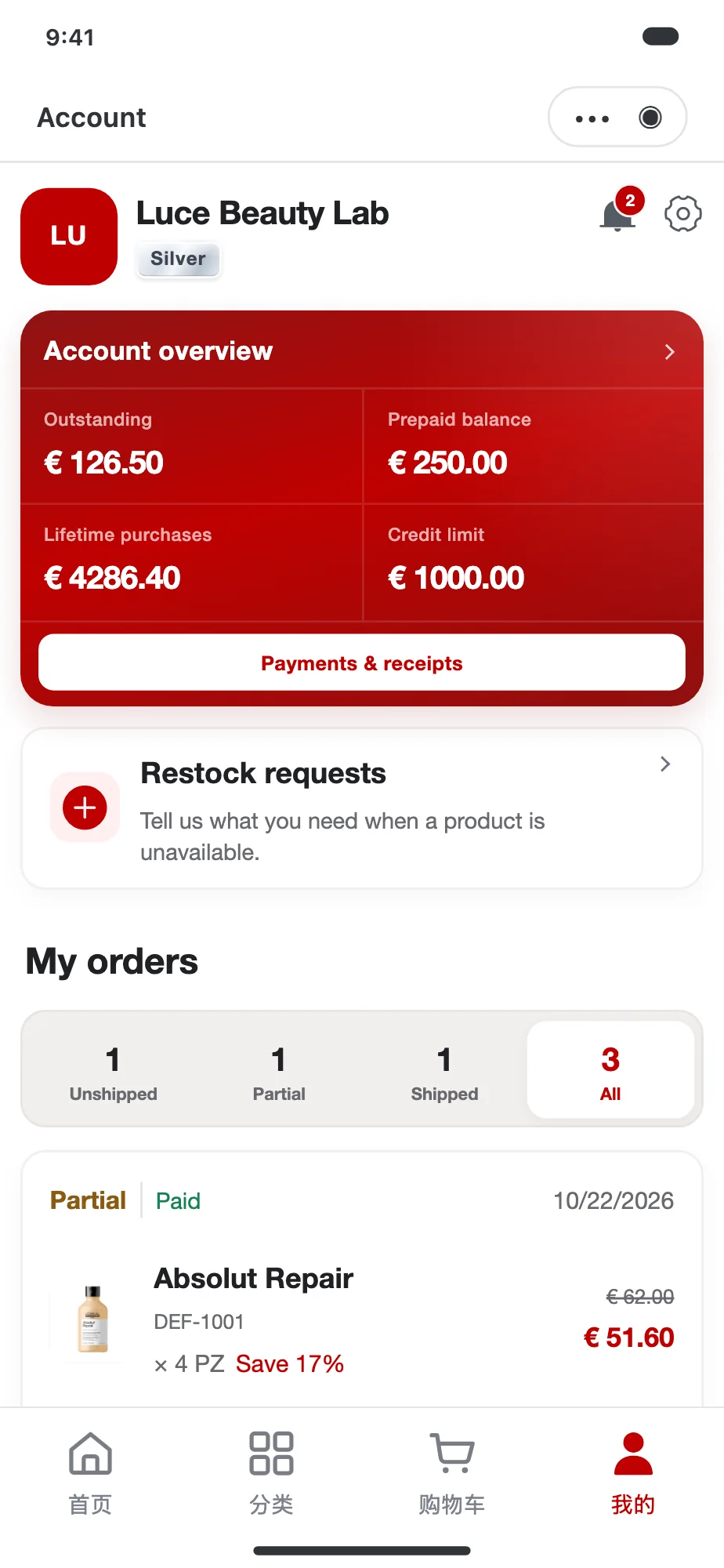
The rebuilt account screen: account overview with outstanding and prepaid balances, restock requests, and a list of orders with status filters.
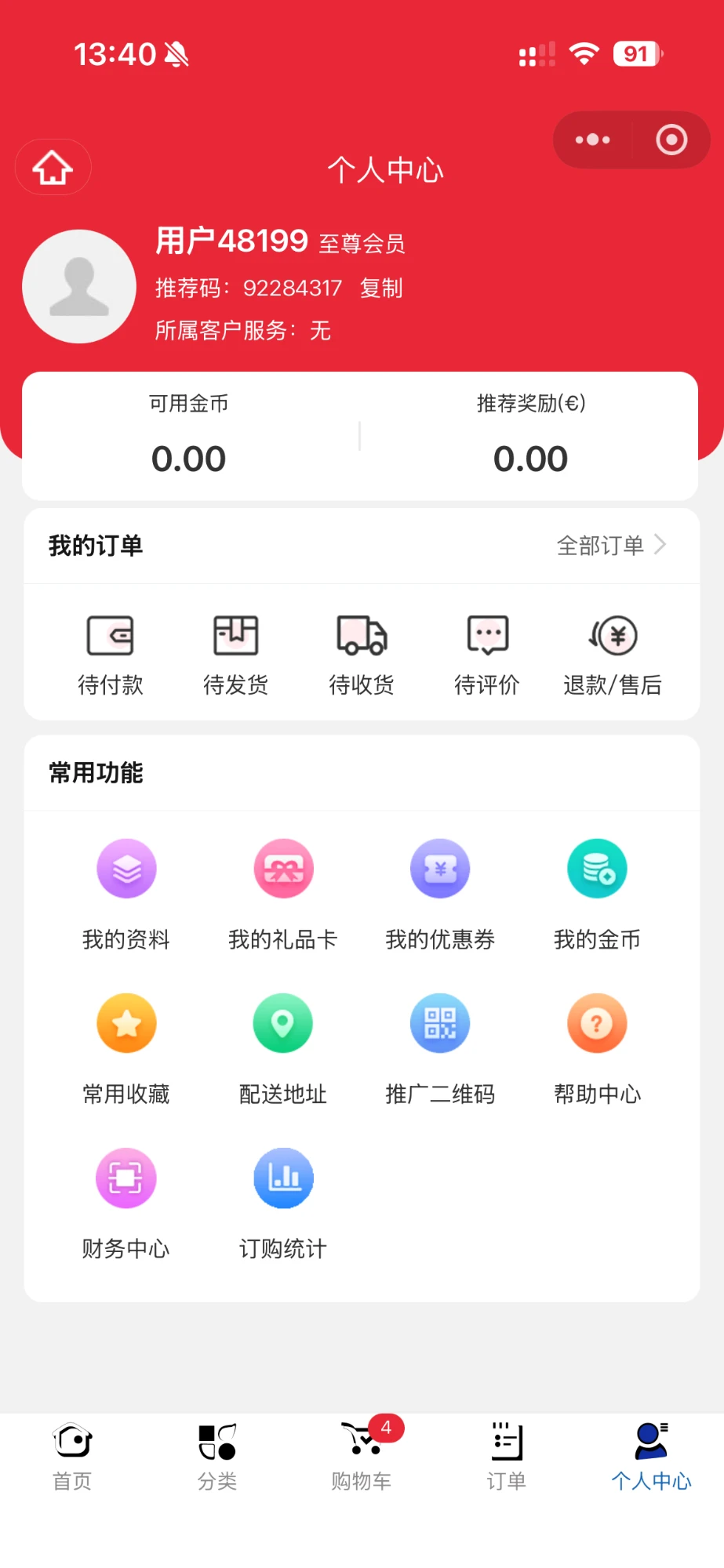
The old mini-program personal centre: member name, coin balances, order shortcuts, and a grid of colourful function icons.
BeforeAfter

Account

The mini-program Home, Sign in and Account screens, before and after. Drag the handle to compare. The layout stayed familiar on purpose, while each block is now configured from the ERP.

Explore the customer-facing screens below. Each phone keeps its header and bottom navigation in place while its content scrolls independently; customer support stays within reach on Home. These read-only previews use demonstration data.

Home — curated categories and salon products.
Catalog — browse products by category.
Product — capacity, customer price, and product details.
Cart — quantities and VAT-inclusive totals.
Sign in — customer access and account benefits.
Account — customer balances and order progress.
Link account — pair the mini-program with an ERP customer.
Order details — payment, dispatch, and tracking.

08 / Results

Customers now place most orders themselves.

Orders placed by customers themselves · one-week sample, about a month after launch
86%
Steps in the wholesale ordering flow
5 → 3
Daily orders that 4 to 5 salespeople used to key in by hand; they now arrive without re-entry
40–70
  • A connected ERP for customer ordering and internal operations, delivered in four months and now in use.
  • Mini-program orders enter the ERP directly, without sales repeating stock checks or entering the order again. Customers order against real ERP stock, prices and delivery costs, so stockouts after ordering have almost disappeared.
  • Order errors almost disappeared and customer back-and-forth dropped, freeing salespeople to develop and maintain customer accounts.
  • Finance reuses sales order details for invoicing, with previously invoiced products excluded from future selection.
  • Customers can check dispatched status and tracking numbers in the mini-program.
  • The owner reported less repetitive work across sales and warehouse operations, giving sales more time for customer relationships and new business.

The 86% comes from a one-week sample about a month after launch. Improvements in order errors and stockouts are reported qualitatively, not as counts, and customer acquisition gains have not been measured.

09 / Reflection

What I Learned

  • A shared source of truth depends on connected records and clear handoffs, so information stays useful as work moves between roles.
  • Different roles need different views of the same data, with relevant tasks and responsibilities visible.
  • Business rules can remove routine checks, while payment review, customer exceptions, and invoice adjustments still need human judgment.
  • The next step is to measure order-processing time, invoice preparation, and the exceptions that still require staff coordination.
  • Customer visibility currently ends at dispatched status and the tracking number; logistics integration could extend it.

The purchasing and receiving workflow, including document checks, partial arrivals, and discrepancy handling, is covered in AI Procurement Agent for DEF Beauty Supply.