Portfolio · AI product design

AI Procurement Agent

I moved purchasing out of Excel and chat into an ERP, then designed an AI Agent to carry the judgment buyers still kept in their heads.

Client
DEF Beauty Supply · Italy
Year
2026
Role
AI product designer & full stack
Duration
4 months
Status
Live · used by procurement
Explore the working demo
  • AI interaction design
  • Human–AI collaboration
  • B2B procurement

At a glance

The challenge

Purchasing was split across Excel, supplier messages, and delivery notes. Even after the ERP, stockouts, seasonality, and customer growth lived in the buyer’s memory.

My approach

Connect the purchase lifecycle first. Then give an Agent those signals, draft one editable plan, and keep every handoff explicit.

The outcome

A purchase plan that took 30 minutes to 2 hours across suppliers now takes 5 to 10 minutes, and three staff members use it daily. AI prepares the recommendation; the buyer commits the order.

01 / My role

I designed the work AI takes on—and the decisions people keep.

DEF Beauty Supply is an Italian B2B beauty wholesaler. I owned research, workflow and AI interaction design, and implementation.

  • Frame the real task

    Map how buyers estimate, confirm, and receive a purchase.

  • Define Agent behavior

    Specify context, recommendations, exceptions, and human authority.

  • Make it testable

    Build the workspace and refine its handoffs with testers.

02 / The problem

One purchase lived in three places, and none of them was the system.

A purchase moved through three places. Only the last one left a record in the system.

  • Excel

    Export recent sales, then calculate the order by hand.

  • Messages

    Confirmation stays in chat or email, and can differ from the order.

  • Delivery note

    The only record, keyed in from the DDT that arrives with the goods.
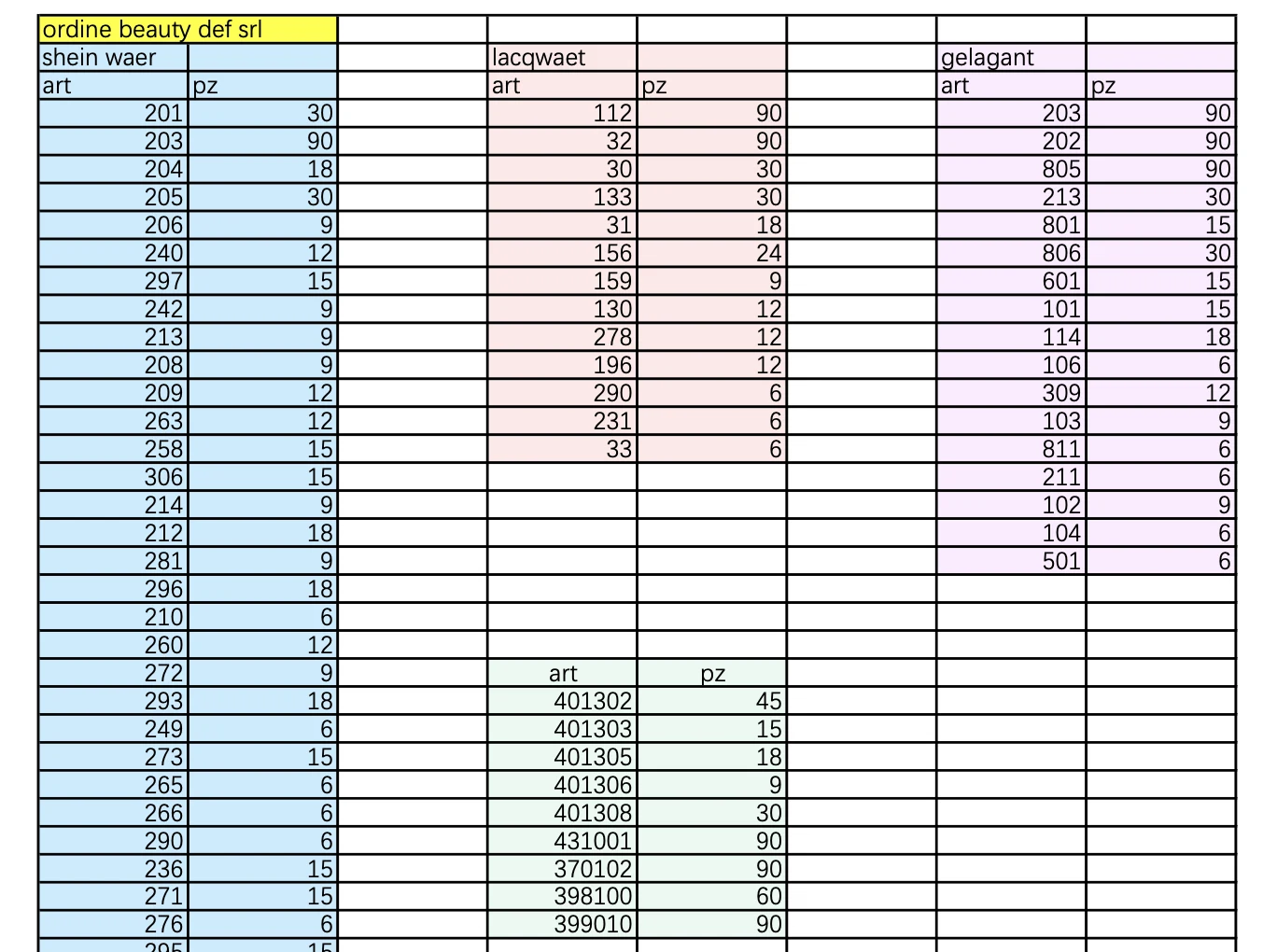
  • An Excel purchase order listing article numbers and piece counts in separate columns by product line.
    1 · Excel order
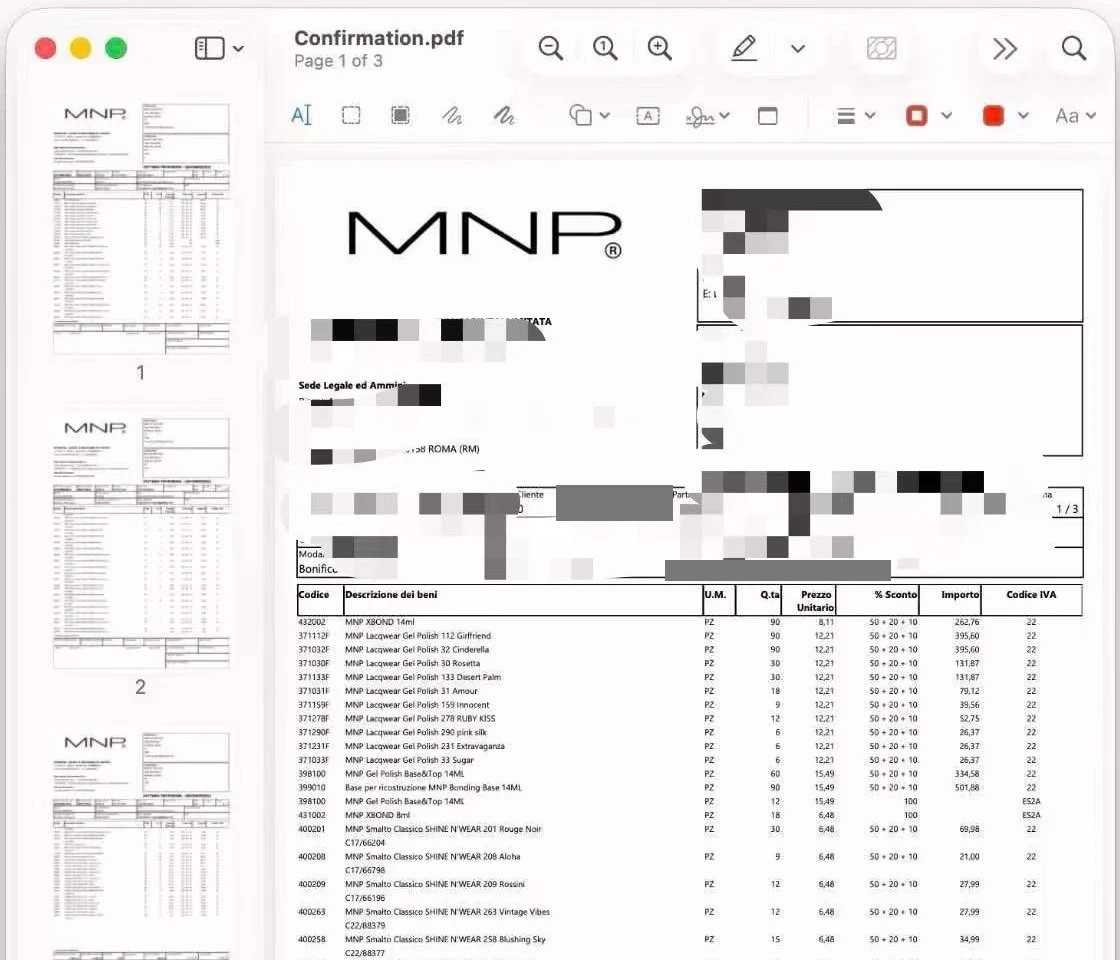
  • A three-page supplier confirmation PDF listing item codes, quantities, and prices, with identifying details masked.
    2 · Supplier confirmation PDF
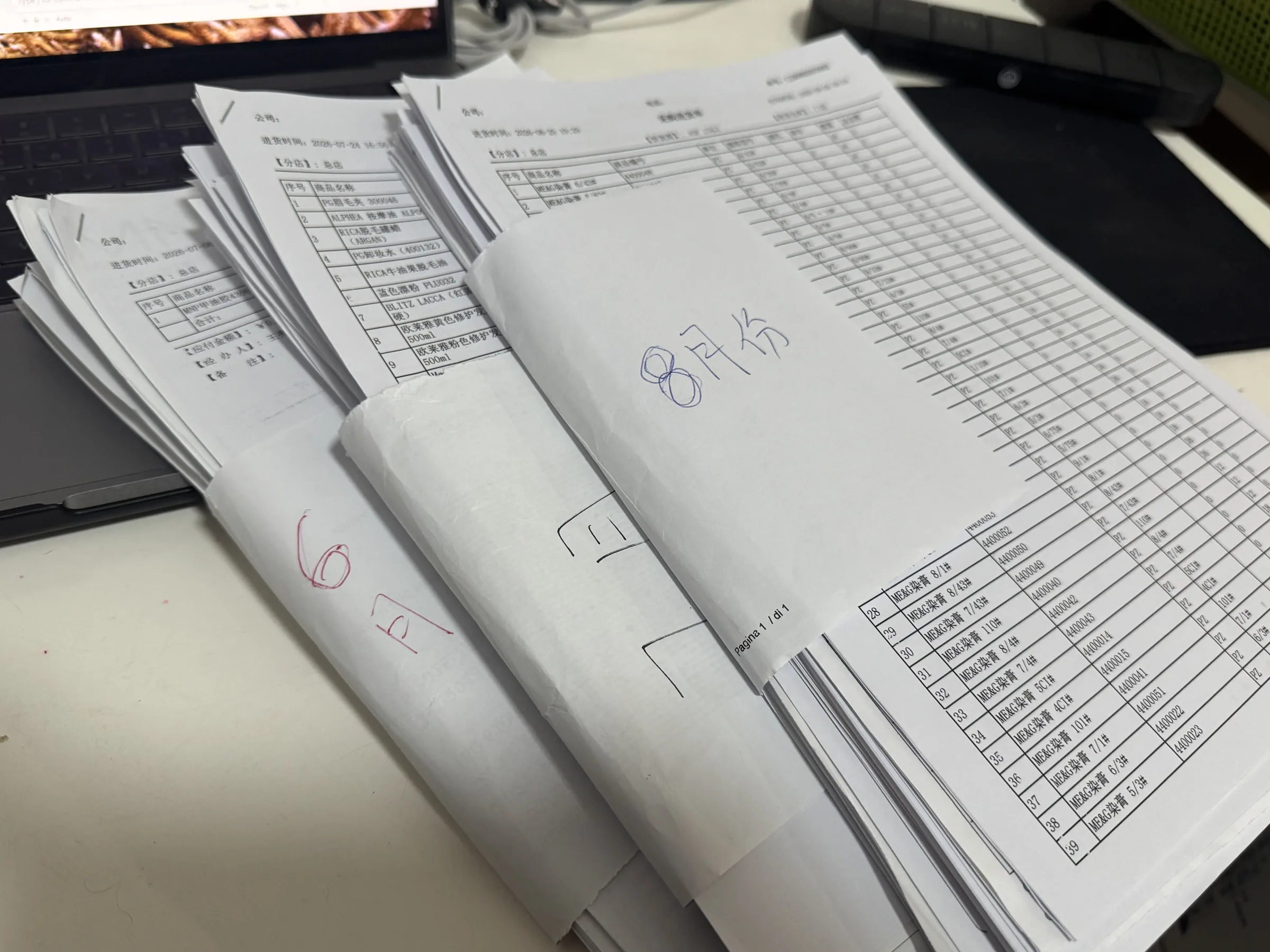
  • Stacks of printed receiving documents, bundled and labelled by month.
    3 · Months of paper documents
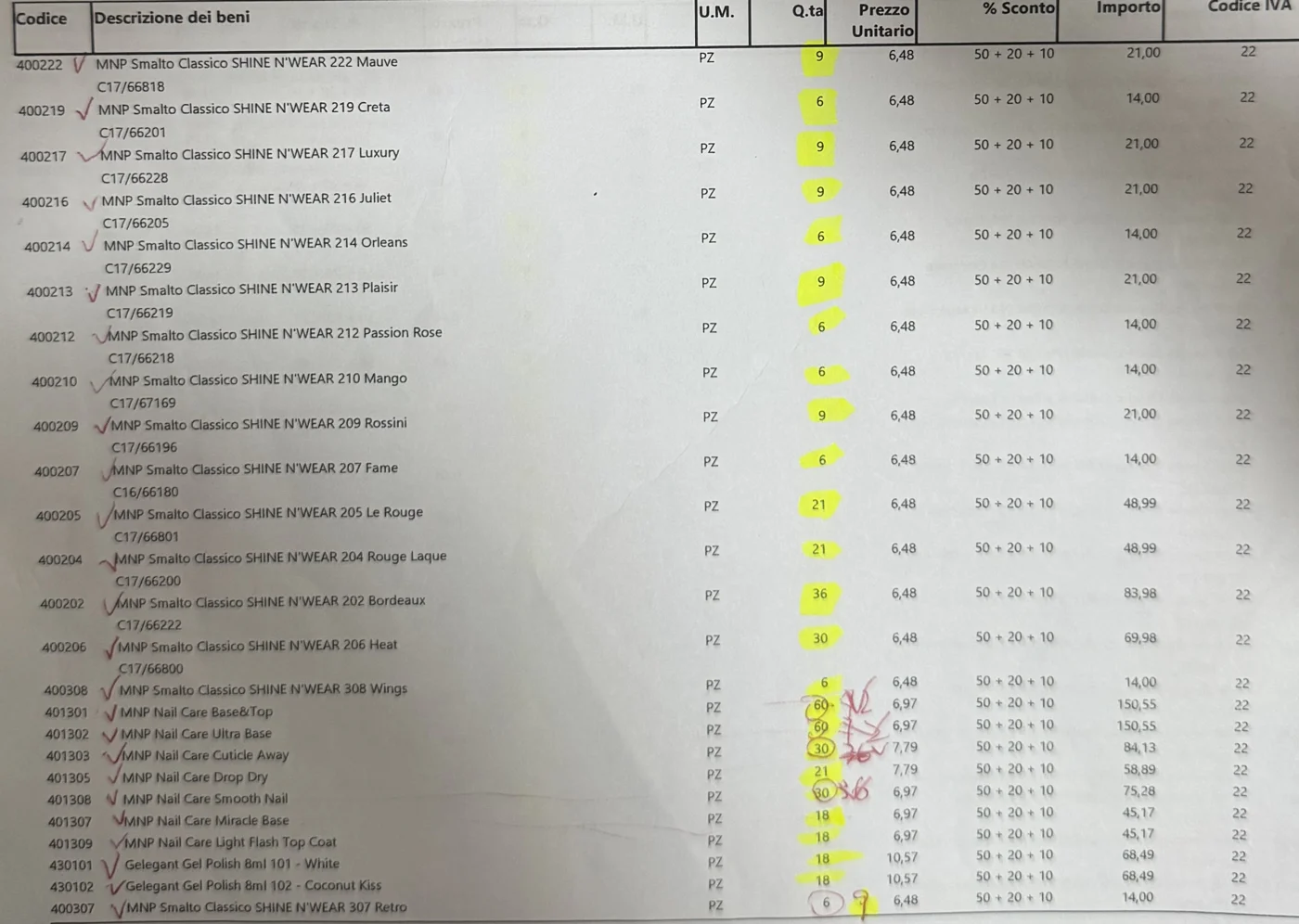
  • A supplier document with ticked items, highlighted quantities, and handwritten corrections.
    4 · Checked line by line
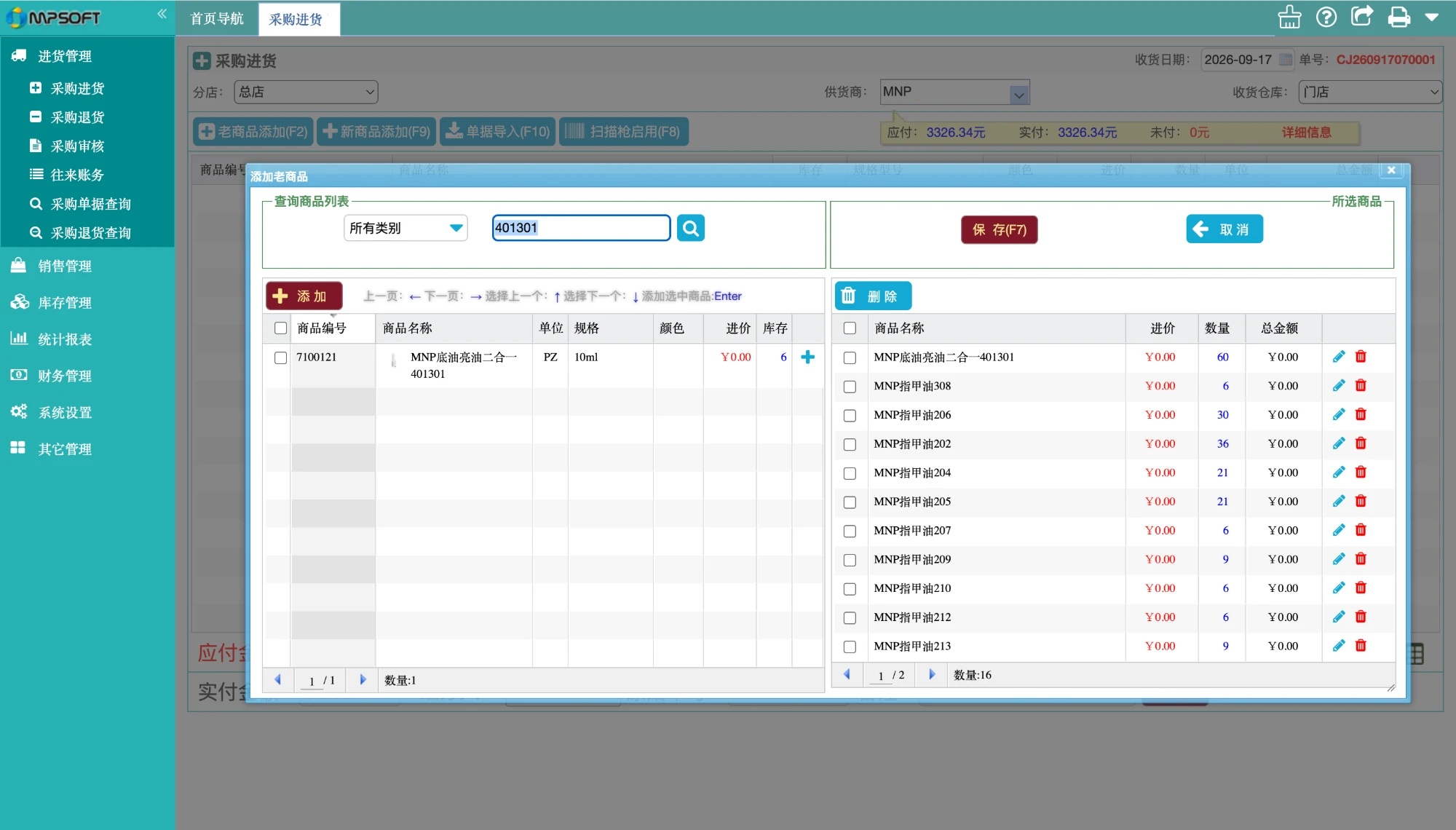
  • Legacy purchase receiving screen: a product search dialog beside the list of products added one at a time.
    5 · Add products one by oneOnly record in the system
Evidence from the old workflow, in order: the Excel order, the supplier’s confirmation, the printed documents that arrived with each shipment, and the legacy receiving screen. Identifying details are masked.
The purchase was scattered across Excel, messages, and the delivery noteA buyer downloads recent sales, imports them into Excel, and writes the purchase order there. The order and the supplier's confirmation travel in messages, outside the system. The only system record is goods received, keyed in from the delivery note (DDT) that arrives with the goods, which cannot represent batch arrivals.EXCEL · OUTSIDE THE SYSTEMMESSAGES · OUTSIDE THE SYSTEMSYSTEM · THE ONLY RECORDDownload recent salesExport, then import into ExcelWrite the purchase orderQuantities calculated by handSend the orderFile or message to the supplierConfirmation in chatStockouts and changes stay thereGoods arrive with a DDTDelivery note travels with the goodsKey in what the DDT saysNo way to record batch arrivalsThe order exists onlyin a spreadsheet.The supplier’s answer isnot in the system.Receiving follows the DDT,not the original order.A person carries information across.The link is lost here.
Before the ERP · The order and the supplier’s answer lived outside the system. Receiving followed the delivery note, so batch arrivals could not be recorded. Scroll horizontally on smaller screens.
  • Hidden status: nobody could see an order’s status without asking the buyer.
  • Checked by hand: a confirmation can differ from the order, so buyers compared them line by line.
  • No link to the order: receiving started from the document, so batch arrivals could not be tracked.
  • Slow entry: every receipt meant searching for and adding each product one by one.

03 / Phase 1

First, I brought the whole purchase into the ERP.

When I built the ERP, the purchasing lifecycle came first.

  • One record: purchase order, supplier confirmation, DDT, and receiving.
  • Visible differences: mismatches between documents surface on the purchase.
  • Batch receiving: each arrival is recorded against the order.

It did not recommend a quantity.

Phase 1 put the purchase lifecycle on one recordThe buyer still drafts the order from sales. The order, the supplier's confirmation, and each receiving batch now attach to the same purchase record, so differences and partial arrivals are visible.1 · ORDER2 · CONFIRM3 · RECEIVEDraft the orderQuantity still judged from salesOrder recordedSupplier, quantities, priceConfirmation loggedAttached to the same purchaseDifferences visibleMissing, quantity, priceReceive against the orderOrdered · DDT · actual, linkedBatch arrivals recordedEach shipment adds progressThe purchase becomesa record, not a file.The supplier’s answer ison the purchase.Partial arrivals staytied to the original intent.Blue: the record moves forward inside the ERP. Heavy outline: judgment still made by hand.
Phase 1 · The same three moments, now on one purchase record. The quantity judgment at the start is still manual. Scroll horizontally on smaller screens.
Phase 1 · Purchase order creation and supplier confirmation stay on the same purchase record.
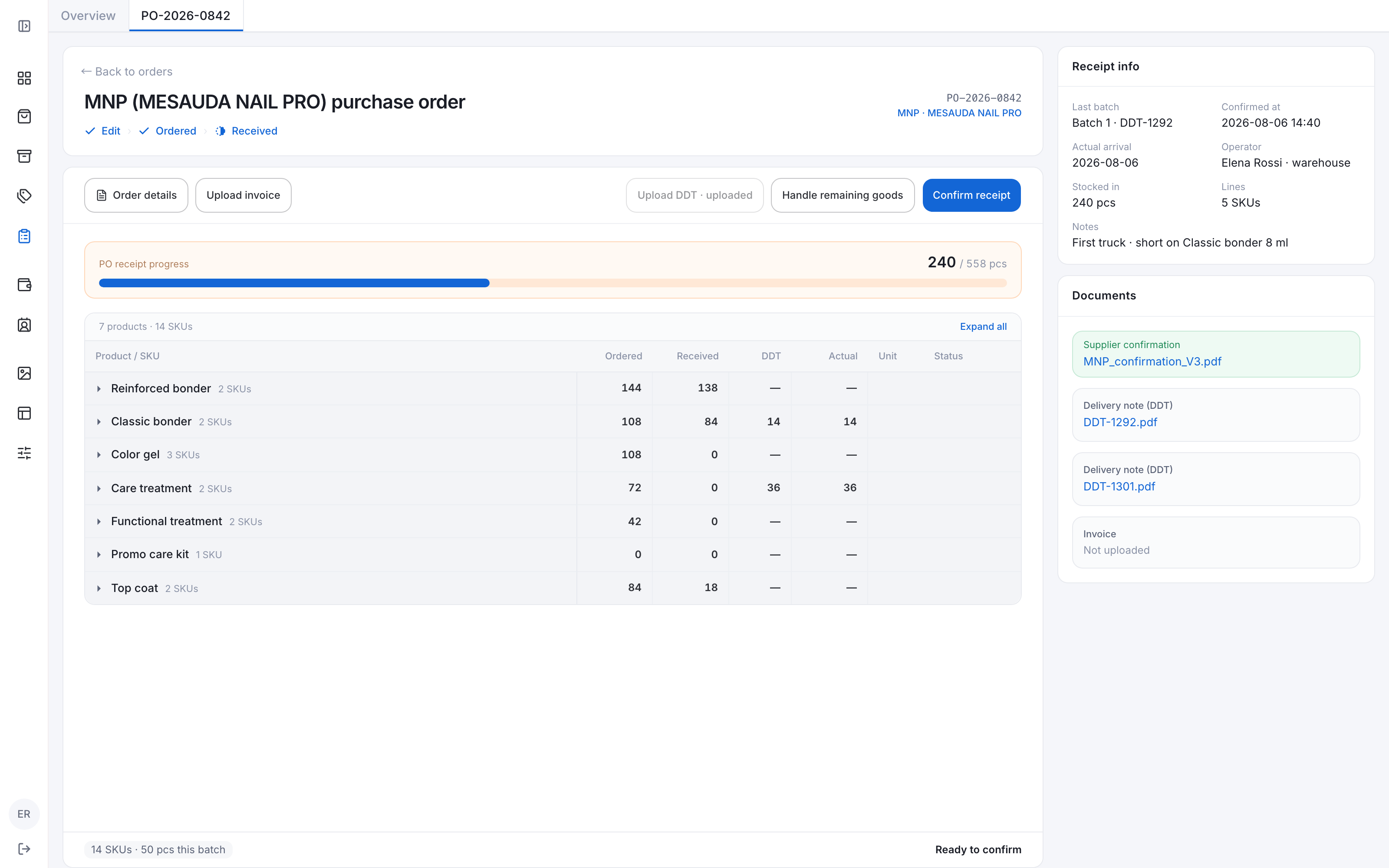
Receiving workspace with purchase quantities, delivery notes, actual counts, and partial arrivals.
Phase 1 · Receiving starts from the purchase: ordered, delivered, and actual quantities stay linked, including partial arrivals.

04 / Why an Agent

After launch, buyers still wrote the order from their own heads.

After launch, the records were better, but the slowest part had not moved. Buyers still worked out each quantity themselves.

Now I don't need to switch between Excel and the system anymore. But the part that takes the most time is still the same. I still have to decide what to buy and how much.

Procurement team, after Phase 1. What they adjusted for was information the system did not hold.

  • Stockouts

    Confirmations show shortages. The buyer remembers and orders around them.

  • Sales hidden by stockouts

    Sales drop while an item is out, so they understate real demand.

  • Seasonality

    Some products sell differently across the year.

  • Customer growth

    More customers, or a different customer mix, changes future sales.

This knowledge lived in messages and personal notes, and was gathered again for every order. The cost was cognitive, and that is what the Agent should reduce.

05 / Agent design

The system should hold the signals. The buyer should hold the decision.

The work is gathering and weighing evidence, which an Agent can do. But an order commits the business, so the Agent proposes and the buyer decides.

  • Capture signals where they appear

    Stockouts, notes, and exceptions are recorded on the purchase, ready for next time.

  • Reduce the decision, and show the work

    One recommendation, not a menu. Each line lists its demand signals: stockout recovery, seasonality, customer mix, buyer notes.

  • Calculate what must be reproducible

    Quantity comes from a deterministic engine. The model interprets and explains, it does not invent numbers.

  • Stop where commitment begins

    The plan stays editable and reversible. The buyer places the order, and confirms what the Agent learns.

Suppliers behave differently, so each one gets its own long-term memory, built from every purchase:

  • Recommendations and what the buyer changed.
  • Confirmations and shortages.
  • Arrivals and variances.
  • Notes written along the way.

Each supplier’s forecast is designed to improve with every purchase; accuracy has not been measured yet. The buyer reviews what to keep and makes the final decision.

The Agent keeps a memory for each supplier, built from every purchaseSupplier confirmation, delivery note, receiving, variance, and outcome feed that supplier's memory at the centre. The buyer reviews what to keep, and only reviewed learning informs the next plan.01Supplier confirmationCommitment and stockouts02DDTShipment evidence03ReceivingWhat physically arrived04VarianceCompared with the order05OutcomeOver, short, or on time06ReviewBuyer confirms to keepSUPPLIER MEMORYOne per supplierrecommendations · overridesoutcomes · notes · rules
The learning loop, per supplier · Solid arrows follow a purchase from confirmation to review. Dashed arrows write each piece of evidence to that supplier’s memory. Scroll horizontally on smaller screens.

I split the work so every number can be checked.

  • Model · interpret

    Read the request and supplier documents. Explain the plan and any differences.

  • Engine · calculate

    Use sales, coverage, stock, inbound, and lead time, adjusted for demand signals.

  • Buyer · decide

    Edit the plan, resolve exceptions, and place the supplier order.

One plan brings every input together, and the reasons appear on demand.

06 / Key decisions

Seven decisions, and what I rejected for each.

Decision records, each with the options weighed
73
Interview and feedback records
47
Documented design iterations
60

Each decision was logged with its alternatives, the evidence behind the pick, and the cost I accepted.

  1. 01

    Where does the Agent live in the ERP?

    DEC-001 · DEC-012
    • Add more filters and fields to the purchase page (rejected)Every season and supplier needs a different data window. A fixed page just keeps growing.
    • Fixed wizards per scenario (rejected)Fine for known cases, but it cannot cover every supplier and season combination.
    • Workbench plus a persistent Agent panelChosen (chosen)The table stays the source of truth. Chat starts tasks, asks, explains, and repairs. Results always land in the workbench, never only in chat.
    • Chat only (rejected)Wide tables, discrepancies, and approvals are hard to audit inside a conversation.
    Evidence
    The buyer lead said one page could not hold that many situations. In prototype review, Chat that only explained had little value, so it became the way to start a purchase.
    Cost I accepted
    A dynamic experience is harder to test than a fixed form. The Agent’s plan and current step have to stay visible.
  2. 02

    How many recommendations should the Agent show?

    DEC-014 → DEC-026
    • Three scenarios: least risk, balanced, opportunityFirst pick, later reversed (rejected)I chose this first, to expose the trade-offs. The buyer wanted a quick check, not a menu.
    • Unlimited generated scenarios (rejected)Too much choice. Nothing to compare against.
    • One best plan, editable line by lineChosen (chosen)Each row shows evidence, confidence, and the calculation. High-impact conditions go to approval, not into extra scenarios.
    Evidence
    Prototype feedback: replenishment needs one best plan to review and edit quickly.
    Cost I accepted
    The Agent has to justify why this plan is best, and make overriding it effortless.
  3. 03

    Who calculates the order quantity?

    DEC-009 · DEC-046 · DEC-047
    • The LLM analyses and calculates (rejected)Cannot be reproduced or regression tested, and can invent stock or sales figures.
    • Fixed rules only, no Agent (rejected)Cannot read supplier emails, PDFs, or the buyer’s intent.
    • LLM interprets, a deterministic engine calculatesChosen (chosen)The model extracts supplier, coverage, and constraints. A tested function computes quantity. A graph makes “no calculation until required fields exist” a control-flow rule, not a prompt.
    Evidence
    Quantity moves cash and supplier commitments, so the same inputs must give the same number. A free-form tool-calling loop was ruled out for the first version.
    Cost I accepted
    Lower confidence at first. Seasonality and customer mix are not in the data, so they show as data gaps rather than being faked.
  4. 04

    Who places the order?

    DEC-002 · DEC-025
    • Suggest only, create nothing (rejected)Too little value. The buyer still builds the order alone.
    • Auto-order under a threshold (rejected)No accuracy or trust data yet to support it.
    • Full automation with audit after the fact (rejected)A real commercial commitment cannot be undone by an audit.
    • Agent drafts, buyer orders outside, platform records itChosen (chosen)Recording “Order placed” requires the final confirmation attached. Ordering happens on WhatsApp or email, so the platform never sends it.
    Evidence
    The buyer lead named automatic ordering as forbidden. A later review corrected a deeper point: the platform cannot order from suppliers at all.
    Cost I accepted
    One manual step stays. Testers read a prepared order as a placed one, so the UI keeps saying that approved is not ordered.
  5. 05

    How should approval relate to ordering?

    DEC-019 · DEC-035
    • Approve means order (rejected)Mixes accepting risk with executing a trade. A changed quote could slip through.
    • Owner approves the direction, not a version (rejected)A supplier can change price or quantity and still reuse the old approval.
    • Agent auto-approves small exceptions (rejected)Exceptions are the user’s own high-impact boundaries. The Agent should not waive them.
    • Approval bound to one quote version, separate from orderingChosen (chosen)A change to price or quantity reopens approval. Escalation happens in place on the same order, only when a confirmation brings a real exception.
    Evidence
    New suppliers, new products, large orders, and unstable prices need the owner. Normal orders do not.
    Cost I accepted
    An extra step after approval, and a quote-version mechanism to build and maintain.
  6. 06

    How should receiving work?

    DEC-017 · DEC-028
    • Keep entering each product by hand (rejected)The same duplicated search and typing, with the same errors.
    • Read the delivery note and stock in automatically (rejected)The DDT says what the supplier shipped, not what arrived.
    • Prefill from the DDT, record only differencesChosen (chosen)Order, DDT, counted, and accepted quantities stay separate. Counted goods do not automatically become stock.
    Evidence
    My first model went from confirmation straight to receipt. An interview showed a DDT sits in between, and that data model could not tell input errors from real over-delivery.
    Cost I accepted
    Needs a dependable DDT-to-order link. Over-receipt takes an extra recount.
  7. 07

    How does the Agent learn?

    DEC-006 · DEC-020
    • Learn automatically from every order (rejected)Fast, but it follows noise, one-off events, and mistaken edits.
    • Static reports only (rejected)Safe, but feedback never changes the next plan.
    • The buyer writes supplier rules by hand (rejected)Good for clear policy. Poor at patterns, and generalizes from single cases.
    • Outcomes become candidates. Reviewed before they shape plansChosen (chosen)Memory has four layers: facts, metrics, observations, and approved rules. One order only yields a candidate.
    Evidence
    One result mixes Agent advice, human edits, supplier behavior, and season. Edits alone do not explain why something happened.
    Cost I accepted
    Slower to improve. With little data, the Agent has to say it does not know yet.

07 / The experience

A clear next action, from replenishment to receipt.

The purchase list coordinates purchases. Each order keeps its own evidence, rules, activity, and conversation.

01 · Surface an opportunity before the buyer asks

Replenishment cards say when to order and how much the goods cover, with one action to start a draft.
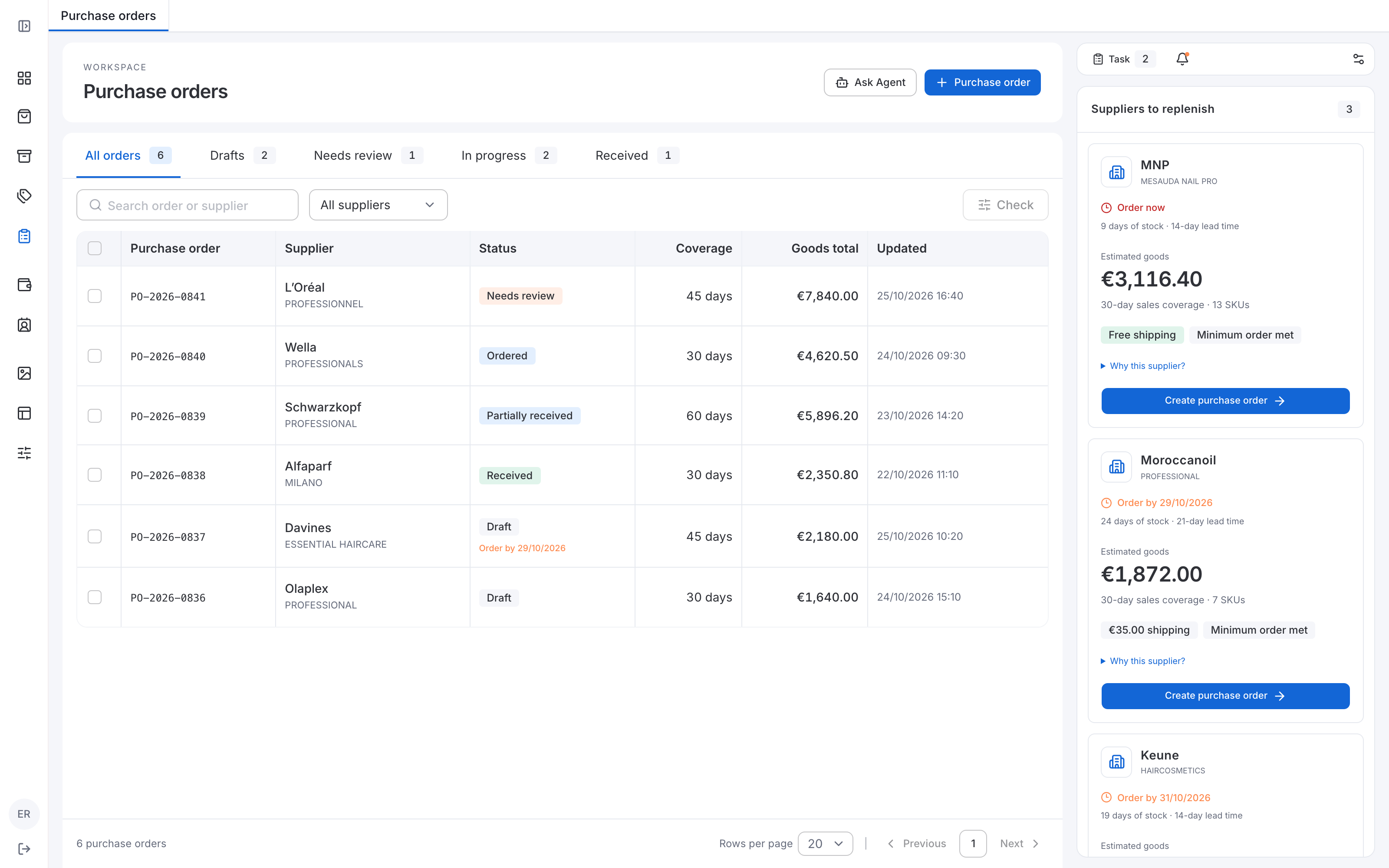
Purchase list beside supplier replenishment cards showing order timing, estimated goods, sales coverage, and Create purchase order.
Before the task · The list coordinates purchases; supplier cards explain the opportunity and offer one direct action.

02 · Keep the familiar table at the center

Quantities and prices edit in place. Each row explains itself on demand, and lasting supplier terms stay apart from this order.
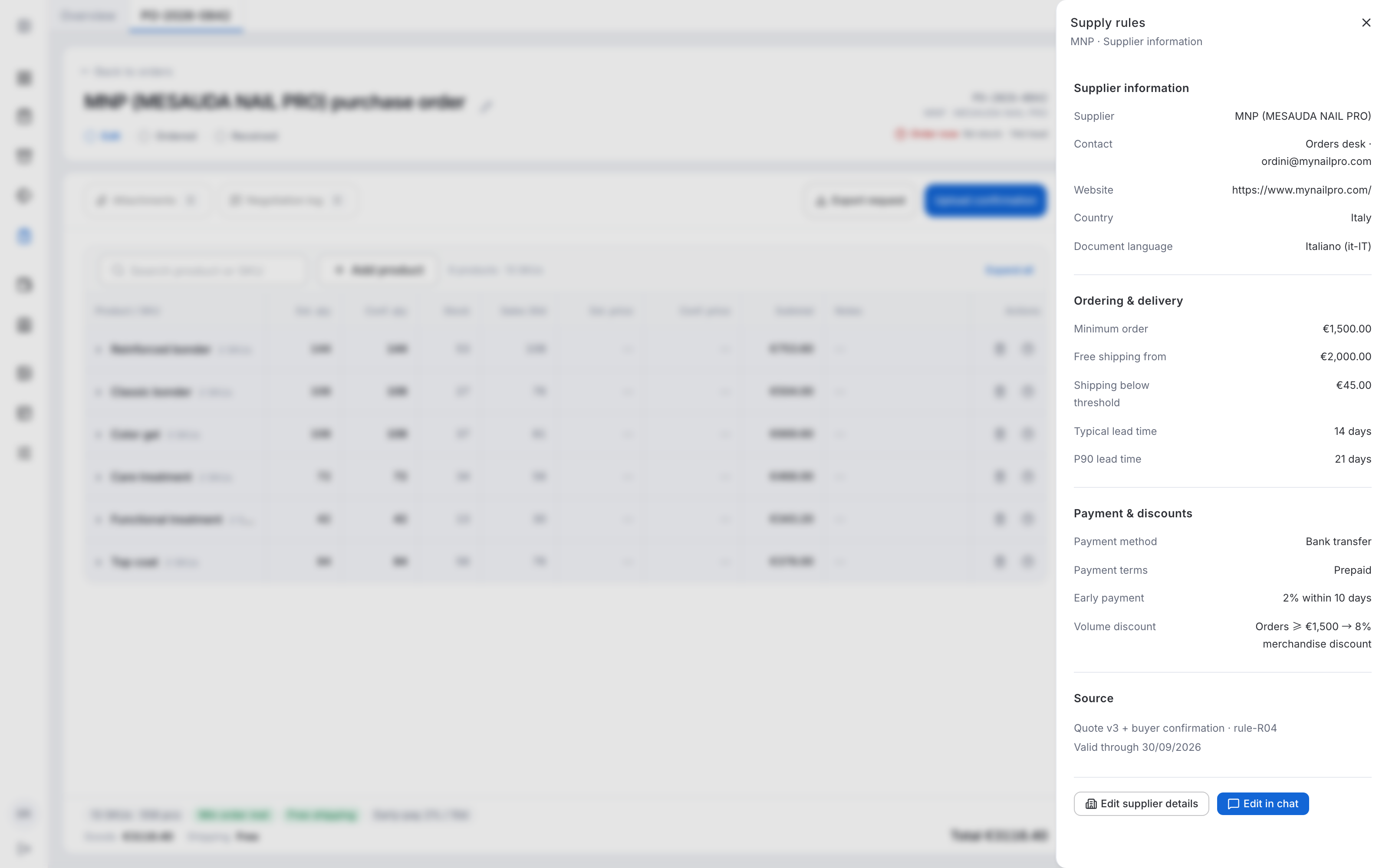
Editable purchase table with the Supply rules panel showing MNP supplier information and commercial terms.
Context on demand · Supplier terms have a stable place beside the order; row-level explanations stay with the recommendation.

03 · Put human judgment at the commercial boundary

Only real exceptions surface, each on its SKU. Approving is not ordering.
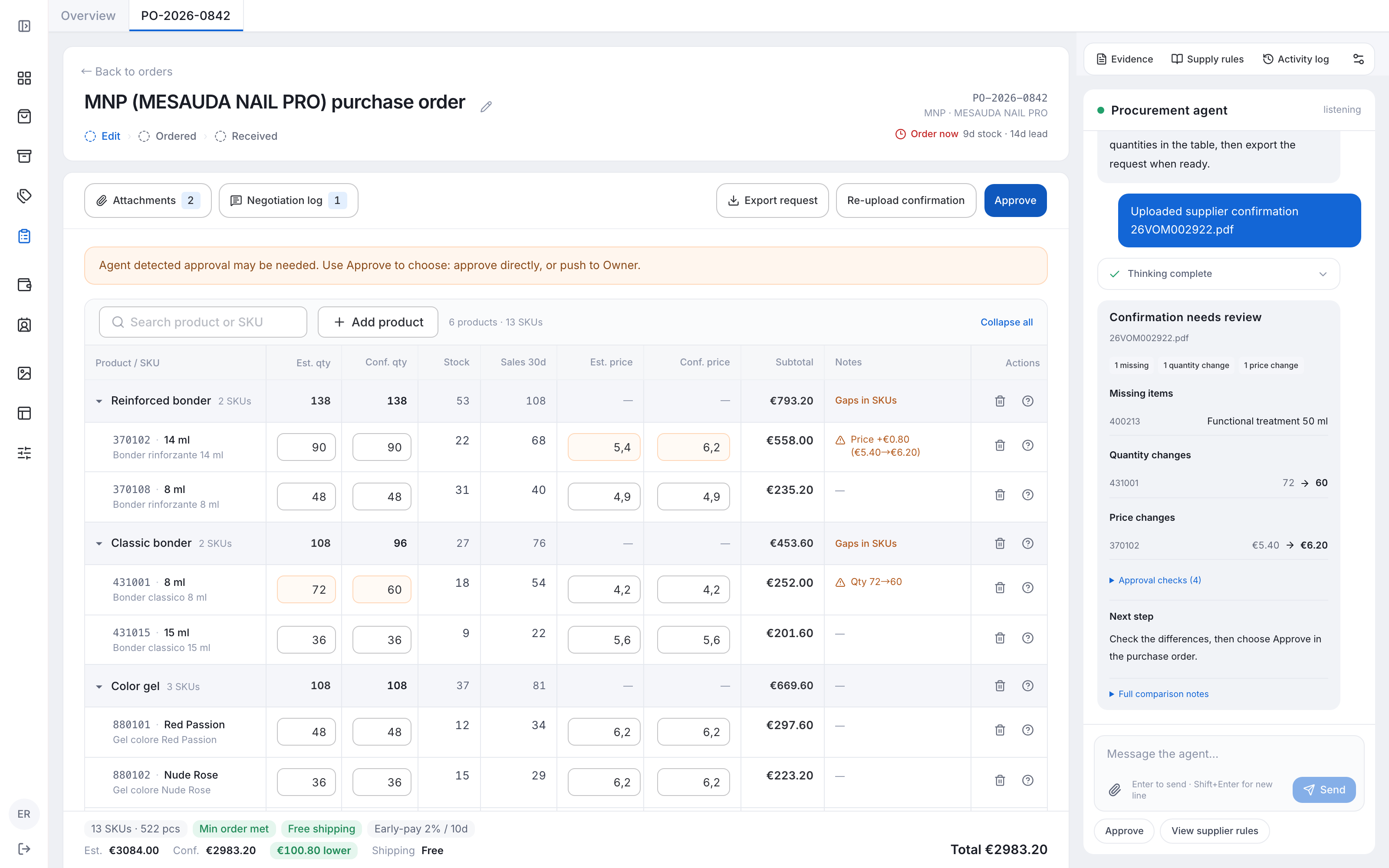
Supplier confirmation with one missing-item, quantity, and price exception highlighted beside a structured Agent comparison.
Focused review · Normal rows remain readable while each type of discrepancy has a clear example and next step.
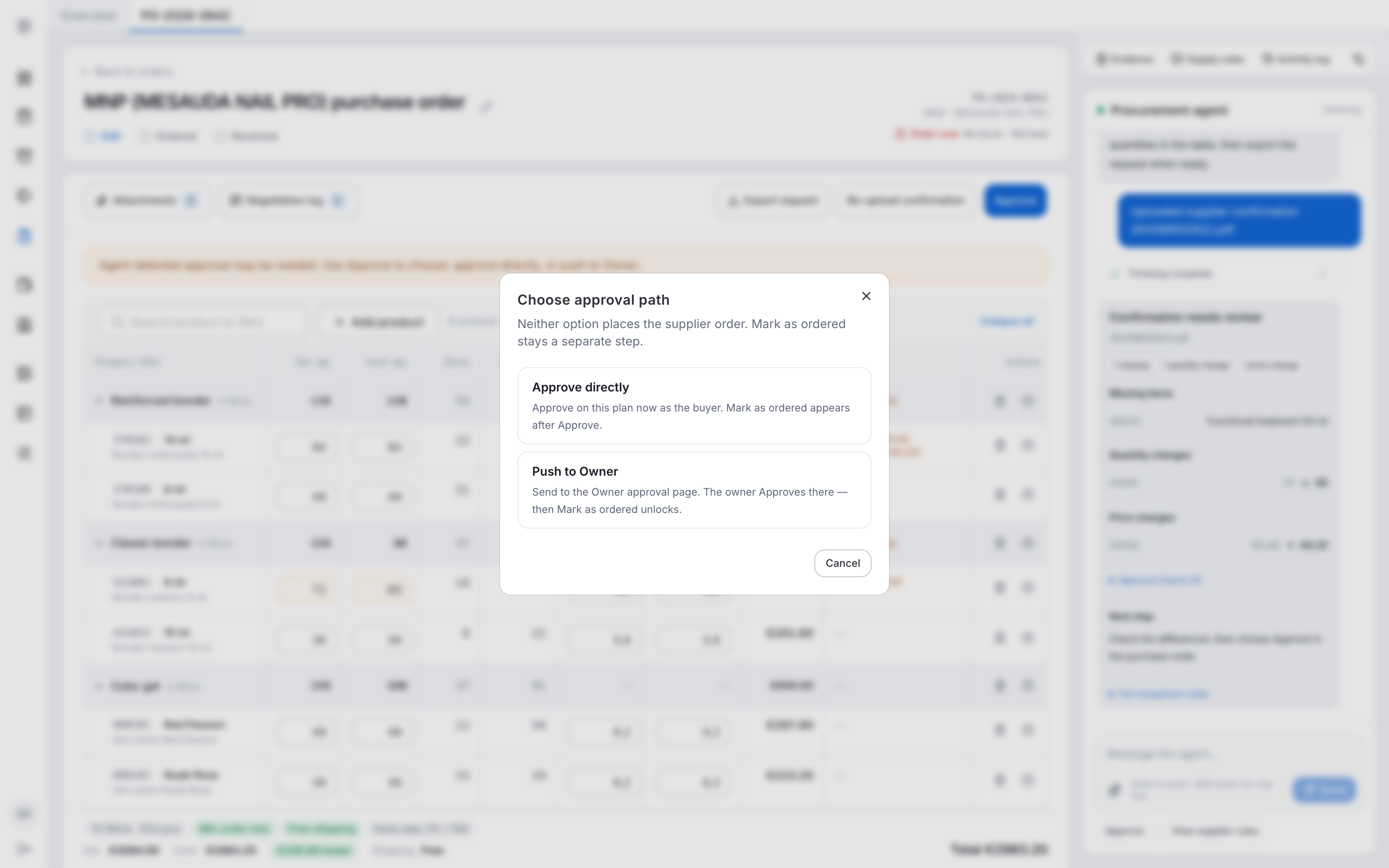
Approval dialog offering direct buyer approval or escalation to the owner, with supplier ordering kept separate.
Human handoff · The buyer chooses an approval path before recording the supplier commitment.

04 · Make a change reversible without restarting

Autosaves become checkpoints. Preview an earlier plan, then explicitly apply it.
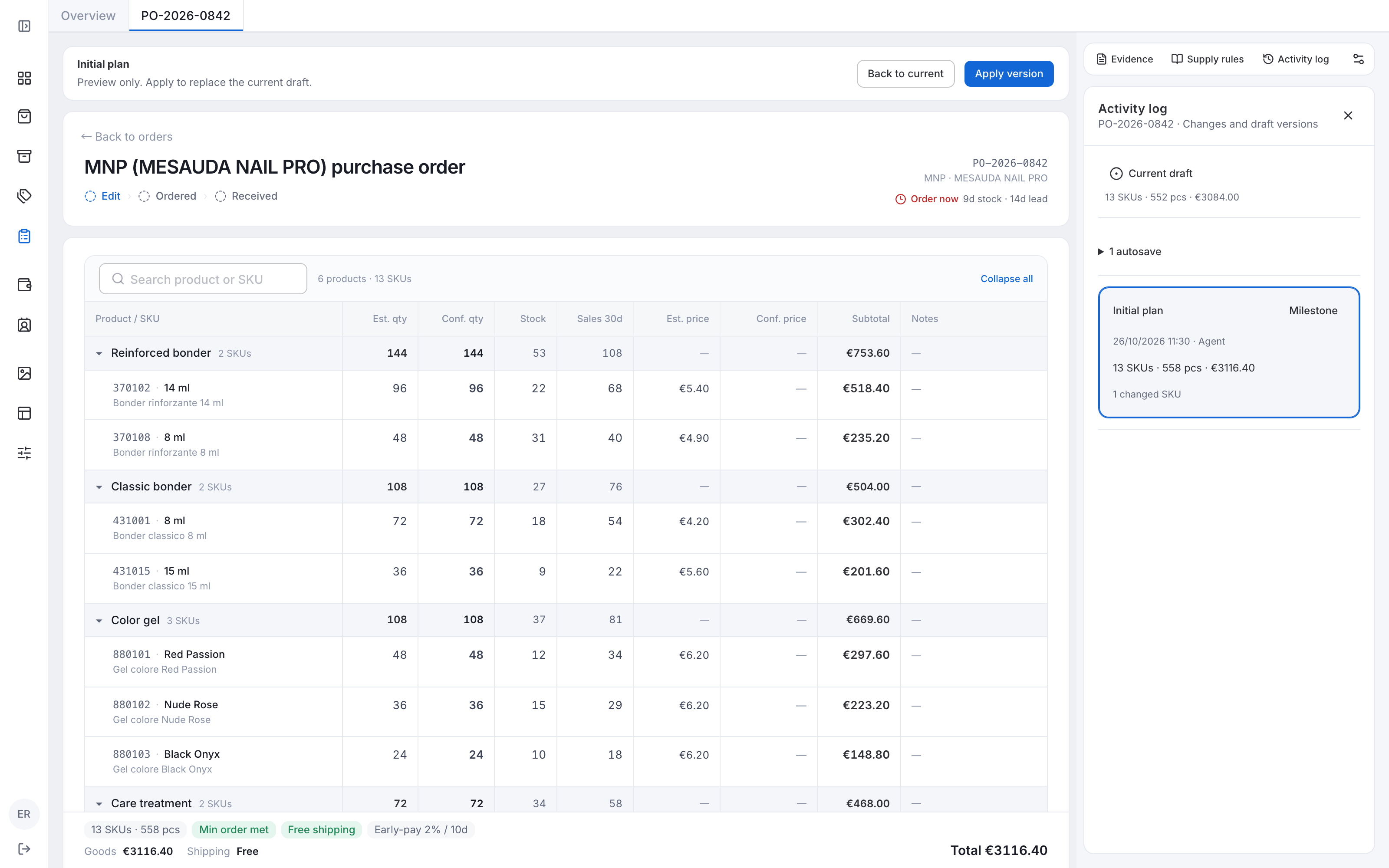
Activity log beside a read-only historical draft preview with Back to current and Apply version actions.
Recovery · Preview a previous plan, compare it in place, and explicitly apply it before continuing.

05 · Reconcile reality before learning from it

Order, DDT, and actual counts stay separate. The buyer resolves differences before closing, and learning waits for review.
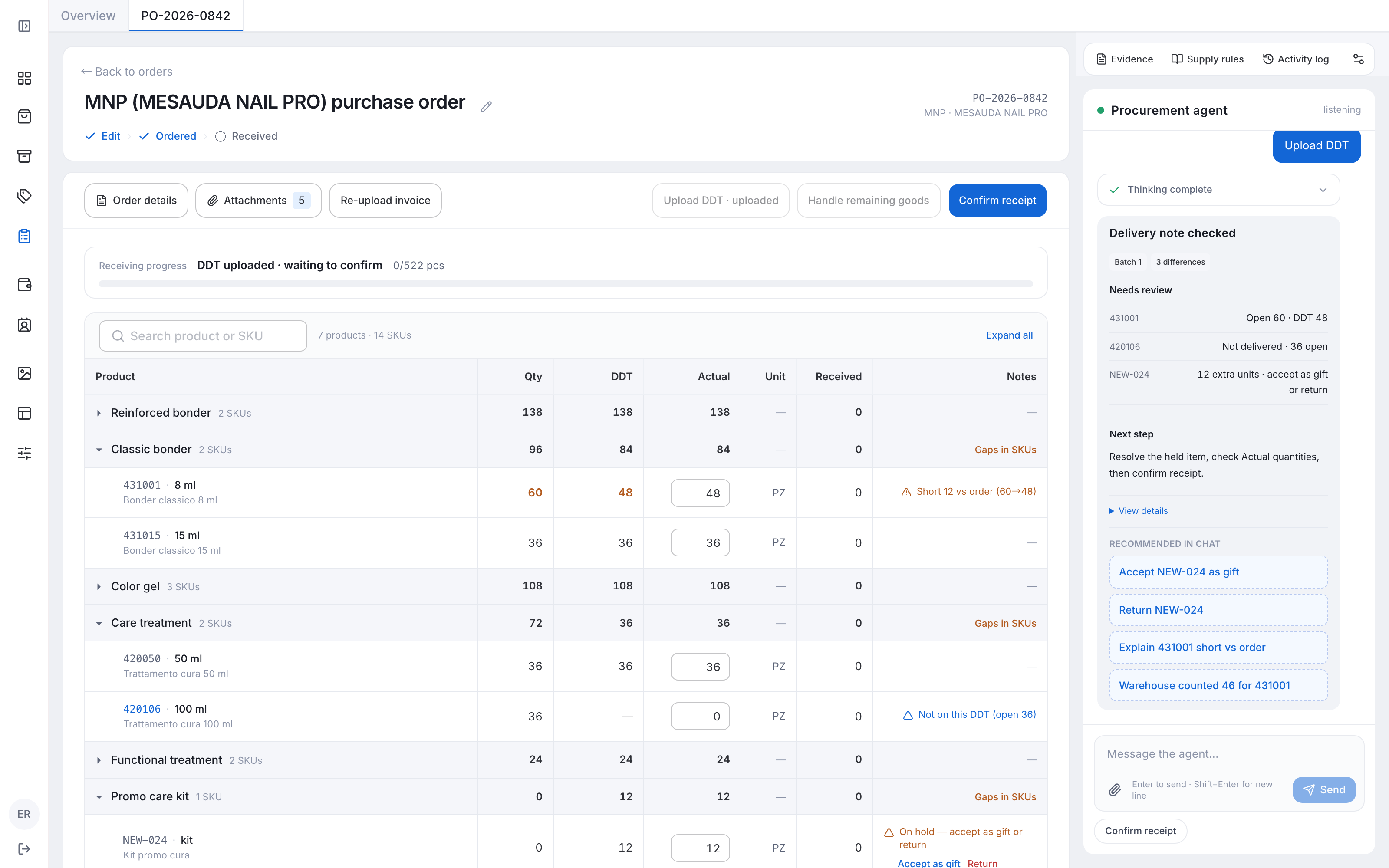
Receiving table comparing order, delivery note, and actual quantities with focused shipment exceptions.
Receiving · The buyer checks actual goods against the linked documents and explicitly resolves open quantities.
  • One purchase context

    Conversation, documents, evidence, and activity stay with the same order.

  • Distinct responsibilities

    The Agent prepares and explains; the buyer edits, approves, orders, and receives.

  • Reviewed continuity

    Autosaves support recovery; order notes and supplier terms keep separate scopes.

08 / Iterations

Five things I got wrong, and what changed my mind.

  1. I designed

    Three scenarios, so the buyer sees the trade-offs.

    Then I learned

    Replenishment needs one best plan to check and edit fast.

    So I changed it to

    One editable plan with evidence on every row.

    DEC-014 → DEC-026
  2. I designed

    Receiving as confirmation to stock-in, with “entry error” as a reason.

    Then I learned

    A delivery note (DDT) sits between them, and real over-delivery was being mislabeled.

    So I changed it to

    DDT as the baseline. Only differences are recorded.

    ITER-001 · DEC-017
  3. I designed

    Chat that explains the page.

    Then I learned

    Buyers already knew what they wanted. Explanation added little.

    So I changed it to

    Chat as the entry point to creating a purchase.

    INT-021 · DEC-044
  4. I designed

    A separate approval flow for risky orders.

    Then I learned

    An order only turns risky after the confirmation arrives.

    So I changed it to

    One order that escalates in place when a real exception appears.

    DEC-035
  5. I designed

    Approve, then the platform places the order.

    Then I learned

    Ordering happens off-platform and creates a binding commitment.

    So I changed it to

    Approval and ordering split. The platform only records the order.

    INT-008 · DEC-025

09 / Design an AI agent

12 clear steps and 6 topics shape every handoff.

Twelve steps follow a purchase before, during, and after a task, then over time. Six themes run through all of them. Every card is held to four goals: explainable, controllable, predictable, recoverable.

01—03 · Before the task. Start with a replenishment opportunity or a request. Establish the goal before generating a plan.

Before the task · 01

Discoverability & entry

Discover the next step where purchasing already happens.

Why and how

User need. Buyers need a next action, not a directory of AI features.

Design. The purchase list brings together existing orders, Ask Agent, and supplier replenishment opportunities. The list coordinates work; the order holds the decision.

Trade-off. Organize entry points by business object, rather than by AI feature.

Before the task · 02

Intent & context

Express intent in business language and carry known context forward.

Why and how

User need. Users should not reassemble information the business already knows.

Design. A new request asks for supplier and sales coverage. A replenishment card carries its calculated supplier and fixed coverage directly into the new draft.

Trade-off. Fix the coverage of a calculated opportunity; let a self-initiated purchase set its own window.

Before the task · 03

Expectation alignment

Make the output and the next commitment clear before work starts.

Why and how

User need. A recommendation can look like a supplier commitment.

Design. The supplier card states estimated goods, coverage, order timing, and commercial thresholds. Create purchase order produces an editable draft; formal ordering remains a separate buyer action.

Trade-off. Creating a draft and formally ordering from a supplier remain different commitments.

04—07 · During the task. Show progress, preserve human control, and make work resumable and recoverable.

During the task · 04

Execution transparency

Give waiting a visible start, process, and result.

Why and how

User need. An unexplained spinner leaves users unsure whether their request is being handled.

Design. The guided empty canvas becomes a plan-loading state while the conversation shows stages. The finished table arrives in the same place. Send becomes Pause during work.

Trade-off. Keep loading and delivery in the same canvas, with matching conversation progress.

During the task · 05

Human-in-the-Loop

Reserve attention for decisions that need business judgment.

Why and how

User need. Constant confirmation creates fatigue, but commercial decisions need an accountable person.

Design. Quantities and prices stay editable in the table. Missing items, price changes, and quantity changes trigger focused review. Approval, recording an external order, and receipt confirmation remain distinct.

Trade-off. Apply low-risk draft edits directly; keep commercial responsibility with the buyer.

During the task · 06

Async & long-running tasks

See work in progress and continue it without starting over.

Why and how

User need. Buyers cannot watch one conversation while other purchases need attention.

Design. Workspace Tasks shows running and completed work across purchases. Notifications report changes. Within an order, Pause and Resume share the composer button and preserve progress.

Trade-off. Task progress and notifications serve different purposes; controls stay in the composer.

During the task · 07

Error handling & recovery

Inspect the past and safely return to an editable present.

Why and how

User need. An accidental edit should not force a buyer to regenerate the whole plan.

Design. Activity log combines business events with draft snapshots. Current draft stays at the top; edit rounds become grouped autosaves. Preview a snapshot in the table, then explicitly apply it.

Trade-off. Preview before applying a compatible draft, and retain the previous state.

08—10 · After the task. Deliver the result in the familiar order. Verify, refine, and retain the reasons behind a decision.

After the task · 08

Delivery & verifiability

Deliver a result the buyer can scan and verify.

Why and how

User need. A long answer makes it difficult to verify what changed and why.

Design. Results separate status, key differences, and next steps. Evidence summarizes sales, stock, inbound, rules, and documents consulted; each row’s Why explains its specific recommendation.

Trade-off. Show a source overview separately from SKU-specific recommendation reasons.

After the task · 09

Iterative refinement

Make local adjustments where the result is already visible.

Why and how

User need. Small corrections should not require another conversation or a separate editing mode.

Design. The familiar product table keeps inline quantity and price fields, product search, row actions, and recalculated totals. The table hugs its rows while the surrounding card fills the workspace.

Trade-off. Preserve the familiar business table and support local edits.

After the task · 10

Feedback & reuse

Connect feedback to the decision that produced it.

Why and how

User need. The reason for a buyer’s judgment can disappear into the conversation.

Design. Order notes retain this purchase’s context. After receiving, structured prompts revisit demand, arrival timing, and SKU variance. Reviewed notes and activity remain linked to the purchase.

Trade-off. Order notes, supplier rules, and audit events retain separate purposes.

11—12 · Over time. Keep supplier information separate from order notes, and surface the next purchase at the right moment.

Over time · 11

Memory & personalization

Find lasting supplier information without confusing it with this order.

Why and how

User need. Supplier terms and one purchase’s exceptions should not become the same memory.

Design. Supply rules holds contacts, minimums, shipping, lead time, and payment terms. Order notes stay with the order. Two entry points offer supplier-detail editing or a chat-led change.

Trade-off. Give lasting supplier information a stable place beside the order.

Over time · 12

Proactive assistance

Appear at the right time and offer a concrete next action.

Why and how

User need. Late replenishment creates stock gaps; too many alerts obscure useful action.

Design. Scheduled checks surface supplier opportunities with an order date. Confirmation and delivery changes go to supplier-labelled notifications with a clear primary action, read state, and deletion.

Trade-off. Schedule proactive checks, but leave creation to the buyer.

A—F · Cross-cutting themes. Check safety, coordination, language, context, resources, and experience quality across the entire workflow.

Cross-cutting themes · A

Safety & privacy

Align access, information scope, and business responsibility.

Why and how

User need. Reading a document does not grant the Agent authority to commit the business.

Design. Order panels stay scoped to the current purchase. Upload, approval, ordering, and receiving have separate boundaries. Deleting a draft requires an explicit confirmation.

Trade-off. The list coordinates globally; each order contains its own context and decisions.

Cross-cutting themes · B

Multi-Agent & ecosystem

Keep collaboration continuous without exposing orchestration work.

Why and how

User need. Internal specialization should not make users carry context between experts.

Design. One Procurement agent coordinates sales, stock, rules, document checks, and approval around the same order. Evidence exposes business sources, without requiring expert switching.

Trade-off. Coordinate internal capabilities through one order and one Agent.

Cross-cutting themes · C

Persona & tone

Make what happened and what comes next immediately readable.

Why and how

User need. Long explanations and confident technical language hide what a buyer needs to do.

Design. The Agent speaks as a purchasing assistant. A general opening serves the list; order replies lead with state and facts, use structured sections, and finish with one clear next step.

Trade-off. Use business facts and put detail in the table and evidence panels.

Cross-cutting themes · D

Multimodal & cross-device

Adapt the layout while keeping the same purchasing mental model.

Why and how

User need. Supplier documents, physical goods, and different window sizes must support one workflow.

Design. Confirmation, DDT, and attachments share the purchase context. The compound composer accepts documents. Narrow layouts retain access to both order and Agent without changing the business sequence.

Trade-off. Change layout and reading order while preserving the purchase workflow.

Cross-cutting themes · E

Cost & resources

Spend analysis effort where it adds value.

Why and how

User need. Repeated analysis and duplicate drafts consume resources and interrupt judgment.

Design. Global controls schedule replenishment checks. Existing results, local edits, pause/resume, and historical previews let work continue without regenerating the whole purchase.

Trade-off. Control the checking cadence instead of exposing internal resource machinery.

Cross-cutting themes · F

Experience metrics

Evaluate correctness, control, and the ability to continue.

Why and how

User need. Generation success or acceptance alone cannot show whether the buyer understood the decision.

Design. Review task completion, discrepancy detection, edits, necessary interventions, and recovery. Separate user roles and task conditions rather than treating every acceptance as trust.

Trade-off. Use task scenarios, activity, and role feedback to evaluate the design.

10 / Validation

A prepared order looked like a placed order.

Testers read a prepared order as a placed order. I checked understanding, lifecycle continuity, and exceptions with the coded prototype and real procurement records.

  • Reproduce the quantity

    Check the recommendation against the same sales, stock, inbound, and supplier inputs.

  • Keep differences visible

    Follow confirmation and receiving exceptions across the purchase lifecycle.

  • Clarify the commitment

    Make the buyer’s external ordering step explicit after testers misread the draft.

11 / Results

A purchase plan in 5 to 10 minutes, down from 30 minutes to 2 hours.

To prepare a purchase plan, down from 30 minutes to 2 hours across suppliers
5–10 min
Staff members using the Agent daily
3

The Agent is in production and used by procurement. It drafts quantities; the buyer keeps the supplier commitment.

  • In use

    Connected purchasing records and an Agent-assisted quantity plan.

  • Human authority

    Buyers edit, approve, place the order, and confirm learning.

  • Not yet measured

    Recommendation acceptance and correct escalation rates.

Planning time is the measured result. Recommendation acceptance and whether the Agent stops at the right approval boundary are still to be measured.

12 / Reflection

My contribution was designing the conditions for delegation.

I moved from connecting purchase records to defining what the Agent can infer, calculate, propose, and hand back.

  • Digitizing was not enough. Connected records did not reduce the thinking. The Agent had to join the decision.
  • Trust is designed, not assumed. Visible evidence, reversible edits, and a human commitment point made the recommendation usable.
  • Narrowing the role helped. Every iteration gave the Agent a more specific job and the buyer a clearer one.

Next, I would measure buyer edits, recommendation acceptance, and whether the Agent stops at the right approval boundary. A per-supplier trust score would then decide when automation is safe to turn on.