01 — Source
Find the right people on LinkedIn
Collect relevant profiles without rebuilding the search in another platform.
Chrome Extension LinkedIn profile collection Search-result ranking
An AI-powered LinkedIn sourcing tool that re-ranks search results by fit and surfaces the best candidates and contacts first.
Overview
ConnectNova uses AI to re-rank LinkedIn search results, helping recruiters and sales teams surface the best-fit people faster. I led the 0–1 design of the Chrome extension and web platform.
View live siteRole
Founding Product Designer
Product Strategy
UX Design
Information Architecture
Interaction Design
Team
Founding Team
1 Product Designer
1 Founder
Engineering Team
Tool
Figma
PostHog
Claude Code
Company
Nova AI
Year
2026 — Present
01 — Project at a glance
Recruiters and sales teams already used LinkedIn to discover candidates and prospects. The workflow broke down after discovery.
Profiles had to be reopened, enriched, copied into spreadsheets, organized manually, and compared across disconnected tools. ConnectNova brought those activities into one connected workflow.
01 — Source
Collect relevant profiles without rebuilding the search in another platform.
02 — Qualify
Define evaluation criteria, compare profiles, and review AI-assisted assessments within a shared Project.
03 — Engage
Move prioritized candidates or contacts into structured outreach workflows.
04 — Manage
Track where each person stands beyond the initial sourcing task.
Source finds the right people. Qualify helps users decide. Engage starts the conversation. Manage preserves progress toward an outcome.
02 — The challenge
A single LinkedIn search could expose users to hundreds of profiles. The work did not stay inside LinkedIn.
Recruiters and sales teams moved between sourcing tools, profile pages, enrichment platforms, spreadsheets, and personal working lists to collect information, compare people, and decide who should move forward.
Recruiting workflow
Search across LinkedIn and LinkedIn Recruiter to identify potentially relevant profiles.
Open profiles individually and gather the experience, skills, and background required for evaluation.
Move selected candidates into spreadsheets or other tools to create a working shortlist.
Review candidates across disconnected sources before deciding who should move forward.
Sales workflow
Use LinkedIn and Sales Navigator to identify relevant prospects and decision-makers.
Gather additional role, company, and contact information through separate tools.
Transfer promising contacts into spreadsheets or working lists for further review.
Assess which contacts best matched the target profile before taking the next step.
Users repeatedly opened and checked profiles one by one.
Profile data, evaluation context, and working lists lived in different tools.
Relevant people had to be copied, grouped, and maintained outside LinkedIn.
Without one workspace, users compared people through additional manual effort.
The challenge was turning hundreds of scattered profiles into a clear, prioritized decision.
03 — The pivotal product decision
The original request was to collect LinkedIn profiles and produce an AI-ranked shortlist.
I challenged this one-shot model because users worked across multiple roles, clients, prospecting goals, and LinkedIn search sessions. A ranking result could show who scored highly, but it could not preserve why someone had been collected, which requirements applied, or what should happen next.
I introduced Project as a persistent container for each sourcing goal. Every collected profile, evaluation criterion, score, note, and later outreach action could remain attached to the same context.
Project became the bridge between collecting a profile and making a decision about it.
04 — One shared product model
Both teams needed to find people, preserve why they mattered, evaluate them against a goal, and decide what should happen next.
Instead of building two separate products, I created one flexible Project model that could adapt to each context.
Profiles remained connected to the goal and criteria that explained why they were collected.
Users could review multiple people within one Project instead of switching between pages and tools.
Recruiting and sales reused the same core logic with different terminology and evaluation criteria.
New sourcing and outreach use cases could extend the same underlying structure.
05 — Information architecture
The earlier structure separated the Project list, profile list, and profile detail into different levels.
Users had to move back and forth while comparing people, reviewing evaluation results, and checking individual profile information.
I combined the ranked list, evaluation criteria, and profile detail into a single Project workspace.
Profiles organized by goal
Evaluation visible in context
Details available without leaving the workspace
Ranking and review in one place
Users could move between overview and detail without losing the Project context behind each evaluation.
06 — The connected workflow
The MVP connected three critical moments in the user’s workflow:
06.1 — Collect without leaving LinkedIn
Recruiters and sales professionals already discovered people on LinkedIn. The workflow became fragmented when a promising profile had to be copied, reorganized, and connected to the correct task in another tool.
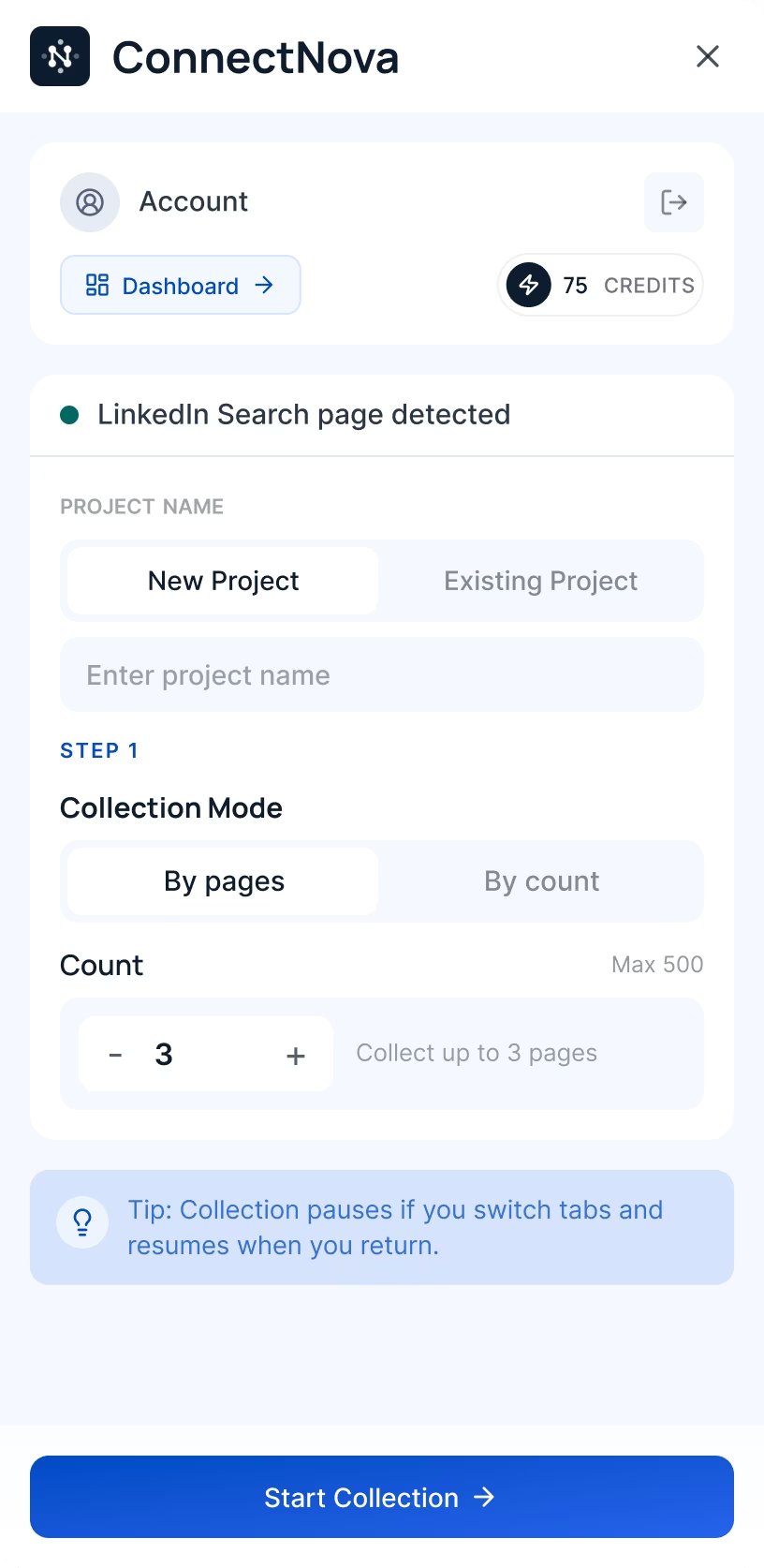
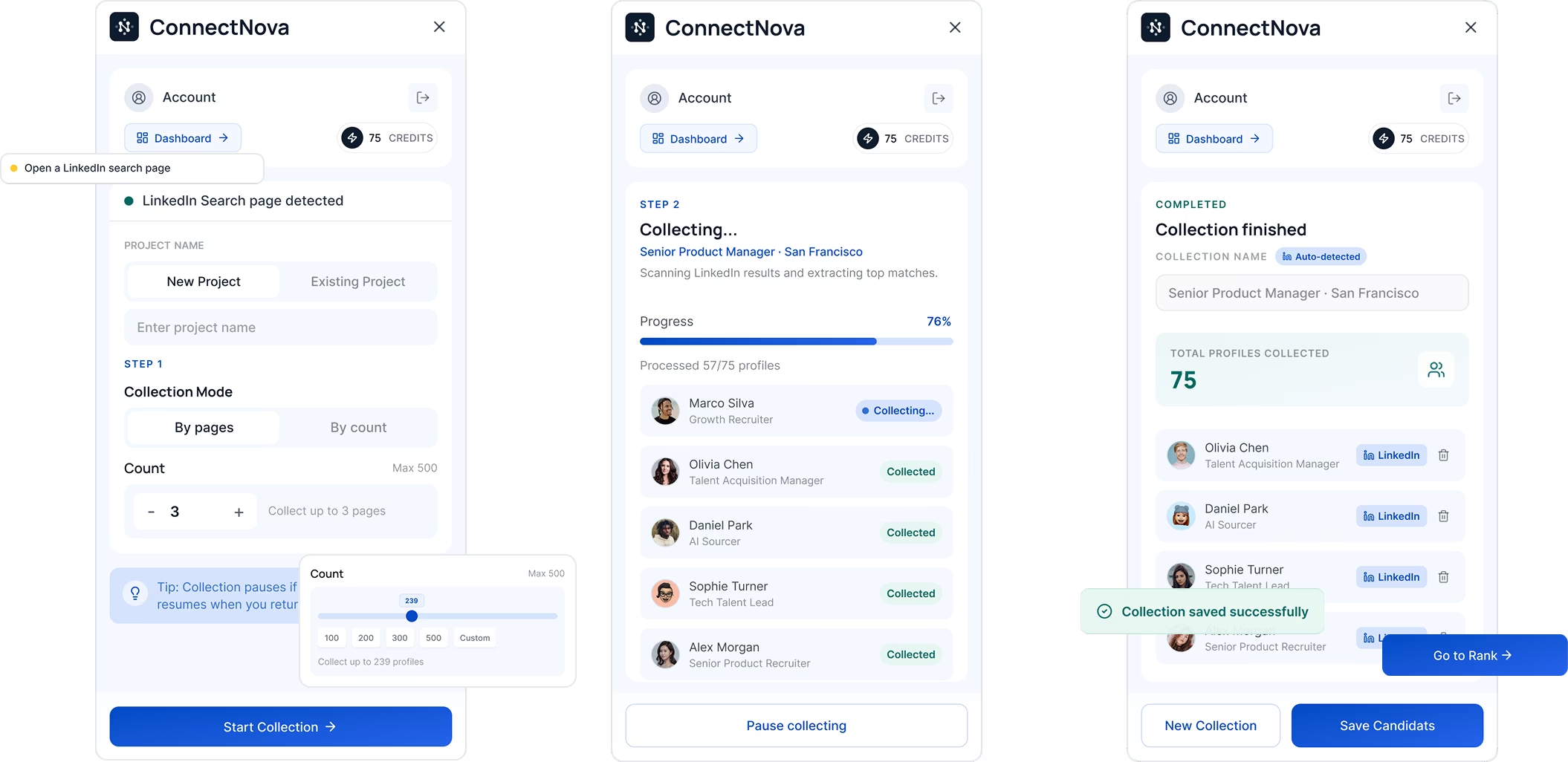
I designed a Chrome Extension that allowed users to collect a profile and place it into the right Project without leaving LinkedIn.
Collection became part of sourcing - not a separate task after it.
06.2 — Make AI criteria visible and editable
Recruiters and sales professionals evaluated people against different goals, but defining a consistent set of criteria for every Project required time and judgment.
ConnectNova generated an initial evaluation framework from the Project context. Users could review and edit the criteria before applying them to collected profiles.
The initial criteria reflected the role, client brief, target profile, or sourcing goal.
Users could understand how profiles would be assessed before accepting the result.
Users could modify the criteria and align the framework with their own judgment.
The adoption rate showed that AI reduced setup effort. The edit rate showed that users still needed control over the final evaluation framework.
Product usage results · Sample size: [add before publishing] · Measurement period: [add before publishing] · Adoption definition: [add before publishing]
AI did not make the final decision. It helped users define a clearer and more consistent way to make it.
06.3 — Manage, rank, decide
After collecting profiles and defining the evaluation criteria, users needed a clear way to review people within each Project.
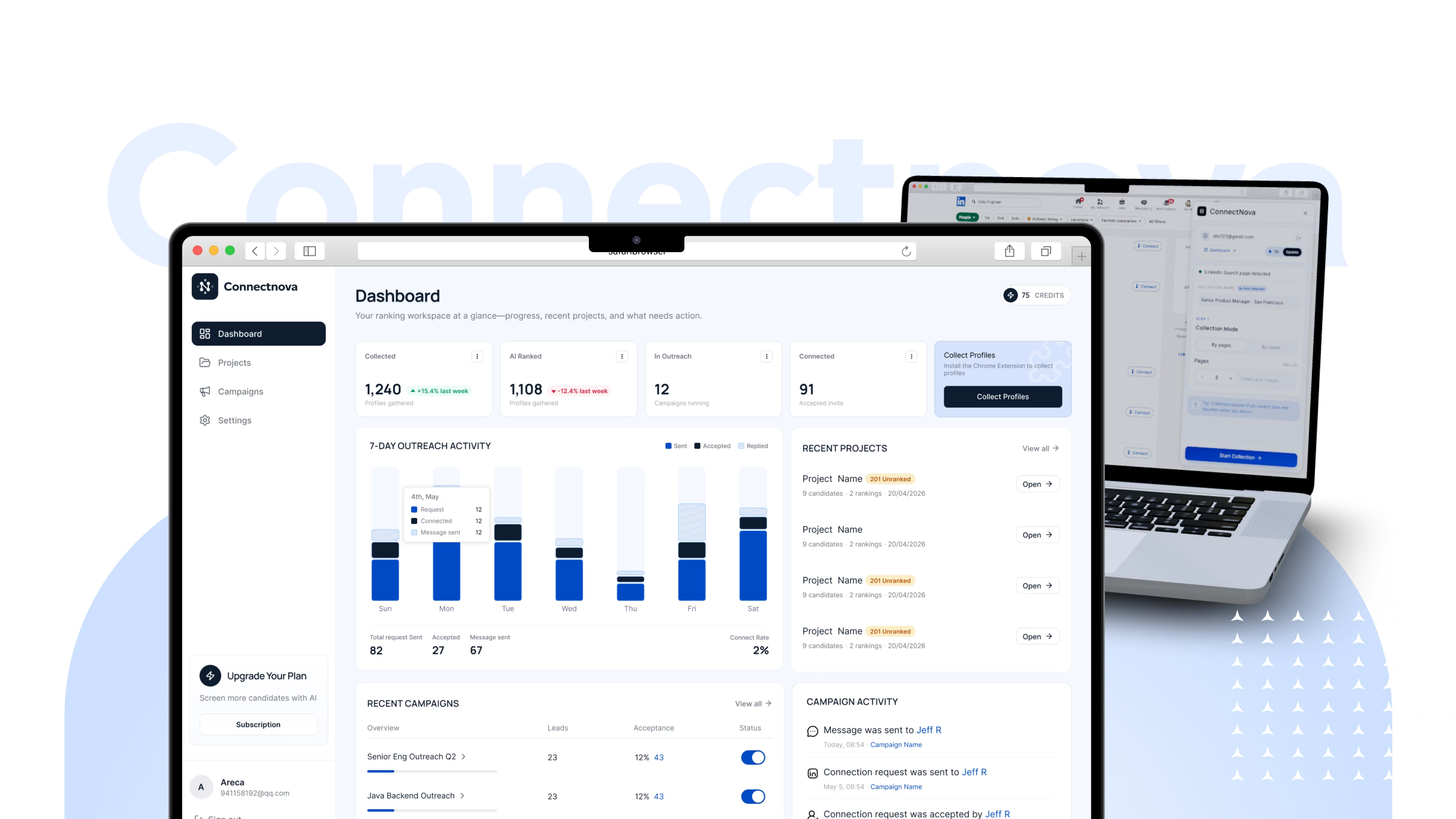
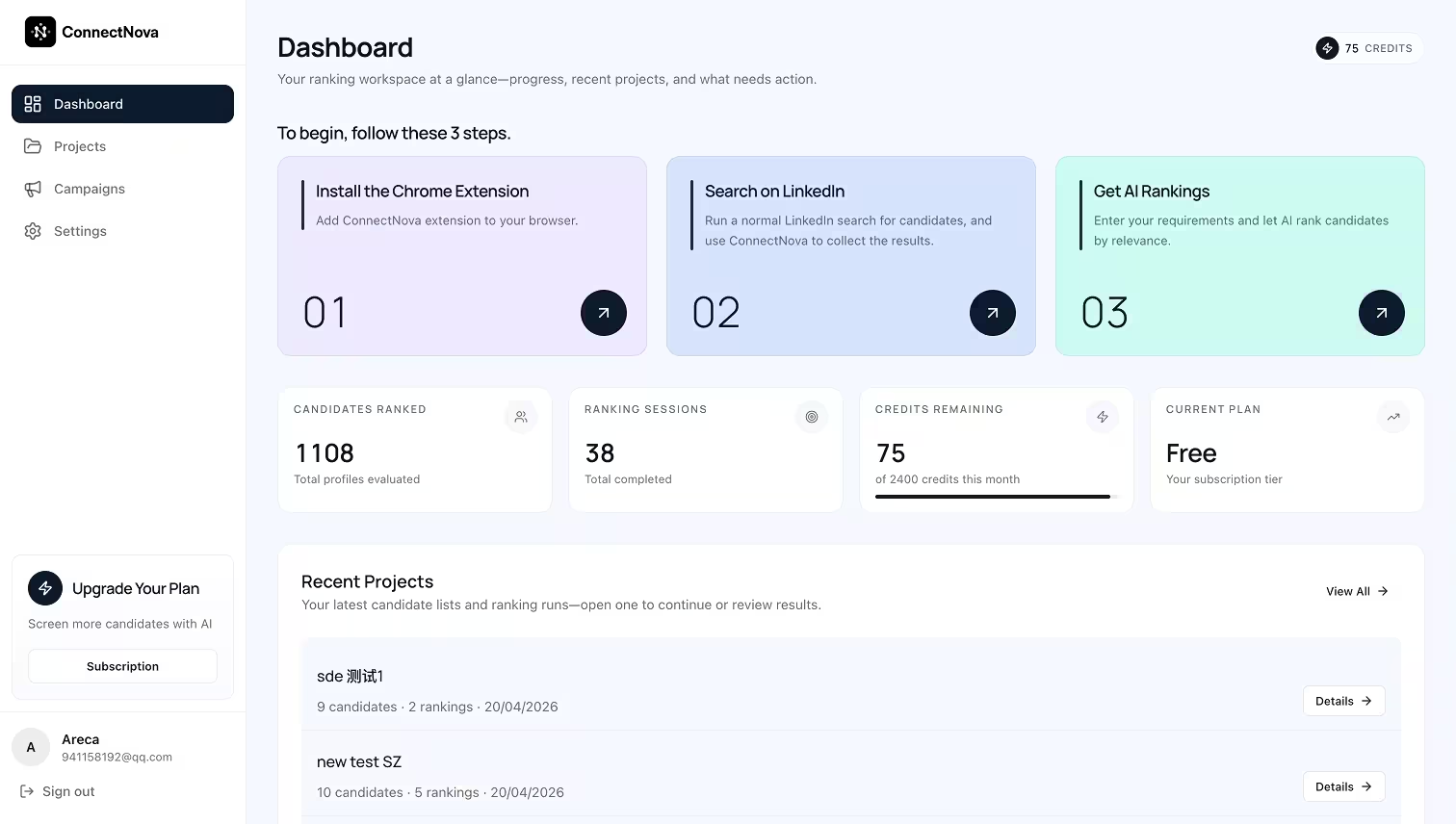
The web dashboard brought the people list, AI-assisted evaluation results, and profile details into one workspace.
Every person was compared within the context of a specific sourcing goal.
Users could understand why someone ranked highly without opening every profile.
Individual information remained accessible while the broader comparison stayed visible.
The dashboard turned a collection of saved profiles into a prioritized working list.
07 — Building and shipping in six weeks
Within six weeks, the MVP had to connect a Chrome Extension and web dashboard as one coherent product.
I built a lightweight foundation of Figma Variables, semantic tokens, and reusable components to keep design and engineering aligned.
The design system was part of the MVP delivery strategy - not a separate project.
07 — Building and shipping in six weeks
Within six weeks, the MVP had to connect a Chrome Extension and web dashboard as one coherent product.
I built a lightweight foundation of Figma Variables, semantic tokens, and reusable components to keep design and engineering aligned.
The goal was the minimum structure needed for consistent delivery, not a comprehensive design system.
Reusable components
Buttons, status states, navigation, inputs, and feedback patterns reused the same token layer across the Chrome Extension and web dashboard.
The design system was part of the MVP delivery strategy - not a separate project.
08 — Results and validation
The six-week MVP connected LinkedIn collection, Project-based organization, and AI-assisted evaluation into one workflow. It improved the core experience while showing where broader validation was still needed.
The redesigned Project selection and collection flow improved successful task completion.
Clearer action feedback improved completion after profiles were collected.
Most users retained at least part of the framework created by ConnectNova.
Users treated AI as a starting point and adapted it to their own requirements.
Exact task definitions, sample sizes, testing methods, and measurement periods must be added from the original research record before publishing.
09 — Beyond the validated MVP
Ongoing explorationAfter users collected, evaluated, and ranked people, the next step was to contact the strongest candidates or leads.
I explored how selected profiles could move into Campaigns, Leads, and messaging Sequences without rebuilding the audience or losing the Project context already collected.
Group selected people around a specific outreach goal.
Preserve the Project and evaluation context around each selected person.
Organize multi-step messaging into a reusable workflow.
Track outreach actions and review performance over time.
Interactive Figma prototype
Users can visually build and edit a Sequence by adding nodes and connecting steps. This original interactive prototype focuses on component organization and a first-pass interaction experience.
Live coded demo
The shipped interface, running here in the case study. Build a workflow from scratch, walk through a complete outreach example, or inspect execution results at every step.
The canvas is built for a full screen — open it fullscreen for the best experience.
— Campaign structure
— Lead management views
— Sequence creation
— Multi-step message organization
— Core outreach navigation
— Final workflow and implementation
— Usability or product-performance results
— Advanced outreach capabilities
— Pipeline capabilities outside the completed MVP
Outreach was the next extension of the workflow - not part of the validated core MVP yet.
10 — Reflection
01 — Challenge the brief
The brief asked for profile ranking. The user workflow required a persistent structure for preserving context, comparison, and next actions.
Introducing Project changed the product from a one-shot ranking tool into a reusable workspace.
02 — Workflow before navigation
The strongest architectural decisions came from understanding how sourcing continued beyond one LinkedIn search session.
Navigation followed the user’s work rather than the first requested feature.
03 — AI with user control
AI was most useful when it created a visible, editable starting point instead of an opaque final answer.
The criteria adoption and editing behavior supported this direction.
04 — Same job, different context
Recruiting and sales used different terminology but followed the same underlying workflow.
A shared Project model supported both contexts without splitting the product.
05 — Foundations create speed
Figma Variables, design tokens, and reusable components helped two connected product surfaces remain coherent within six weeks.
Speed came from shared foundations, not from treating every screen as an exception.
11 — Next steps
01
Validate the connected workflow through repeated task-based studies with clearly documented participant groups, task definitions, and success criteria.
02
Test how Campaigns and Sequences can extend the Project context into structured communication.
03
Explore status, progress, follow-up, and final outcomes after outreach begins.
04
Define shared ownership, visibility, comments, handoff, and coordinated follow-up.
The MVP validated a connected foundation for collecting, organizing, and evaluating people.
The complete workflow still required broader validation and continued development.
Two tightly coupled products — an extension that lives inside LinkedIn, and a dashboard that turns collected profiles into a ranked, manageable pipeline.
01 · Overview
ConnectNova is made up of two tightly coupled products — a Chrome extension that lives inside LinkedIn, and a web dashboard for managing, ranking, and reviewing candidates.
01 — Product at a glance
ConnectNova helps recruiters and sales teams find, evaluate, contact, and manage the right people within one connected workflow.
ConnectNova is made up of two tightly coupled products — a Chrome extension that lives inside LinkedIn, and a web dashboard for managing, ranking, and reviewing candidates.
01 — Source
ConnectNova enhances the LinkedIn workflow so users can identify and collect relevant candidates or contacts without rebuilding their search in another platform.
02 — Qualify
Users organize people around a specific Project, generate evaluation criteria, and compare profiles within a consistent decision framework.
03 — Engage
Qualified candidates or contacts can move into structured outreach workflows for personalized messaging and follow-ups.
04 — Manage
The long-term platform will help teams record where each person stands and manage their progress beyond the initial outreach.
Recruiting and sales teams may use different stage names, but both need to understand what has happened, where each person stands, and what should happen next.
Source finds the right people. Qualify helps users decide. Engage starts the conversation. Manage preserves progress toward an outcome.
LinkedIn surfaced hundreds of possible matches, but users still had to review, compare, and manage people manually.
ConnectNova evaluates each profile against the user’s goal and re-ranks the search by fit.
Users can evaluate people, save them into Projects, run personalized outreach, and track every candidate or lead through a stage-based pipeline.
Product workflow
01 — Source
Search on LinkedIn while AI brings the strongest matches to the top.
02 — Qualify
Review profile evidence, compare relevance, and save the right people into Projects.
03 — Engage
Add candidates or leads to Campaigns and manage personalized outreach and follow-ups.
04 — Manage
Move people through pipeline stages, record activity, assign next actions, and maintain team visibility.
Search results become prioritized people, active conversations, and finally managed outcomes.
01 — The challenge
Recruiters and sales teams used LinkedIn to discover potential candidates and contacts, but the work did not stay there. They moved between sourcing tools, enrichment platforms, and spreadsheets to collect information, compare profiles, and organize the people worth pursuing.
A single search could involve around 500 profiles, turning evaluation into a repetitive and fragmented process.
~500
profiles in one search
Recruiting workflow
Search across LinkedIn and LinkedIn Recruiter to identify potentially relevant profiles.
LinkedIn · RecruiterOpen profiles individually and gather the experience, skills, and background needed for evaluation.
Profile review · Separate toolsMove selected candidates into spreadsheets or other tools to create a working shortlist.
Spreadsheets · Working listsReview candidates across disconnected sources before deciding who should move forward.
Manual comparison · Team judgmentSales workflow
Use LinkedIn and Sales Navigator to identify relevant prospects and decision-makers.
LinkedIn · Sales NavigatorGather additional role, company, and contact information through separate tools.
Profile data · Enrichment toolsTransfer promising contacts into spreadsheets or working lists for further review.
Spreadsheets · Working listsAssess which contacts best matched the target profile before taking the next step.
Manual comparison · Target criteriaShared friction
01
Users repeatedly opened and checked profiles one by one.
02
Profile data, evaluation context, and working lists lived in different tools.
03
Relevant people had to be copied, grouped, and maintained outside LinkedIn.
04
Without one workspace, comparing and ranking people required additional manual effort.
The challenge was not access to people. It was turning hundreds of scattered profiles into a clear, prioritized decision.
Recruiters searched for candidates and sales teams searched for contacts, but both faced the same fragmented workflow.
~500
profiles in a single search
Every result still required manual review before users could decide whether the person matched a role or target customer profile.
01 — Review
Users inspected experience, skills, roles, and company context across multiple profiles.
02 — Qualify
They compared each person against job requirements or target customer criteria without a consistent evaluation framework.
03 — Organize
Relevant profiles were copied into spreadsheets, ATS platforms, CRM tools, notes, or separate lists.
04 — Track
After outreach, users still had to record replies, follow-ups, ownership, and the current stage of every candidate or lead.
A fragmented journey
Discover
Qualify
Engage
Manage
How could one product support two different sourcing contexts without creating two separate workflows?
LinkedIn gave users access to people, but no connected way to collect, evaluate, prioritize, and manage them.
03 — Understanding the shared workflow
Recruiters searched for candidates, while sales professionals searched for contacts. Their terminology and evaluation criteria differed, but workflow mapping revealed that both groups followed a similar process for turning LinkedIn profiles into people worth pursuing.
Recruiting
01 — Discover
Search LinkedIn or LinkedIn Recruiter using role, experience, skills, and location filters.
LinkedIn · Recruiter
02 — Collect
Gather promising candidates and organize them around a specific role or client requirement.
Role · Client context
03 — Evaluate
Compare each profile against the experience, skills, and background required for the opportunity.
Hiring criteria
04 — Prioritize
Create a focused list of candidates who appear most relevant and worth progressing.
Focused shortlist
Sales
01 — Discover
Search LinkedIn or Sales Navigator using role, company, industry, and location filters.
LinkedIn · Sales Navigator
02 — Collect
Gather promising contacts and organize them around a specific prospecting goal.
Prospecting context
03 — Evaluate
Compare each profile against the target role, company, or ideal customer criteria.
ICP criteria
04 — Prioritize
Create a focused list of contacts who appear most relevant and worth approaching.
Focused contact list
The shared workflow
Recruiters evaluated candidates against hiring requirements. Sales teams evaluated contacts against prospecting criteria. In both cases, users needed to identify relevant people, preserve their context, compare them consistently, and decide who deserved attention first.
Key insight
The product did not need two separate workflows. It needed one flexible structure that could adapt to different goals and evaluation criteria.
This insight led to Project becoming the shared container for profiles, context, and evaluation.
How might we
How might we help users find the strongest matches first—and manage every person from discovery to outcome?
This required connecting search relevance, evaluation context, outreach activity, and pipeline status in one workflow.
Four design constraints
01 — Enhance, not replace
Users already relied on LinkedIn, Sales Navigator, or LinkedIn Recruiter to search for people. The experience needed to improve the workflow they understood rather than require them to rebuild searches in another tool.
Familiar workflow · Lower adoption cost · In-context actions
02 — Contextual relevance
A profile was not universally relevant. Fit depended on the role, client brief, target account, or outreach objective behind each search.
Project context · Editable criteria · Goal-based ranking
03 — Continuous context
Saving a profile was not enough. Users needed to retain why the person was relevant, how they were evaluated, whether they had been contacted, and what should happen next.
Shared context · Activity history · Next action
04 — Human control
AI could reduce the time required to review profiles, but users still needed to understand the criteria, inspect the evidence, and adjust the final judgment.
Explainable scoring · Editable criteria · Human judgment
The product framework
Source
AI re-ranks LinkedIn search results and brings the strongest matches to the top.
Qualify
Users review criteria, supporting evidence, and save relevant people into Projects.
Engage
Selected candidates or leads move into Campaigns for personalized messages and follow-ups.
Manage
Teams record activities, ownership, current stage, next actions, and final outcomes.
Outcome
Hired
Placed
Converted
Closed
02 — The pivotal product decision
The original request was to collect LinkedIn profiles and produce an AI-ranked shortlist. I pushed back on this one-shot model because users managed multiple goals across multiple LinkedIn search sessions.
I introduced Project as a persistent container for each sourcing goal—creating the foundation for ranking, review, outreach, notes, and longer-term people management.
Core insight
The same person could be relevant to one hiring brief or prospecting task, but less relevant to another. Saving a profile alone could not explain why it mattered or how it should be evaluated.
Why was this person collected?
What requirements applied?
How did they compare with others?
Were they worth prioritizing?
A Project preserved this context around every group of profiles.
Project connected three things
01 — Goal
A Project represented a specific hiring, client, or prospecting objective.
02 — People
Profiles saved through the Chrome Extension were organized inside the relevant Project instead of becoming an isolated list of bookmarks.
03 — Evaluation
Each Project contained its own AI-generated and user-editable evaluation criteria, allowing people to be assessed against the same goal.
03 — Simplifying the information architecture
The earlier structure separated the Project list, profile list, and profile detail into different levels. Users had to move back and forth while comparing people and reviewing evaluation results.
Before
Three separate navigation layers
After
People · Ranking · Evaluation · Profile detail
Project workspace
game developer
31 candidates · 2 rankings · 20/04/2026
Live in USA, female
Currently resides in the United States
Identifies as female (based on profile indicators such as pronouns, name, or gender-specific organizations)
Ranked Candidates (24)

Samik is a Game Engineer currently based in Pittsburgh, Pennsylvania at Schell Games, with portfolio signals aligned to hands-on game programming and studio leadership.
Jordan ships gameplay systems at scale in Los Angeles, California with Riot Games; residency signal is strong while role-title match is mixed for this ranking.
Priya is a Graphics Engineer at Epic Games in Cary, North Carolina, with strong engine-side signals and credible senior ownership patterns.
Profiles organized by goal
Evaluation within the Project
Details without leaving the workspace
One model for two use cases
Create Projects around roles or client briefs.
Role or client brief · Candidate criteria · Hiring context
Create Projects around target profiles or prospecting goals.
Target profile or sales goal · Contact criteria · Prospecting context
Profiles remained connected to the goal and criteria that explained why they were collected.
Users reviewed multiple people within one Project instead of switching between pages.
Recruiting and sales reused the same core logic with different terminology and criteria.
New sourcing use cases could extend the shared structure consistently.
Project became the bridge between collecting a profile and making a decision about it.
It gave every saved person a clear purpose, a shared evaluation framework, and a place within the wider sourcing workflow.
The shared object model
Project
The shared workspace for evaluating and managing people around one goal.
01 — People
02 — Evaluation
03 — Pipeline
Fit was not a fixed property of a person. It was a relationship between a person and a Project.
Five connected objects
01 — Project
Stores the role, client brief, target profile, evaluation criteria, team, and workflow context.
The same person could belong to multiple Projects for different reasons.
02 — Person
Candidate and lead were different business labels for the same reusable person profile.
Profile data stayed consistent while business context changed by Project.
03 — Evaluation
Connects a person with a specific Project through criteria, score, and supporting evidence.
Fit was a relationship between a person and a goal.
04 — Campaign
Turns selected people into personalised messaging, scheduled follow-ups, and trackable conversations.
Campaigns use Project and profile context instead of rebuilding the audience.
05 — Pipeline
Captures current status, ownership, activities, next action, and final outcome.
Outreach was an activity within the journey—not the end of it.
One model, configurable stages
Recruiting pipeline
Sales pipeline
Different labels, the same underlying logic: stage, activity, ownership, next action, and outcome.
Project defined the context. Evaluation determined priority. Campaign initiated action. Pipeline preserved progress.
04.1 — Collect without leaving LinkedIn
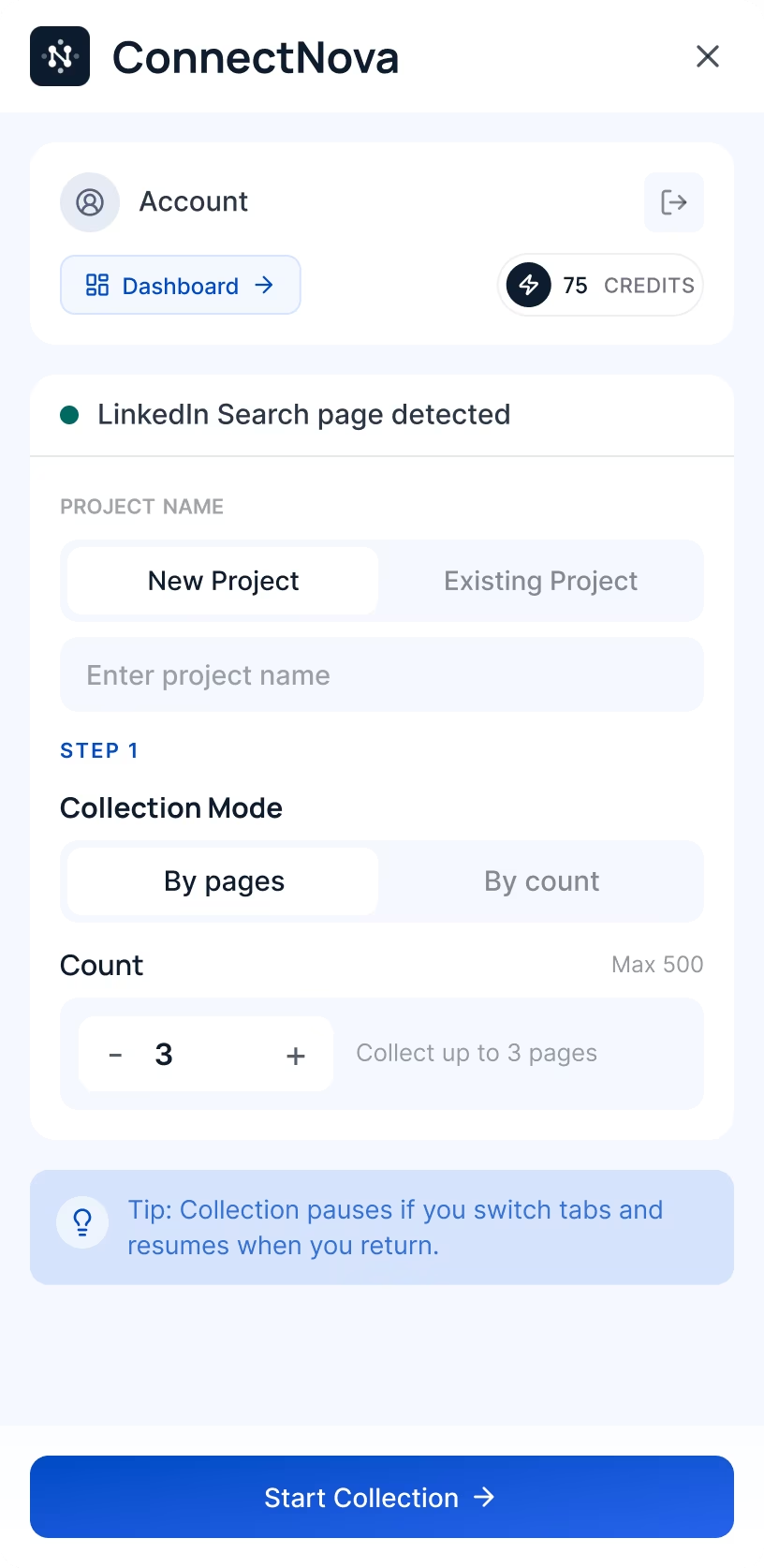
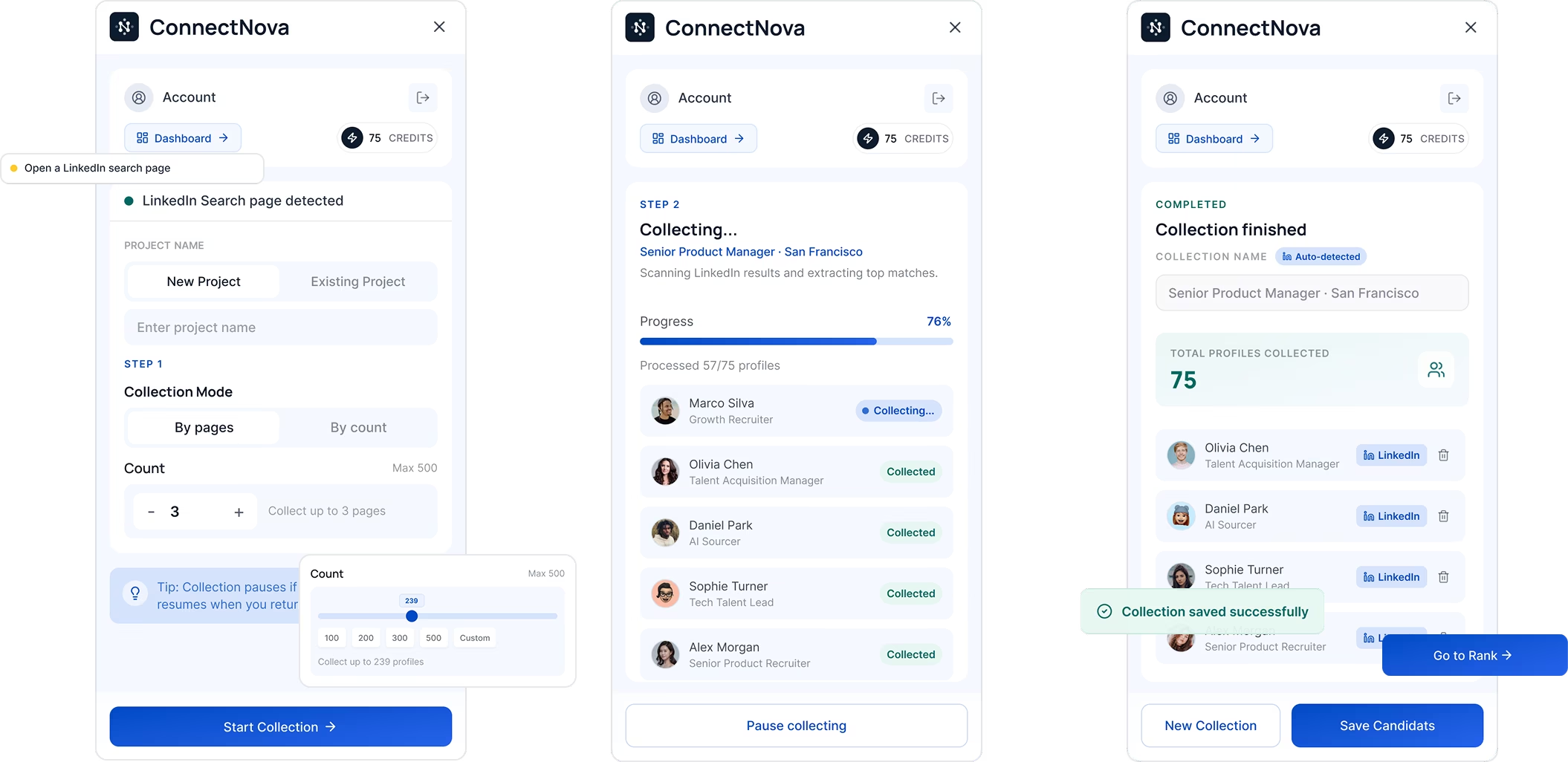
Recruiters and sales professionals already discovered people on LinkedIn. The problem began when they needed to preserve a promising profile: information had to be copied, reorganized, and connected to the correct task in another tool.
I designed a Chrome Extension that allowed users to collect a profile and place it into the right Project without leaving LinkedIn.
Instead of treating collection as a separate administrative task, ConnectNova brought the action directly into the LinkedIn profile page.
Users could choose where the person belonged, save the available profile information, and continue browsing without interrupting their search.
Collect in context
Save to the right Project
Clear success feedback
How the collection flow worked
01 — Open the Extension
Open ConnectNova while reviewing a candidate or contact.
02 — Choose a Project
Select an existing Project or create a new one before saving.
03 — Review the information
Verify the person and Project context before completing the action.
04 — Collect the profile
Add the profile directly to the selected Project in ConnectNova.
05 — Receive confirmation
A clear success state confirms where the person was stored.
Why these decisions mattered
Users could act at the moment they identified a relevant person instead of postponing the task until they returned to another platform.
Selecting a Project during collection ensured that every saved profile entered ConnectNova with a clear purpose.
Visible feedback showed whether the action succeeded and where the profile had been stored.
Validation
76% → 93%
Task completion increased after clarifying the Project selection and save flow.
72% → 87%
Task completion increased after improving action feedback and the post-save state.
Results from usability testing. Participant count and test round to be added from the original research record.
Collection became part of sourcing—not a separate task after it.
Users could move a promising LinkedIn profile into a structured Project while preserving the context behind the decision.
ConnectNova evaluated profiles against the user’s Project criteria and re-ranked the existing LinkedIn results by fit.
Instead of opening profiles in LinkedIn’s default order, users could begin with the strongest candidates or contacts.
Re-ranked by fit
Evidence behind the score
Save with Project context
How the experience worked
01 — Define the goal
Users selected an existing Project or created a new one using a job brief, client requirement, or ideal customer profile.
The Project established the context used to evaluate every profile in the search.
02 — Generate the criteria
ConnectNova translated the Project brief into evaluation criteria such as experience, skills, role, industry, company background, and other relevant signals.
Users could review and edit the criteria before applying them to the search.
03 — Evaluate the results
AI reviewed the information available in each LinkedIn profile and evaluated how well the person matched the Project criteria.
Each result included an overall fit score, criteria-level results, and supporting profile evidence.
04 — Re-rank by fit
ConnectNova reordered the search so that the most relevant candidates or contacts appeared first.
Users could focus on high-potential profiles instead of reviewing the list in LinkedIn’s default order.
05 — Save without losing context
Users could save a profile from LinkedIn while retaining its evaluation, Project context, and source information.
The person entered the managed workflow without requiring users to copy information into another tool.
ConnectNova did not replace LinkedIn search. It made the results more relevant to the user’s actual goal.
The workflow stayed familiar, while AI reduced the effort required to identify who deserved attention first.
04.2 — Make AI criteria visible and editable
Recruiters and sales professionals evaluated people against different goals, but defining a consistent set of criteria for every Project required time and judgment.
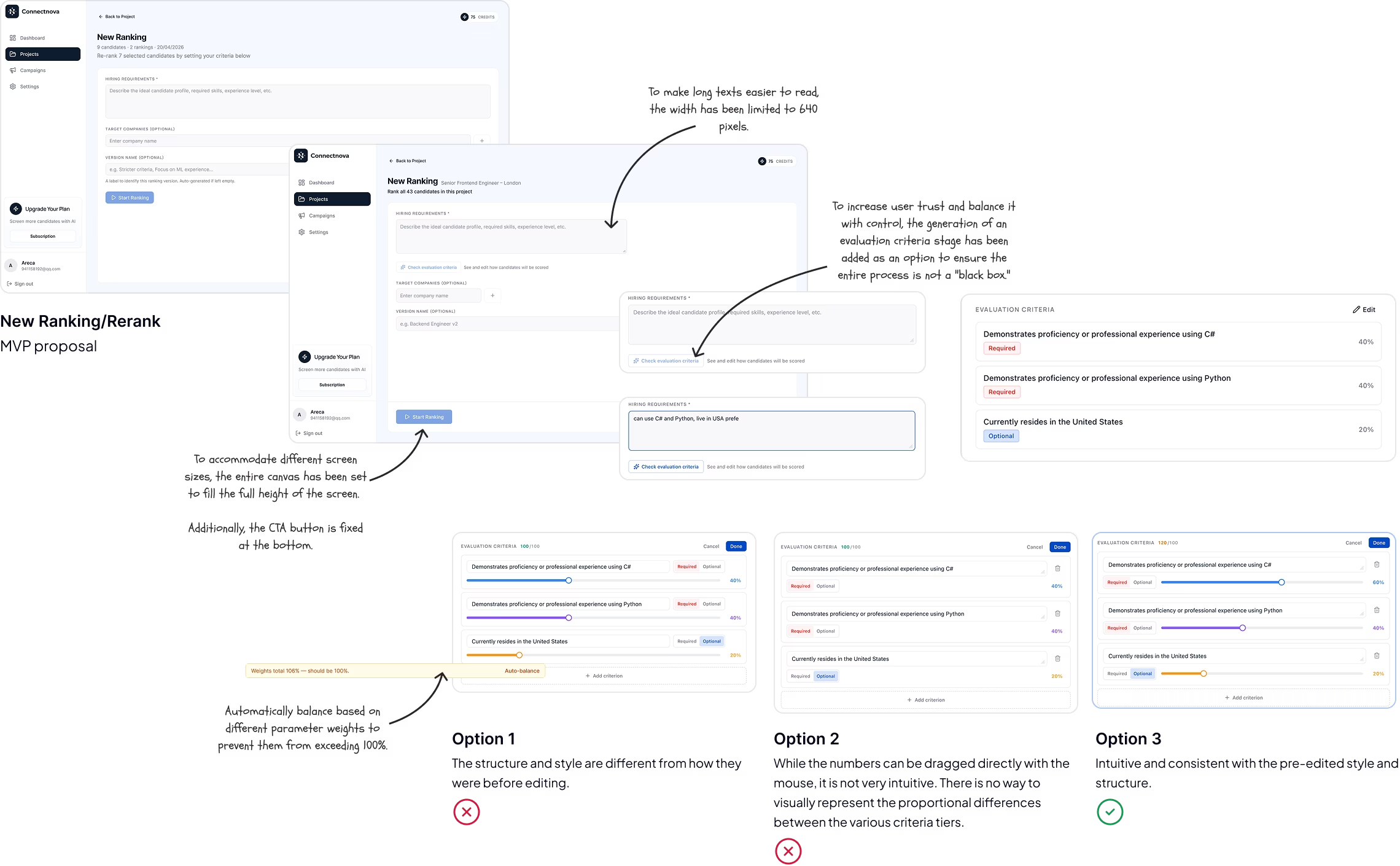
ConnectNova used AI to generate an initial evaluation framework from the Project context. Users could review and edit the criteria before applying them to collected profiles.
Instead of presenting users with an unexplained score, ConnectNova first generated a visible set of evaluation criteria.
This gave users a structured way to compare people while allowing them to adapt the framework to a specific role, client, or prospecting goal.
Project context
Find an experienced product recruiter for a fast-growing enterprise AI company.
Goal
Hire for a senior recruiting role
Industry
AI · B2B SaaS
Experience
8+ years preferred
Profiles
24 people collected
AI-generated criteria
Relevant recruiting experience
8+ years across product and technical recruiting
AI or B2B SaaS background
Experience in the target industry or business model
Enterprise team scaling
Evidence of hiring within scaling organizations
Stakeholder partnership
Experience working with senior hiring managers
Generated from Project context
Visible before evaluation
Editable by the user
How the framework worked
01 — Generate
ConnectNova generated an initial set of criteria so users did not need to build the framework from a blank state.
02 — Review and edit
Users could review and edit the AI output before applying it across profiles.
03 — Apply consistently
The selected criteria helped users compare and prioritize people within the Project consistently.
Design principles
Generated criteria were shown before becoming part of the evaluation process.
Users could refine the framework instead of accepting AI output as fixed.
Criteria changed with each hiring, client, or prospecting goal.
Adoption
84%
Most users kept at least part of the framework generated by ConnectNova.
31%
A meaningful share of users adjusted the framework to reflect their own judgment and context.
The adoption rate showed that AI reduced setup effort, while the edit rate confirmed that users still needed control over the final evaluation framework.
Product usage results. Sample size, testing method, and measurement period to be added from the original research record.
AI did not make the final decision. It helped users define a clearer and more consistent way to make it.
The generated framework reduced the effort required to start, while editing kept the evaluation aligned with each Project’s real requirements.
ConnectNova broke each profile’s overall fit into visible evaluation criteria and connected every judgment to supporting information from the LinkedIn profile.
Users could quickly scan the result, investigate the reasoning, and make the final decision themselves.
Profile information
Senior Product Recruiter · AI and B2B SaaS
Experience
Senior Product Recruiter · Aperture AI
2021 — PresentLed technical and product hiring for a scaling enterprise AI organization.
Evidence used in evaluationTalent Acquisition Partner · Northstar SaaS
2017 — 2021Built recruiting programs across product, engineering, and go-to-market teams.
Skills and context
Project-specific score
Criteria-level breakdown
Evidence from the profile
Three levels of explanation
01 — Overall fit
A clear fit indicator showed the profile’s overall relevance to the current Project—not a permanent rating attached to the person.
02 — Criteria breakdown
Project-specific criteria made profiles comparable through the same framework instead of memory and intuition.
03 — Supporting evidence
Experience, roles, skills, and company context made the AI assessment easier to verify.
Before evaluating profiles, ConnectNova generated criteria from the Project brief. Users could review the framework and adapt it to the way their team actually made decisions.
Criteria editor
User control
01 — Generate
AI translated the brief into an initial evaluation framework.
02 — Refine
Users reviewed and edited the framework before applying it.
03 — Evaluate
Each profile was compared against the same Project-specific criteria.
04 — Decide
AI informed prioritisation; the user chose the final action.
AI accelerated the first review without replacing professional judgment.
The score helped users prioritise. The criteria and evidence helped them decide.
04.3 — Manage, rank, decide
After collecting profiles and defining the evaluation criteria, users needed a clear way to review people within each Project.
The web dashboard brought the people list, AI evaluation results, and profile details into one workspace, helping users compare profiles and decide who deserved attention first.
Users could scan the ranked list at a high level, then open a Profile Panel to review one person in more detail without leaving the Project.
This reduced repeated movement between separate list and detail pages while comparing multiple people.
game developer
31 candidates · 2 rankings · 20/04/2026
Live in USA, female
Currently resides in the United States
Identifies as female (based on profile indicators such as pronouns, name, or gender-specific organizations)
Ranked Candidates (24)
Samik is a Game Engineer currently based in Pittsburgh, Pennsylvania at Schell Games, with portfolio signals aligned to hands-on game programming and studio leadership.
Jordan ships gameplay systems at scale in Los Angeles, California with Riot Games; residency signal is strong while role-title match is mixed for this ranking.
Priya is a Graphics Engineer at Epic Games in Cary, North Carolina, with strong engine-side signals and credible senior ownership patterns.

Sarah Chen
Candidate Overview
Skills
Strong product leadership background with excellent experience in roadmap execution, cross-functional alignment, and shipping measurable outcomes.
Ranked within the Project
Evaluation visible in the list
Details without leaving the workspace
Three layers of the workspace
01 — Ranked list
Profiles were organized within the current Project and ranked using its evaluation framework.
02 — Evaluation overview
The list surfaced each person’s result so profiles could be compared within the Project.
03 — Profile Panel
Selecting a profile revealed detailed information and evaluation context while preserving list position.
How users reviewed people
01 — Scan
Scan the people list, ranking, and evaluation results.
02 — Compare
Compare multiple people against the same Project goal.
03 — Inspect
Examine one person without navigating away from the list.
04 — Prioritize
Focus further review on the people most relevant to the Project.
Keeping list and detail in the same context
The earlier structure separated profile list and detail across navigation levels. The Project workspace kept comparison and detailed review in one environment.
Before
Three separate navigation levels
After
People list · Ranking · Evaluation · Profile Panel
The dashboard turned a collection of saved profiles into a prioritized working list.
Users could move between overview and detail without losing the Project context behind each evaluation.
A saved profile retained its source, AI evaluation, notes, current stage, and next action. Users could move from reviewing a LinkedIn result to managing the person without rebuilding the context in a spreadsheet, ATS, or CRM.
Ranked within the Project
Details without leaving the list
Stage and next action in context
Three parts of the Project workspace
01 — Prioritized people
People were listed by relevance to the current Project, allowing users to compare fit and focus on the most promising candidates or leads first.
Ranking remained specific to the Project because the same person could have different relevance in another context.
02 — Profile context
Selecting a person opened a detail panel containing profile information, evaluation breakdown, notes, and activity history.
Users could investigate a profile and return to the list without losing filters, ranking, or position.
03 — Pipeline progress
Each person had a current stage, ownership, latest activity, and next action within the Project.
The Project became a living pipeline rather than a static collection of saved profiles.
Before
Context changed across three separate pages.
After
Ranking · Detail · Evaluation · Pipeline
How users managed people
01 — Compare
Scan fit, criteria, stage, and key profile details across the Project list.
02 — Inspect
Use a side panel to reveal profile and evaluation information in context.
03 — Update
Change stage, add notes, assign ownership, and define the next action.
04 — Select
Send qualified candidates or leads to a Campaign without recreating the audience.
One model, different pipelines
Recruiting
Sales
The stage labels could change by workflow, while the underlying model remained consistent: status, activity, ownership, next action, and outcome.
Project turned a search result into a managed relationship.
It preserved why the person was relevant, what had already happened, and what the team needed to do next.
05 — Building and shipping in six weeks
With only six weeks to design the MVP, the challenge was not simply producing screens quickly. The Chrome Extension and web dashboard also needed to feel like one product and remain practical for engineering to build.
I created a lightweight design foundation using Figma Variables, design tokens, and reusable components. This allowed the team to move quickly without treating every new screen as a separate design problem.
Instead of waiting until the interface was complete, I established the core visual rules and reusable patterns while designing the MVP.
The goal was not a comprehensive design system. It was the minimum structure required for consistent and efficient delivery.
Figma Variables
Recurring visual decisions stayed visible and reusable as the product expanded.
Design tokens
Semantic color
Spacing scale
Type scale
Corner radius
Component states
Shared visual rules
Reusable values
Consistent states
Three parts of the foundation
01 — Variables and tokens
Figma Variables and design tokens defined recurring decisions across the Extension and web platform.
Semantic colors · Text styles · Spacing · Radius · State values
02 — Reusable components
Frequently used interface elements became reusable components instead of being redesigned for each screen.
Buttons · Inputs · Navigation · Profile rows · Feedback states
03 — Design and development alignment
Design and engineering shared reusable rules, component states, and recurring product patterns.
Shared rules · Visible states · Reusable behavior
One system across two surfaces
The Chrome Extension and web dashboard had different space and interaction constraints, but still needed to feel like parts of the same product.
Chrome Extension
Web Dashboard
Shared foundation · Color · Typography · Controls · States · Profile patterns
The design system was part of the MVP delivery strategy—not a separate project.
A lightweight foundation helped the team maintain consistency across two product surfaces while continuing to design and build in parallel.
06 — Extending into outreach
OngoingAfter users collected, evaluated, and ranked people, the next step was to contact the strongest candidates or leads.
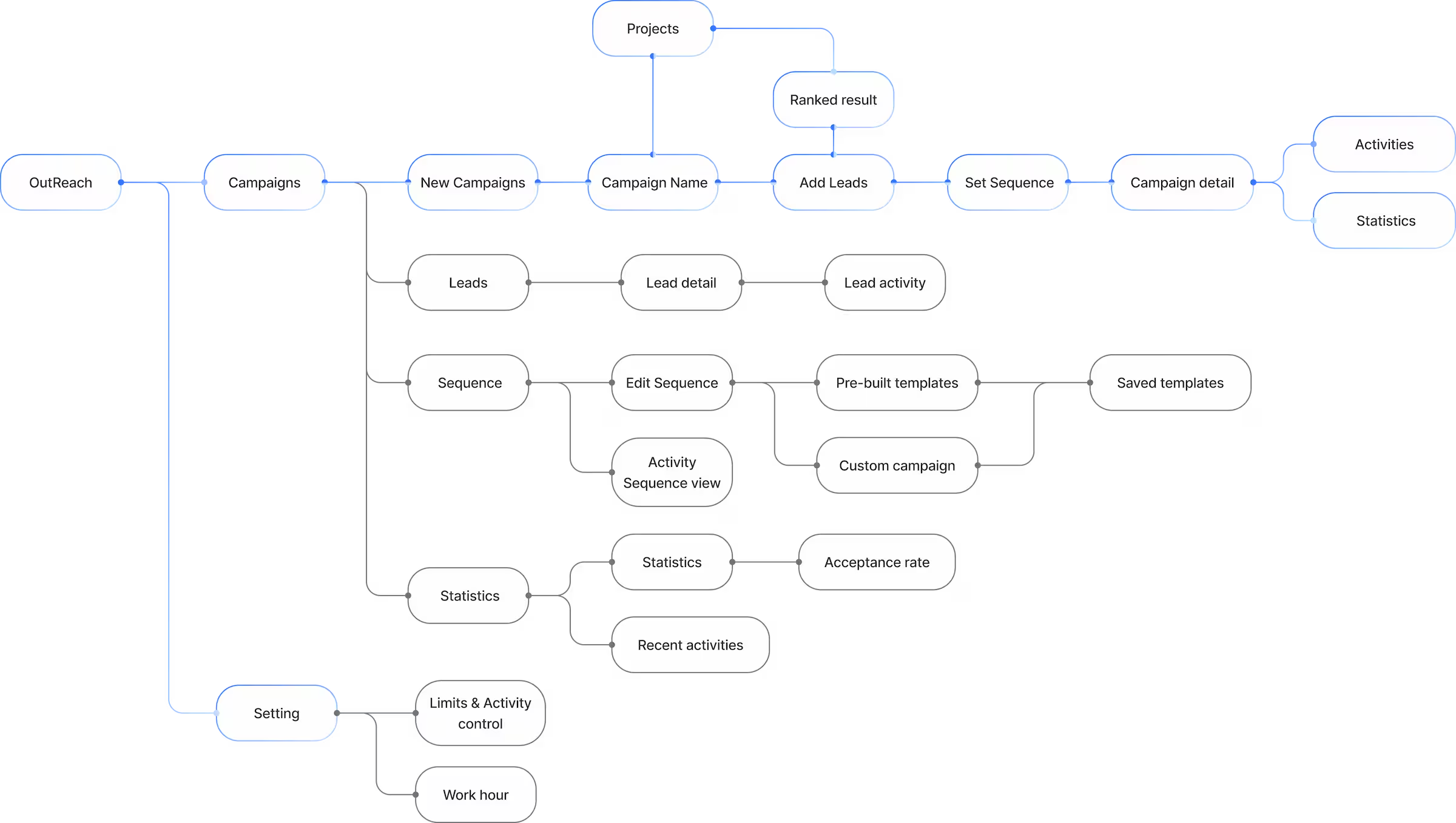
I began extending ConnectNova beyond sourcing and evaluation through an outreach module built around Campaigns, Leads, and messaging Sequences. This work was still ongoing and had not yet been fully delivered or validated.
Ongoing exploration
Selected profiles could move into a structured messaging workflow without rebuilding the audience or losing the Project context already collected.
Project / ranked people
Outreach module
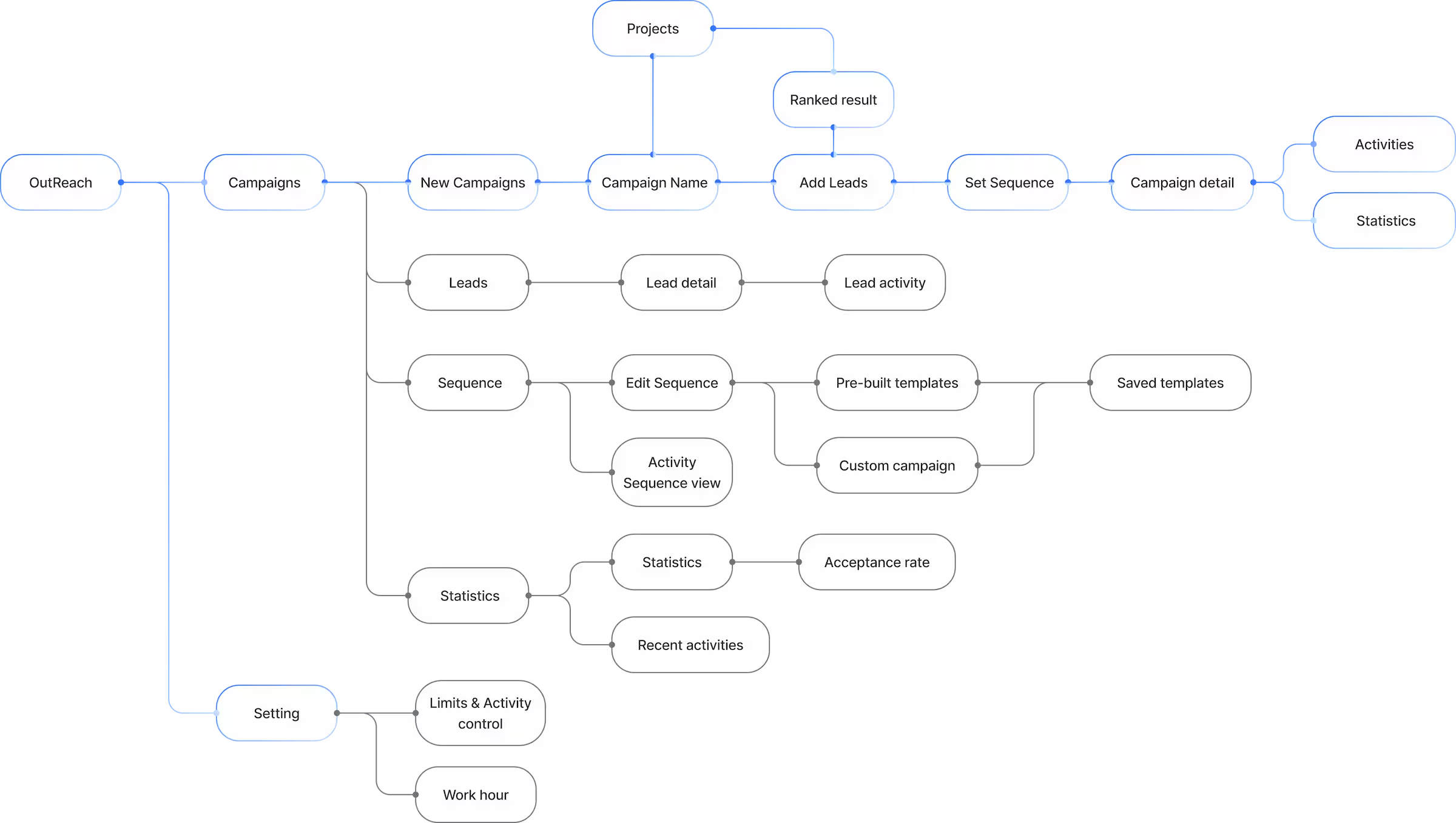
Three parts of the outreach model
01 — Campaigns
Group selected people and prepare a coordinated recruiting or sales outreach effort.
02 — Leads
Connect people already reviewed in Projects with the next stage of the workflow.
03 — Sequences
Prepare a clear, repeatable series of outreach messages instead of writing each independently.
Campaign / Lead screen
Selected Leads · 3
Project context connectedSequence builder
Group people into Campaigns
Manage selected Leads
Organize outreach into Sequence steps
Sequence editing canvas
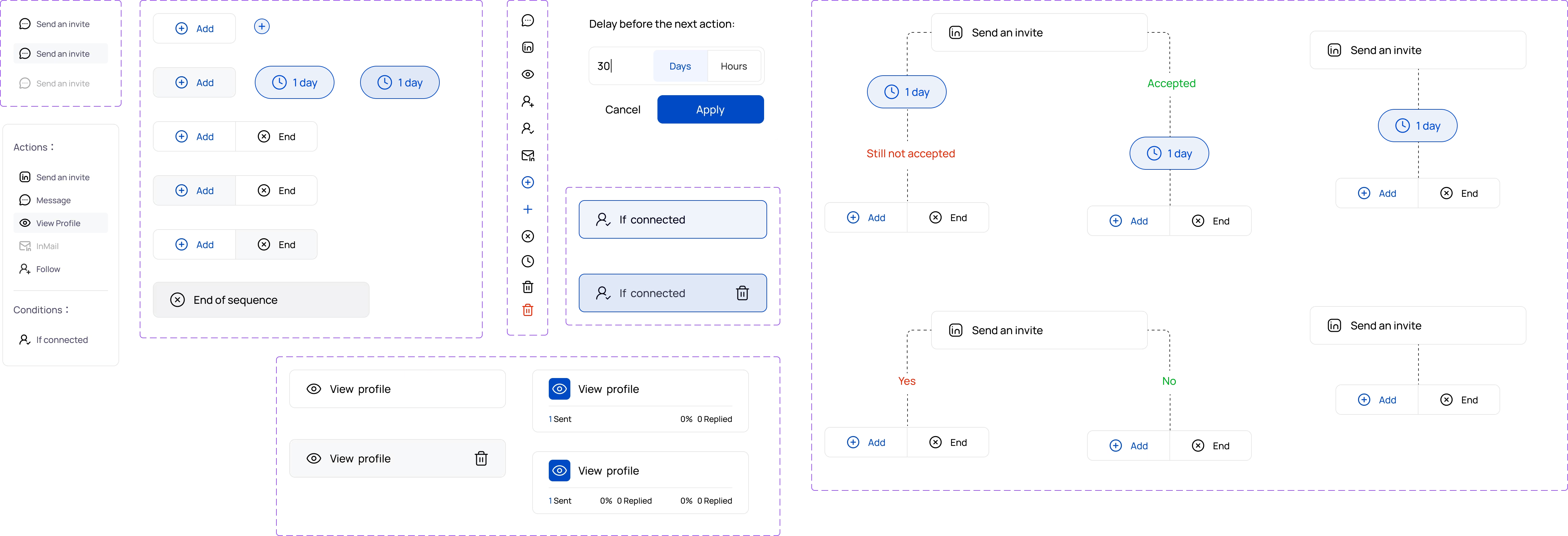
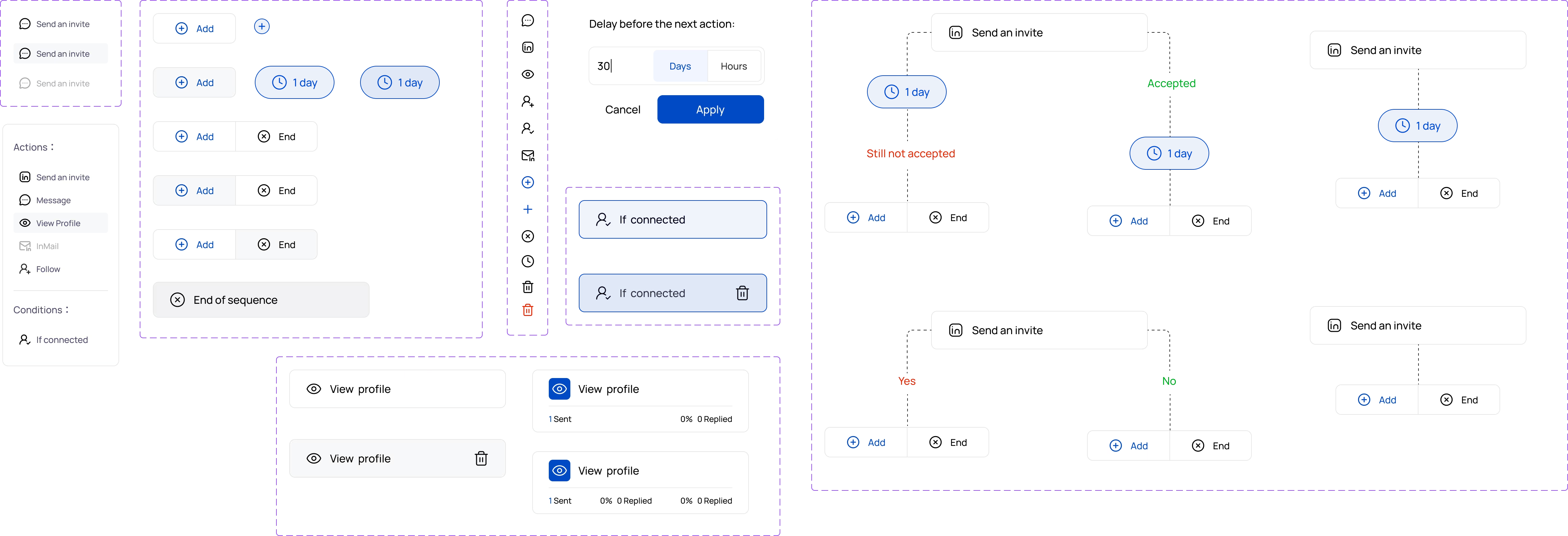
Users can visually build and edit a Sequence by adding nodes and connecting steps. This original interactive prototype focuses on component organization and a first-pass interaction experience.
Design direction
Reuse established structures for Campaign creation, Lead management, and Sequence building.
Extend sourcing and evaluation instead of introducing a separate product.
Define the essential structure before expanding into advanced outreach capabilities.
Ongoing status
Outreach was the next extension of the workflow—not part of the validated core MVP yet.
The exploration showed how ConnectNova could move from helping users decide who to prioritize toward helping them prepare structured outreach.
07 — Results and reflection
The six-week MVP demonstrated that ConnectNova could connect LinkedIn profile collection, Project-based organization, and AI-assisted evaluation into one coherent workflow.
The results showed improvements in the core collection and evaluation experience, while also revealing where the product needed clearer measurement, broader validation, and continued development.
Results
The strongest signal was not only that users accepted AI-generated criteria, but that they also felt able to modify them.
This supported making the evaluation framework visible and editable instead of presenting users with a fixed AI judgment.
Data note: Exact task definitions, sample size, testing method, and measurement period must be added from the original research records before publishing.
Limitations
Results focused on collection and evaluation, not the complete vision across sourcing, outreach, and people management.
The exported case study did not include full task names, sample size, or testing conditions.
Campaigns, Leads, and Sequences had not yet produced validated usability or product-performance outcomes.
The case contained stronger evidence for collection and evaluation than full AI re-ranking performance.
Reflection
01 — Code as a design medium
Working in code reduced translation between interaction decisions and implementation.
The closer the prototype is to real behavior, the faster the team can evaluate product decisions.
02 — Workflow before IA
The strongest architecture decisions came from understanding how sourcing continued beyond one search session.
Information architecture should follow the user’s work—not the first feature request.
03 — Same job, different context
Recruiting and sales used different language but followed the same underlying people workflow.
Shared product objects can support different contexts without splitting the experience.
04 — Beyond the brief
Introducing Project changed the product from a one-shot ranking tool into a reusable workspace.
A designer’s role includes identifying the structure the product will need next.
05 — Foundations create speed
Tokens and components helped two product surfaces stay coherent within six weeks.
Speed came from good foundations, not from treating every screen as an exception.
Next steps
01
Validate the connected workflow with repeated, task-based studies.
02
Test how Campaigns and Sequences extend the Project context.
03
Explore status, progress, and outcomes after outreach.
04
Define shared ownership, visibility, and coordinated follow-up.
The MVP validated a connected foundation for collecting, organizing, and evaluating people—but the complete workflow still required broader validation and continued development.
As the sole designer and frontend engineer on a two-person startup team, I run a compressed loop where prototyping happens in code, not Figma — eliminating the handoff entirely and letting the backend ship as soon as requirements are clear.
Conducted user research and continuously collected real feedback from shipped V0 users — design decisions are grounded in actual usage, not assumptions.
Rapidly implemented functional frontend via vibe coding. The output is real, runnable code — not a static mockup — so there is no translation loss when handing off to the backend.
Internal testing with the full team, including a market partner who works in the recruiting industry — validation is grounded in real domain knowledge.
The backend engineer connects APIs directly to the already-built frontend. Speed is possible because the frontend is real code from day one.
Used Figma MCP to generate a Figma file from the live codebase, then systematically refined the UI — design decisions are grounded in what actually shipped.
Collect real user feedback, make targeted adjustments, and rapidly prototype the next version — the loop restarts from a position of live data.
Before touching any design, I mapped how our two core users actually work today — tracing every step from the moment they open LinkedIn to the moment they reach out to someone.
The same gap surfaced in both workflows: LinkedIn surfaces people but provides no way to rank or prioritize them. Everything after "find" is handled by a disconnected tool — or not at all.
The original ask was straightforward: collect profiles from LinkedIn using the Chrome extension, describe what you're looking for, get an AI-ranked shortlist.
I pushed back and advocated for introducing the Project concept — a container that groups collected profiles under a specific search goal. Three reasons:
“This shouldn't just be a ranking tool. It should be a pipeline management platform.”
The early structure was the textbook three-layer model: Project list → Rank list → Rank detail.
But after studying actual usage patterns, one thing stood out: every time a recruiter opens the dashboard, 90% of the time they only care about the latest ranking for that role. Forcing one extra click to reach the thing they came for is friction with no payoff.
The team had six weeks to go from zero to a shippable MVP. Design had to move fast without fracturing.
I used Stitch to rapidly explore direction and lock in a token system — color, type, spacing, radius — then built every screen on top of it. The Chrome extension and the web dashboard ended up speaking the same visual language, and engineers had a clean variable reference to work from.
Two tightly coupled products — an extension that lives inside LinkedIn, and a dashboard that turns collected profiles into a ranked, manageable pipeline.
ConnectNova is made up of two tightly coupled products — a Chrome extension that lives inside LinkedIn, and a web dashboard for managing, ranking, and reviewing candidates.
I designed the extension as an in-context collection tool for LinkedIn search pages, focusing on clear page recognition, flexible collection controls, and calmer feedback during long-running collection tasks.
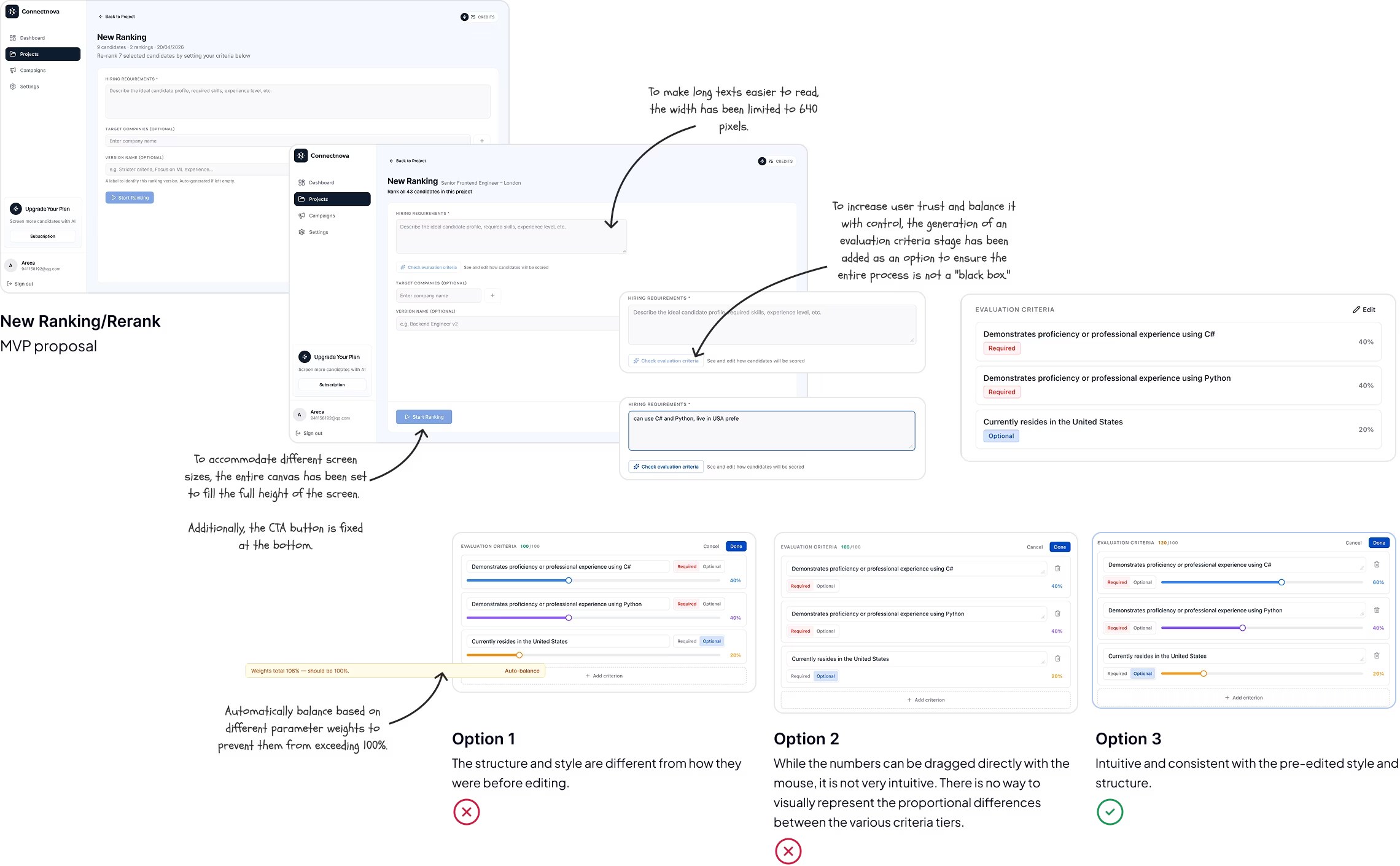
To balance transparency, trust, and control in AI products — and to keep the ranking process from feeling like a black box — I designed an evaluation criteria layer that users can review, adjust, and apply before generating a new ranking.
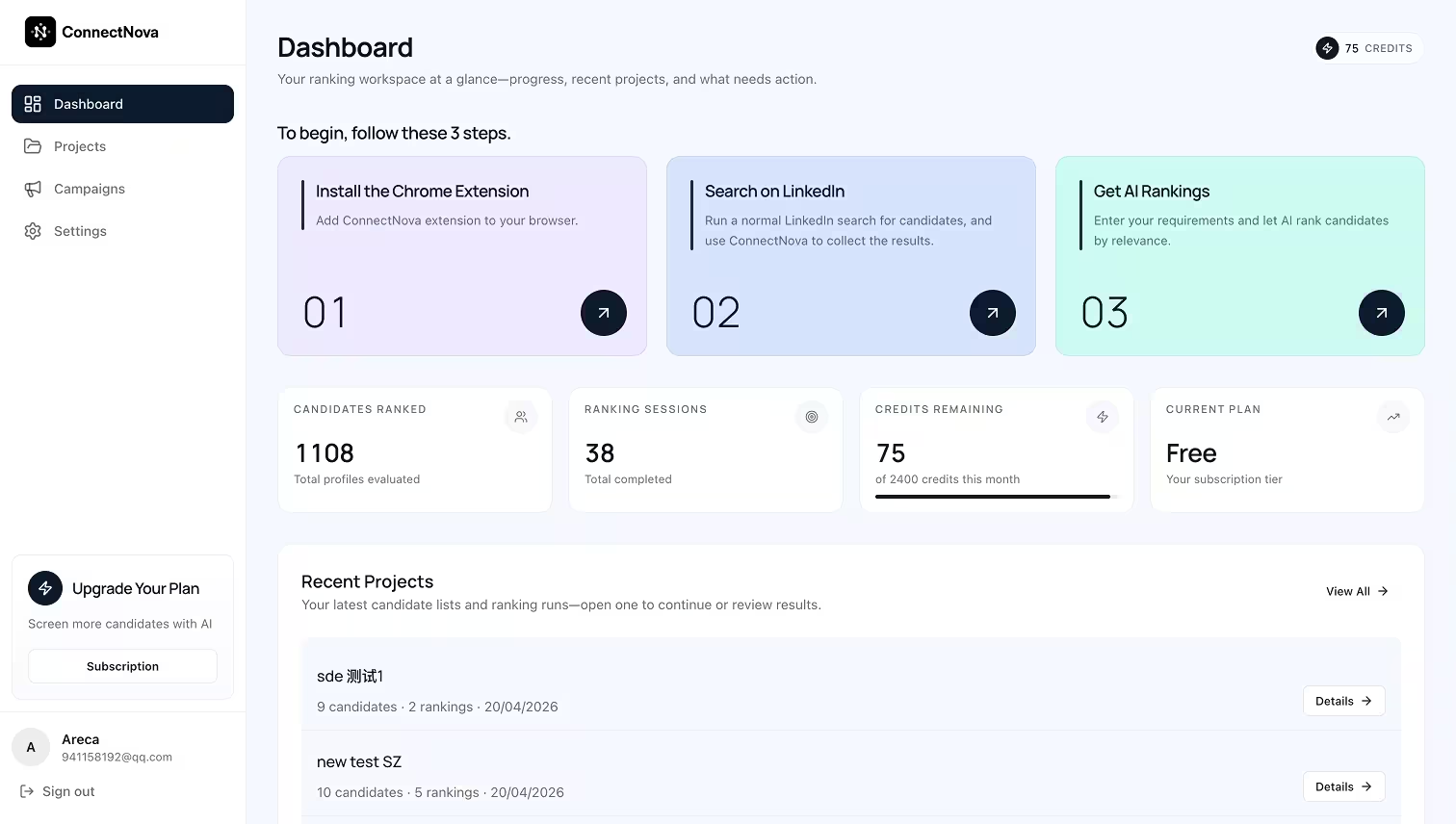
Every candidate the extension collects lands here. Four surfaces carry the day-to-day work — from overview to individual profile.
Every hiring need appears as a Project card. Status is visible at a glance — which are ranked, which still have unprocessed candidates.
game developer
31 candidates · 2 rankings · 20/04/2026
Live in USA, female
Currently resides in the United States
Identifies as female (based on profile indicators such as pronouns, name, or gender-specific organizations)
Ranked Candidates (24)
Samik is a Game Engineer currently based in Pittsburgh, Pennsylvania at Schell Games, with portfolio signals aligned to hands-on game programming and studio leadership.
Jordan ships gameplay systems at scale in Los Angeles, California with Riot Games; residency signal is strong while role-title match is mixed for this ranking.
Priya is a Graphics Engineer at Epic Games in Cary, North Carolina, with strong engine-side signals and credible senior ownership patterns.
Opening a project lands on the latest ranking, no extra hop. Each candidate ships with an AI score, a dimension breakdown, and the rationale behind it. History is a version-switch away.
game developer
31 candidates · 2 rankings · 20/04/2026
Candidate pool
All people collected for this project - ranked and not yet ranked.
Every candidate in the project — ranked or not — in one view. Search, tag, annotate. The foundation for pipeline management down the road.
Clicking a candidate slides in their full LinkedIn profile — work history, education, skills — alongside any notes the recruiter has added.
Sarah Chen
Candidate Overview
Skills
Strong product leadership background with excellent experience in roadmap execution, cross-functional alignment, and shipping measurable outcomes.
Ongoing exploration for recruiter outreach workflows. This prototype tests messaging loops and follow-up orchestration on top of the current platform architecture.
Since we are building an MVP, we referenced established outreach platforms (e.g. Apollo, Outreach.io, Salesloft) for core functionality and interaction patterns, adapting only the visual language to align with our design system.
A few honest notes on what worked, what I'd rework, and where the product is headed from here.
Prototyping in real code meant zero translation between design and engineering. What got designed got shipped — no handoff gap, no fidelity loss.
Used Figma MCP to generate specs from the live codebase. Design documentation caught up to the product — not the other way around.
Tracing both users' end-to-end journeys — before any interface decisions — made the shared gap obvious. The problem defined itself once the workflow was visible.
Recruiters and sales reps share one core JTBD: find and prioritize people on LinkedIn. Recognizing this let us design one platform instead of two separate products.
One expert partner gave us speed and depth. But a single perspective has blind spots. The tradeoff was velocity over breadth.
Project wasn't in the original spec. Advocating for it changed the platform from a ranking widget into the foundation for a full pipeline product.
A token-based design system established early meant every screen felt coherent at launch — not polished later, but right from the start.
V0 is live. Next priority: structured testing with real users to validate the two-layer IA and the Project concept.
Roadmap: outreach automation, pipeline tracking, and team collaboration — all of which the current architecture was designed to support.
Live and in production · Used by real recruiting teams
Explore the live site